18 Performing Dry Eye Examinations: JENVIS Dry Eye Report
62 / 106 Instruction Manual Keratograph 5M (G/77000/XXXX/EN – Rev05)
18 Performing Dry Eye Examinations:
JENVIS Dry Eye Report
You can perform Dry Eye examinations in the JENVIS Dry Eye Report.
The results are summarized in a clear and understandable manner. You
can also print a report with the results and explanations for the patient.
Select the [New JENVIS Dry Eye Report] menu in the “Examination”
menu bar.
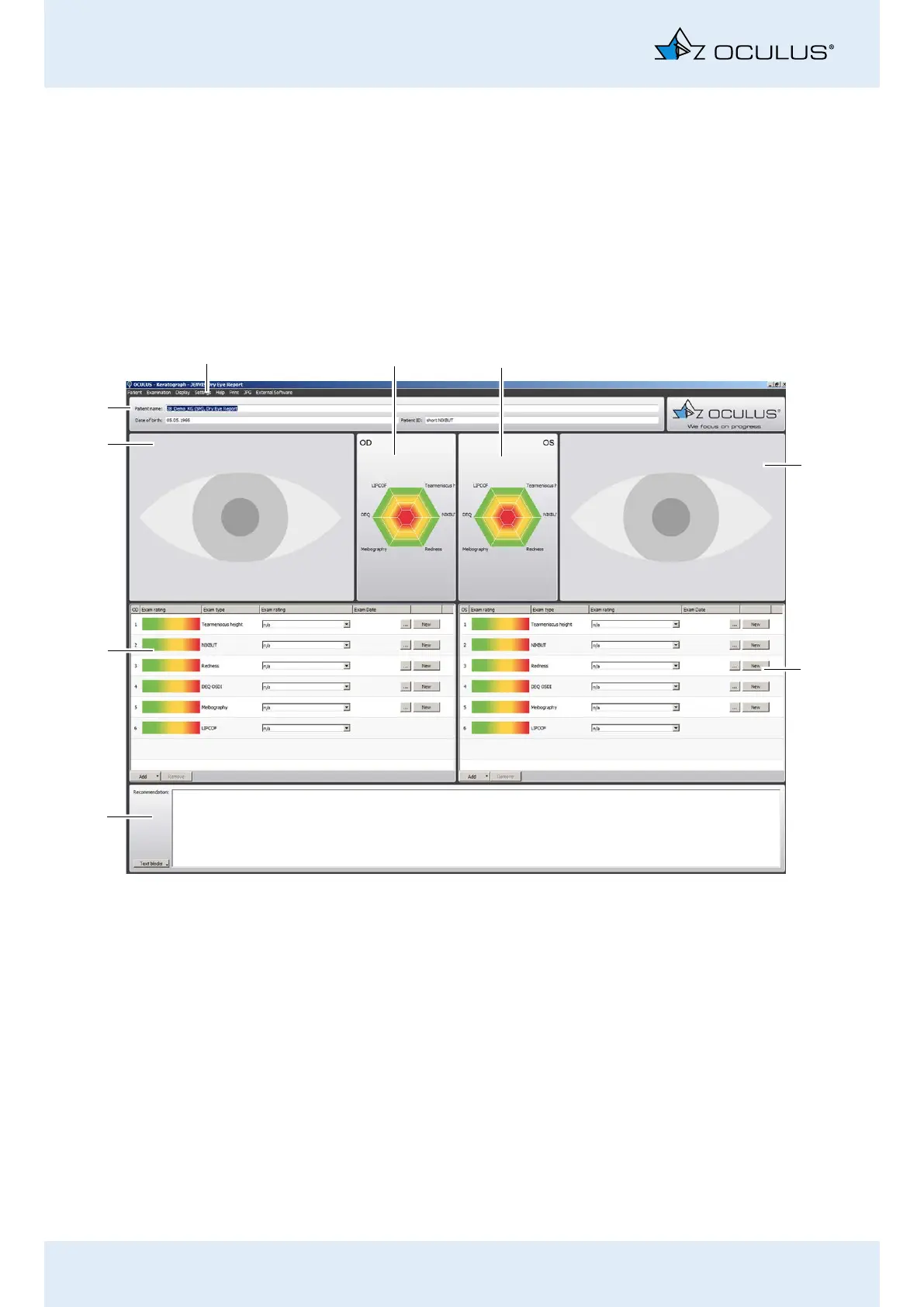
The following screen will appear:
Fig. 18-1: Overview of Dry Eye Examinations
1
2
4
5
3
8
7
6
9
1 JENVIS Dry Eye Report menu bar
2 Result diagram for right eye
3 Result diagram for left eye
4 Camera image for left eye (if available)
5 Exam types for left eye
6 “Recommendation” field
7 Exam types for right eye
8 Camera image for right eye (if available)
9 Patient and examination data



 To Next Page