Chapter 8: Maintenance
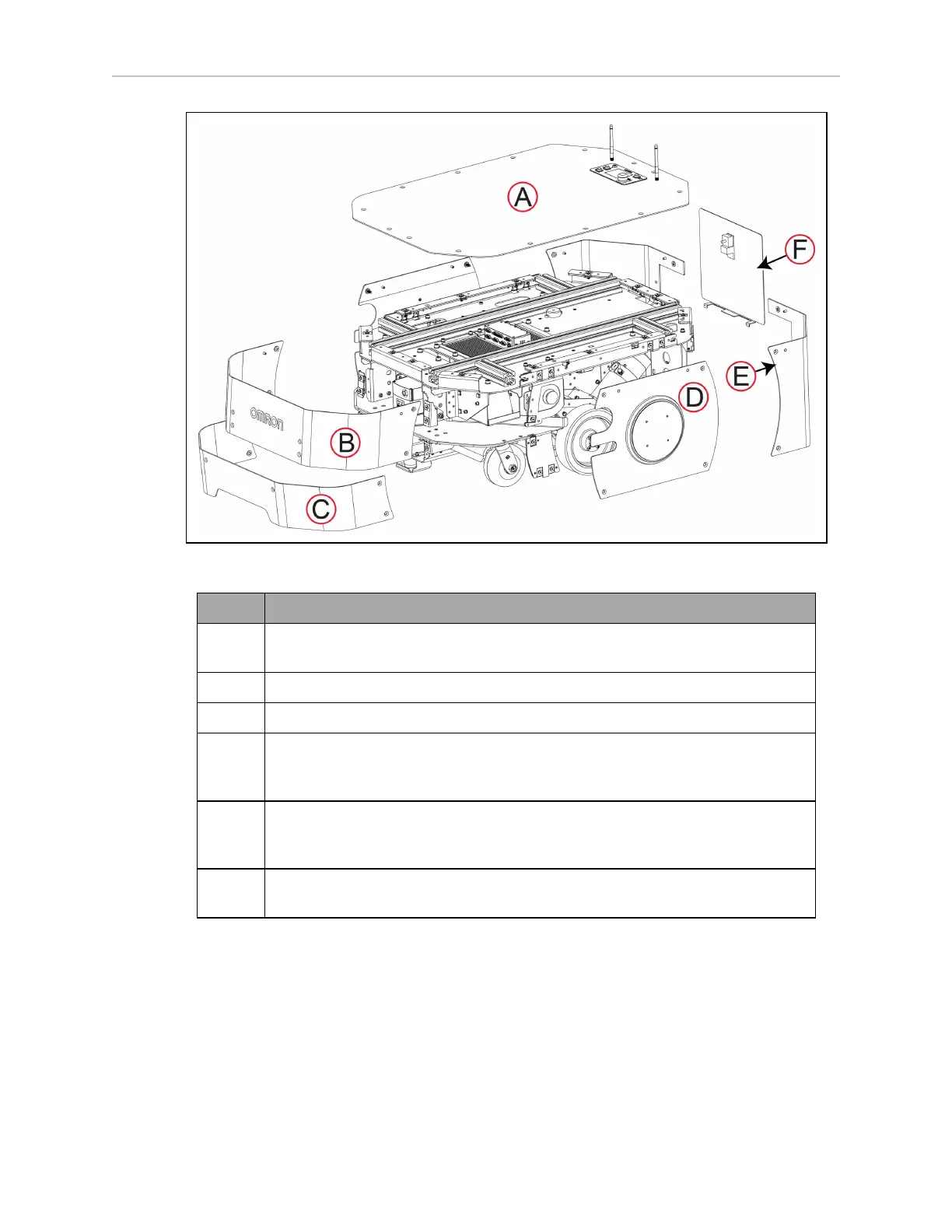
Figure 8-22 Left Side View of LD-250 Skins
Callout Skin Description
A Top cover, incorporating the Operator Panel. This skin covers the payload bay
and is often removed completely for payload attachment.
B Upper front skin, covering the main safety and navigation laser.
C Lower front skin, covering the low (toe) laser.
D Left side skin, incorporating the wheel light disk and covering the drive assem-
blies. The right and left side skins are symmetric for the task of installation and
removal.
E Left rear skin. The right and left rear skins are symmetric for the task of install-
ation and removal. The left rear skin includes a door that covers the Joystick
and Ethernet ports.
F Battery skin, secured by a rotating latch. (There is a separate lockable battery
door underneath this skin.)
With the exception of the battery door, skins are secured to the chassis by captive M6 flat head
Torx plus screws into clip nuts. A Torx driver is supplied with the LD-250.
The skins include alignment pins that fit into holes in the chassis to assist you in installing
and aligning the skins.
The left side and right side E-Stop buttons are not attached to the skins, and remain attached
to brackets on the chassis even when you remove all skins.
20472-000 Rev B LD-250 Platform User's Guide 179








 To Next Page