NOTE:
The osets are applied in the original frame of the detected workpieces.
For this reason, it is more intuitive to adjust the picking osets first, and the
picking orientation afterwards.
•
Press and go to the first page of Task Using Detection by the Workpiece's Outline.
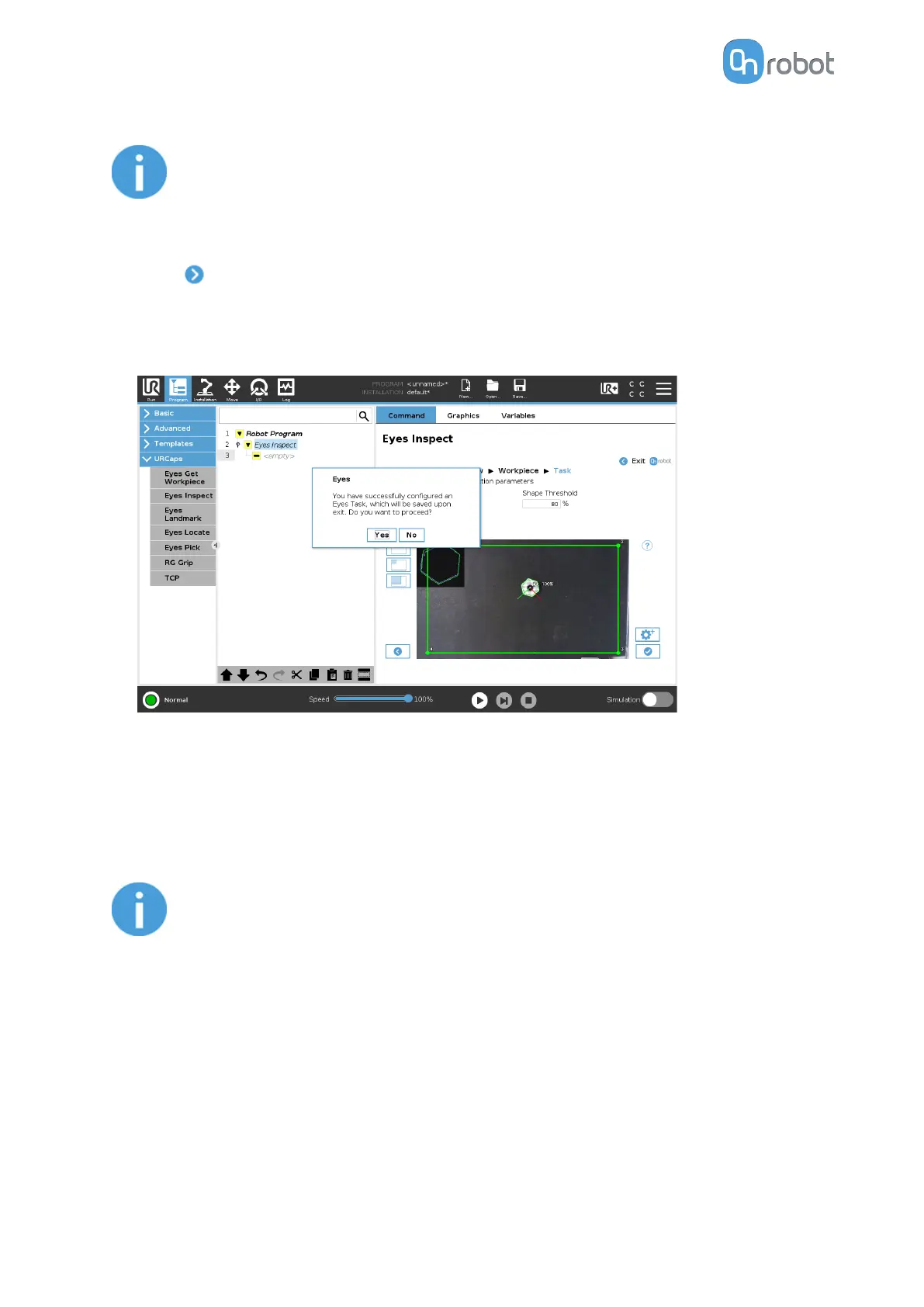
II/5. Finish Configuration
•
Eyes Inspection configuration is finished.
•
Press Yes to save and exit the Task configuration.
Configure Eyes in the Robot Program
The Eyes Inspect command is used to run an Eyes task to inspect workpieces. This
command is used together with the Eyes Get Workpiece command, using the latter as a
child command.
NOTE:
If the camera is attached to the robot wrist, the camera view is linked to the
robot pose. Before using the Eyes Inspect it is required to move the robot to
the saved robot pose for the appropriate camera view. In the case of an
external mount is used, ensure the camera is not obstructed by the robot.
When the Eyes Inspect command is executed, the Eyes will attempt to identify workpieces
defined by the chosen Eyes task. The dierent functions are explained below.
Select Eyes task
The user can select an Eyes task from the drop-down selection. When there is no task
selected the drop-down menu will be bordered in red and the Eyes Inspect command will
be incomplete, as shown below.
OPERATION
84


 To Next Page