Chapter 3 - How to...
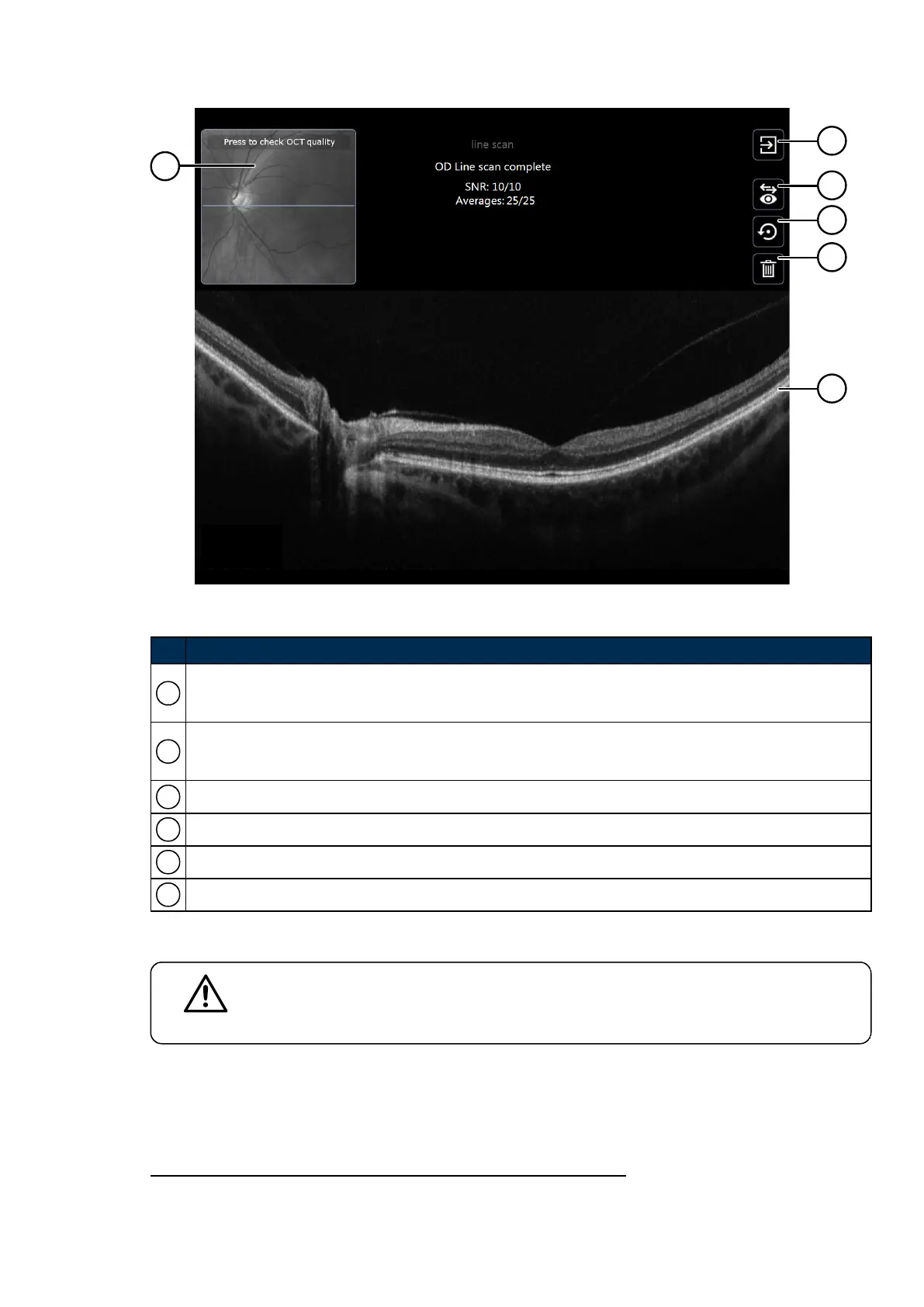
FIGURE 15: OCToptions after capture
No. Description
1
SLO image showing the fundus region corresponding to the OCT scan. Press to check OCT quality.
For topographies, touch the SLO image to replay the OCT frame sequence.
2
Finished OCT.
Returns to the optomap screen to re-align the patient or change the imaging mode.
3 Change the laterality of the captured scan.
4 Save the captured scan and set up to recapture the same scan type.
5 Delete the captured scan and set up to recapture the same scan type.
6 Captured OCTscans.
3.2.8.6 SNR and OCT scan quality
CAUTION
Signal to Noise Ratio
SNR
1
has a major impact on OCT image quality and therefore could determine the ability
to distinguish the retinal layers.
1.
Signal to noise ratio
Part Number: G108707/8GME Page 49 of 75
Copyright 2018, Optos plc. All rights reserved. English



 To Next Page