V–44
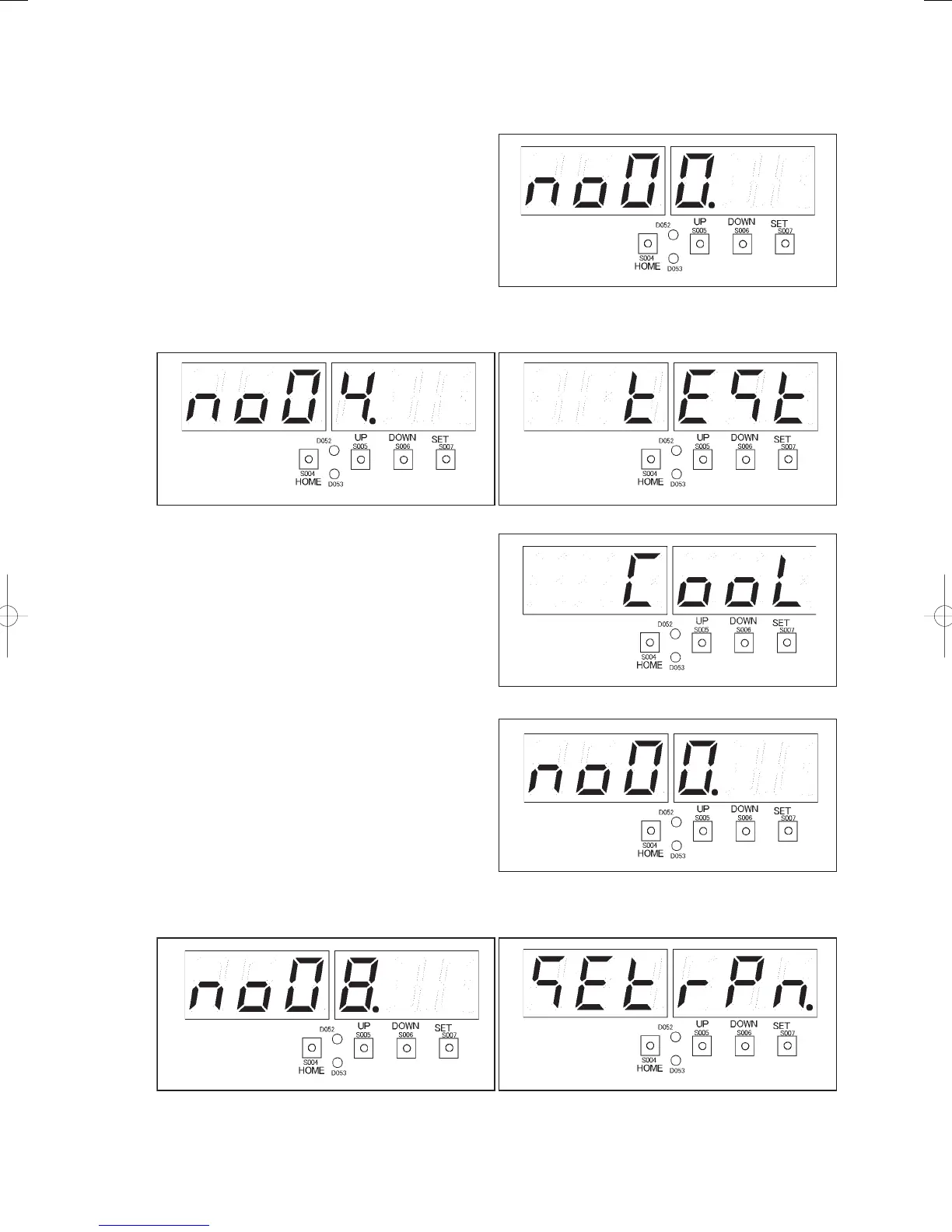
Start test run and set engine rotational speed
Start test run, and select “
” forced engine rpm setting, and set 800 [min
-1
].
Start test run.
1) Press the HOME key (S004) for one second or
more.
Menu item number “
”(right fi gure) will be
displayed.
2) Press the UP (S005) or DOWN (S006) key, displaying the menu item numbers. Select menu item “
”
in the fi gure below. The display “
” (fi gure below) will appear.
3) Press the SET key (S007). “
” (right fi gure)
will be displayed. The LEVEL LED (D053) will
light.
Press the SET key (S007) for one second or more.
The TEST/WARNING LED (D052) will light, and
the test run will start.
Set the engine rotational speed to 800 [min
-1
].
4) Press the HOME key (S004) for one second or
more.
Menu item number “
” (right fi gure) will
be displayed.
5) Press the UP (S005) or DOWN (S006) key, displaying the menu item numbers. Select menu item “
”
in the fi gure below. The display “
” (fi gure below) will appear.
GHPtroubleshooting.indbV‒44GHPtroubleshooting.indbV‒44 2012/11/2611:20:222012/11/2611:20:22















 To Next Page