V–48
Correction example b)
The adjustment value is 10°BTDC, but the observed value was 13° BTDC. Press the UP (S005) or DOWN
(S006) key to set a correction of -3 in relation to the current “
” (ignition timing offset) value.
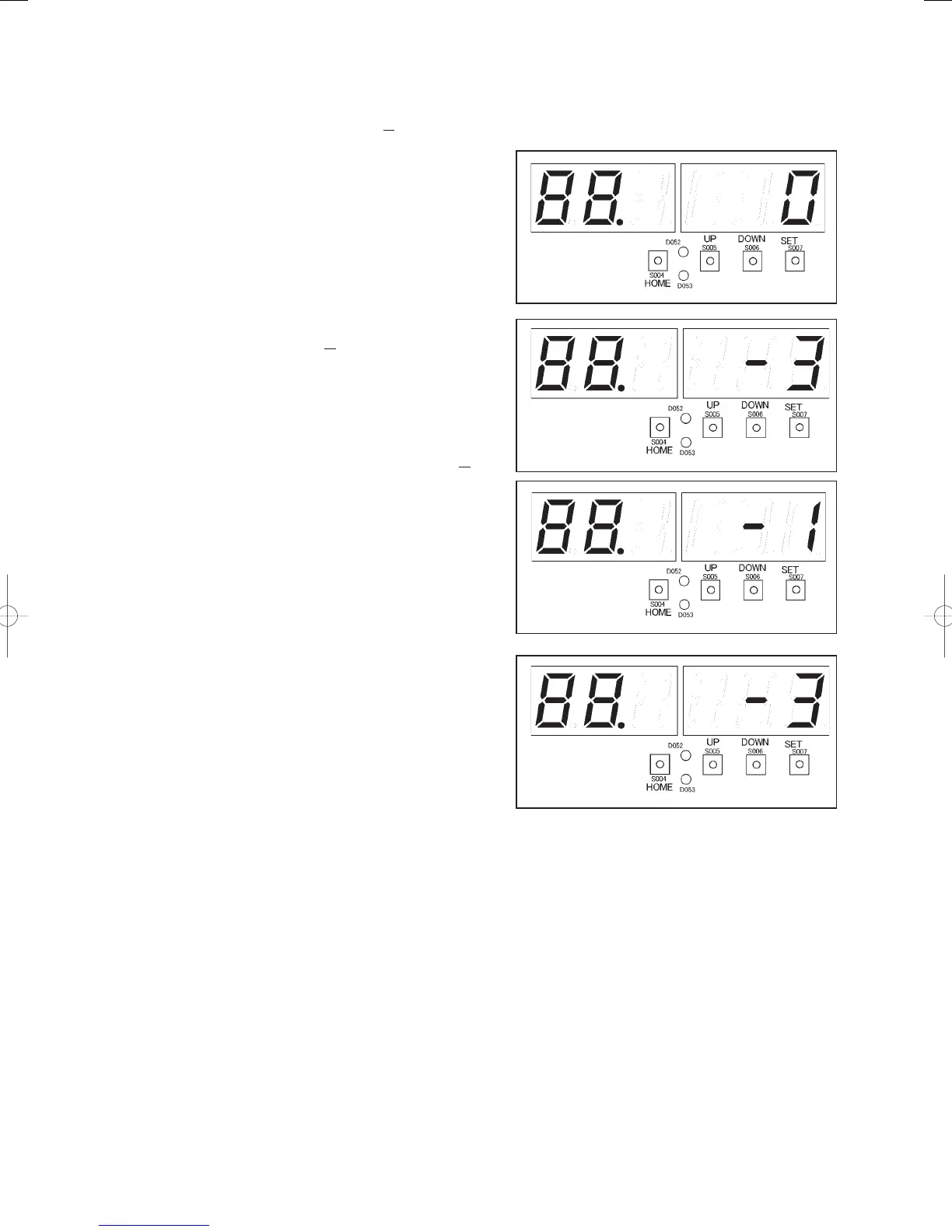
i) Display the current “
” (ignition timing
offset) value, and check it. The current value is
zero (0).
The display for “
” will be as shown at
right.
ii) With “
” (ignition timing offset)
displayed, press the SET key (S007) for one
second or more.
The TEST/WARNING LED (D052) will light,
and LEVEL LED (D053) will fl ash.
iii) Press the UP (S005) or DOWN (S006) key to
set a correction of -3 in relation to the current
value checked in “ii).”
The display will show “
” (right
fi gure).
Caution: The display example at right is an
example for when the current value
checked in “i)” is zero (0).
If the current value is “2” and a -3
correction is set in relation to that
value, the value will become “-1”
after the setting is made. The display
will show “
” (fi gure below
right).
iv) With “
” (right fi gure) displayed,
press the SET key (S007) for one second or
more. The TEST/WARNING LED (D052)
will go out, and LEVEL LED (D053) will
light. The ignition timing offset mode will
be cancelled, and the setting process will be
ended.
GHPtroubleshooting.indbV‒48GHPtroubleshooting.indbV‒48 2012/11/2611:20:232012/11/2611:20:23















 To Next Page