Operation Manual
FT128 Rev 2.4
17
3.4.1 LED Indicators and Push Button
LED’s and push buttons are contained on the front panel display and are described in the
tables below. See also Figure 3 above, for the LEDs and push buttons.
3.4.1.1 Fire Brigade Panel Display and Control
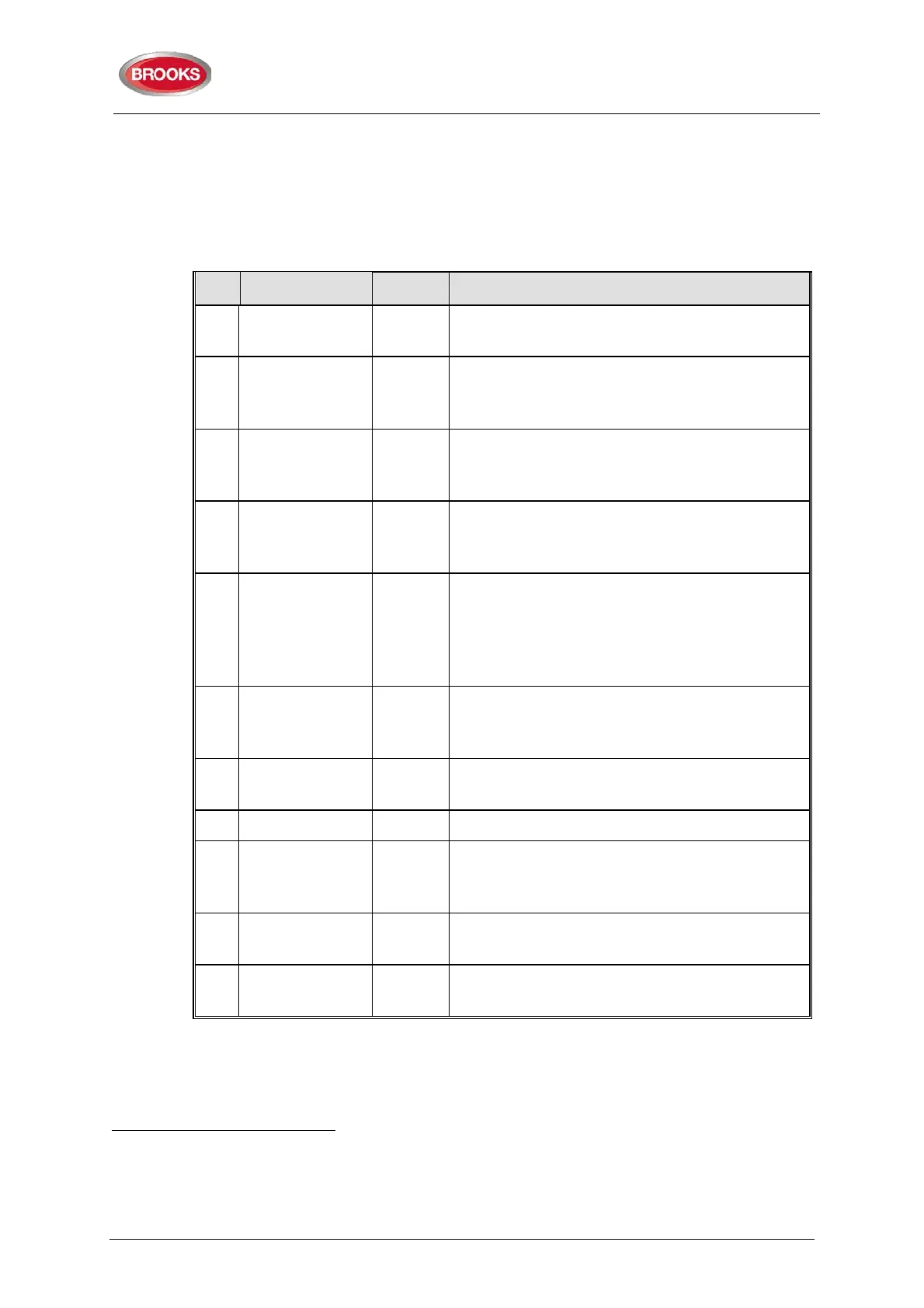
Table 4 Fire Brigade Panel LED Indicators and Push Buttons
No. Label Colour Indicating / Action
L1 Fire
5 x Red Fire alarm, Quiet alarm, etc. See
Alarm
Types
page 49
9
L2 Alarms queued
2 x Red More than one unit / zone has generated fire
alarm.
Use push button "Alarms queued" (P1) to
scroll amongst the alarm points (zone-address).
L3 Extinguishing
Red Output(s) for extinguishing equipment
10
activated
(or a programmable input ty
activated).
L4 Ventilation
Yellow Output(s) for fire/smoke ventilation equipment
10
activated (o
r a programmable input type
"Ventilation" is activated.)
L5 Fire Brigade TX Red
Output for “Fire alarm” for Fire Brigade TX (routing
equipment)
activated. Or a programmable input(s)
type "Activated routing equipment" is activated. Or
t
est of routing equipment in progress (see menu
H1).
L6 Operation
Green
Power on, i.e. the FT128 power supply (switch
mode power supply and/or batteries) are
connected and working properly.
P1 Alarms queued BLACK
Used, when LEDs "Alarms queued" (L2) are lit, to
scroll/browse through the queued alarms (zones).
P2 Silence buzzer Yellow Used to silence the buzzer in FT128
P3
Silence Alarm
devices
Red
Used to silence
devices configured as “Alarm
devices” such as sounders or OWS (i.e. to "reset"
outputs for alarm devices).
11
P4 Reset
Green Used to reset the fire alarm(s), has to be pressed
for > 0.5 Secs
P5 Disable
Yellow Used to disable active alarm(s), all outputs of the
device or zone in alarm will be disabled.
9
In the New Zealand convention also "Acknowledged alarm" (ACK).
10
L3, L4 and L5 can as an alternative be programmed to indicate when a programmable input is activated, i.e. input trigger
condition "Extinguishing system released", "Activated fire ventilation" and "Activated routing equipment" respectively (e.g. L5
can be turned on when a programmable input is activated by an activated routing equipment output). L5 is turned on until all
fire alarms are reset.
11
Via EBLWin can be set if the alarm devices are to be continuously off / disabled or re-sound for a new alarm.



 To Next Page