Operation Manual
FT128 Rev 2.4
76
2. Install Sentinel_LDK_Run-time_setup:
Win7: Right click on HASPUserSetup.exe and choose “Run as Administrator”
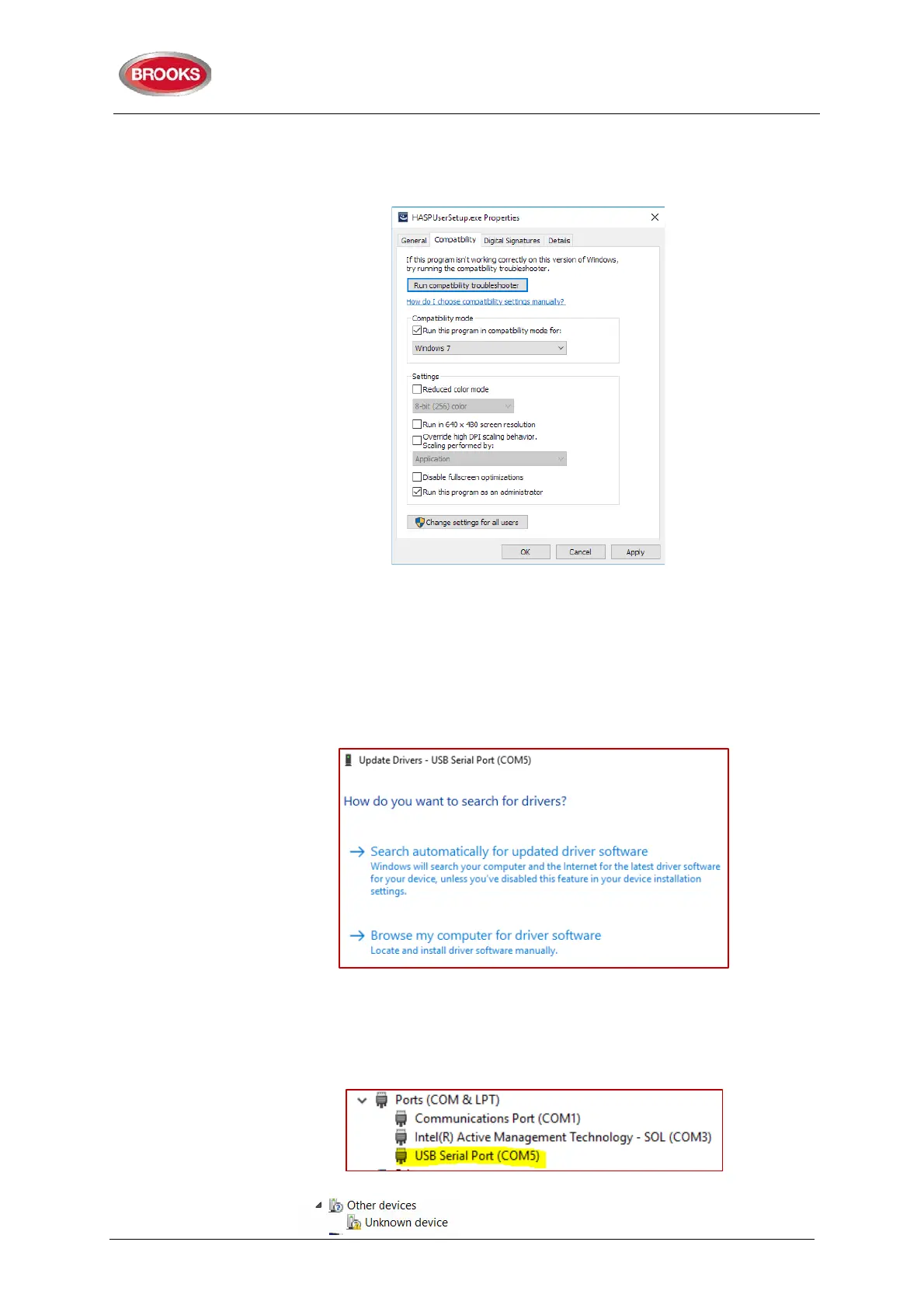
Win10: Right click on HASPUserSetup.exe and choose properties then go into
the Compatibility tab. Set as shown in Error! Reference source not found. :
o
o Figure 24 Installing HASPUserSetup in compatibility mode
o
3. Install drivers for USB to Serial Converter (e.g. Brooks CA375). Choose spare
USB port in your PC and plug in your USB to Serial Converter. Plug-in the null
modem serial cable between the panel and the serial connector of the converter,
you should see an exclamation mark or something like “Serial to USB” on device
in the “Device Manager”. Select properties and click on Update Drivers, you should
see the following:
choose “Browse my computer for driver software” if you have the driver software
in your hard drive otherwise select “Search automatically for updated driver
software” to search the internet. Leave cables in place.
When the installation is completed, you should see the following in the “Device
Manager”:
4. Next install the USB drivers 2.10.00 WHQL (Win7_Win8_Win8.1). Look for a
device or something with and exclamation mark named



 To Next Page