Menu Descriptions
6400
5
29
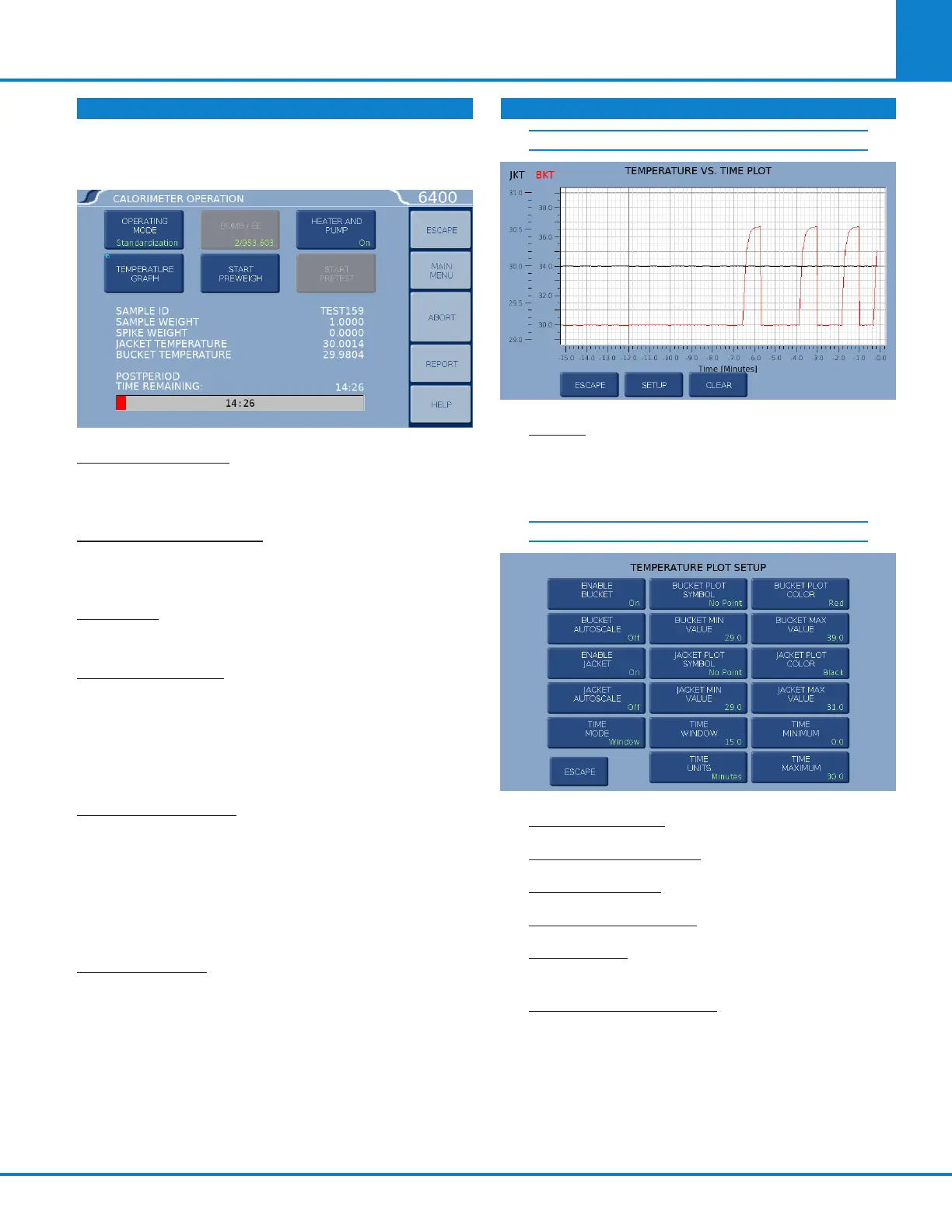
CALORIMETER OPERATION
The Calorimeter will normally be operated from
the Calorimeter Operation menu, although tests
can always be started from any menu screen.
OPERATING MODE: Sets the operating mode by
toggling between Standardization (for instrument
calibration) and Determination (for test runs).
TEMPERATURE GRAPH: Press this key to display a
real-time plot of the bucket and/or jacket tempera-
ture on the Temperature vs. Time Plot screen.
BOMB/EE: Used to identify the bomb presently
installed in the Calorimeter and its EE value.
START PREWEIGH: This key is used to start the
sample pre-weigh process. The user is presented
with or prompted for a sample ID. Next, the user
is asked to key in the associated sample mass or
alternatively the mass is retrieved from a con-
nected balance or network.
HEATER AND PUMP: The heater and pump must
only be turned on after the calorimeter water tank
is filled with water.
Note: The heater and pump must be turned ON to
bring the jacket to the correct starting temperature
before testing can commence.
START PRETEST: This key is used to initiate a
pretest cycle. A pretest will cycle the calorimeter
through the fill and cool/rinse process. This func-
tion is used to pre-condition the calorimeter.
TEMPERATURE VS. TIME PLOT
SETUP: Press the Setup key to access the Tem-
perature Plot Setup Menu, which has many keys
that permit the user to fully customize both the x
(time) axis and the scaling of the yaxis.
TEMPERATURE PLOT SETUP
ENABLE BUCKET: Toggles ON/OFF.
BUCKET AUTOSCALE: Toggles ON/OFF.
ENABLE JACKET: Toggles ON/OFF.
JACKET AUTOSCALE: Toggles ON/OFF.
TIME MODE: Toggles between Autoscale,
Window, and Range.
BUCKET PLOT SYMBOL: Toggles between -
» No Point
» Small Dot
» Round
» Square
» Up Triangle
» Down Triangle
» Diamond
CALORIMETER OPERATION (CONTINUED)



 To Next Page