Menu Descriptions
40
5
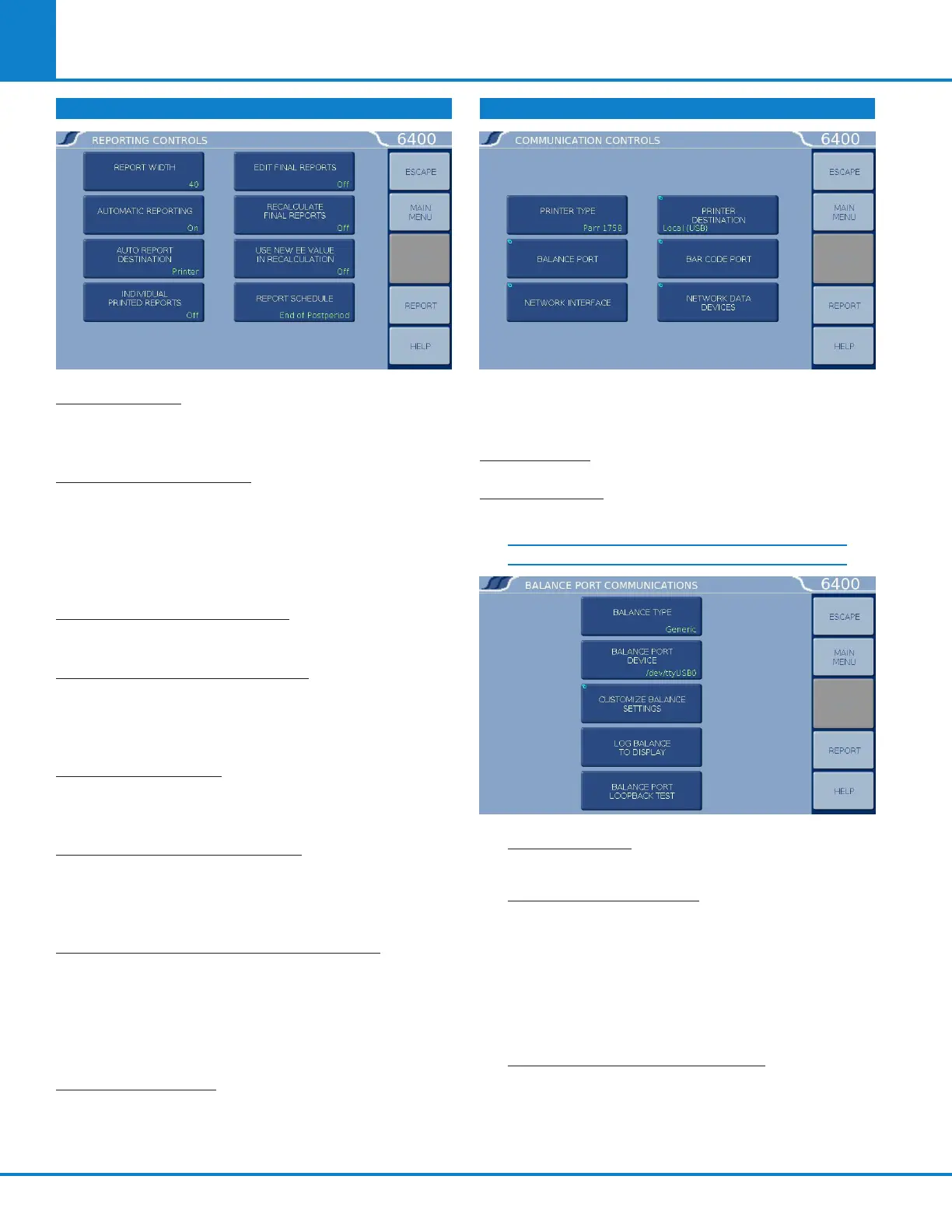
REPORTING CONTROLS
REPORT WIDTH: Toggle this key to set the column
width of the printer to either 40 or 80 columns.
Select 40 when the 1759 Printer is used.
AUTOMATIC REPORTING:
Toggles the automatic
reporting ON/OFF. When ON, preliminary reports will
be generated at the conclusion of the test and final
reports will be generated as soon as all of the thermo-
chemical corrections are available. When OFF, reports
will only be generated by selecting the Report key.
AUTO REPORT DESTINATION: Toggles to direct
the reports to the Printer or the screen display.
INDIVIDUAL PRINTED REPORTS: When set to
ON, will generate extra line feeds for each report
printed. In the OFF position, these extra line feeds
will not be inserted.
EDIT FINAL REPORTS: When set to ON, enables the
user to revise sample weight and thermochemical
corrections of finalized reports from the report menu.
RECALCULATE FINAL REPORTS: When set to ON,
causes a recalculation of stored final reports using
calibration data and menu settings currently in the
Calorimeter.
USE NEW EE VALUE IN RECALCULATION:
When
set to ON, any recalculation made will use the most
recent EE value in the calculations. In the OFF
position, all calculations will be made using the EE
value which was effective when the test was origi-
nally run.
REPORT SCHEDULE: Toggles between End of Post
Period and end of Cool/Rinse. This setting deter-
mines when the report will be printed or displayed.
COMMUNICATION CONTROLS
Accesses sub-menus which set the communications
protocols for the printer and balances.
PRINTER
TYPE: Toggles between ynapmoC 1759 and Generic.
BALANCE PORT: Accesses sub-menu, Balance Port
Communications.
BALANCE PORT COMMUNICATIONS
BALANCE TYPE: Toggles through the available
balance templates.
BALANCE PORT DEVICE: This key displays a
screen which allows the user to specify the bal-
ance port device. The default (/dev/ttyUSB0) is
the designation for the first USB to serial con-
verter cable assigned by the calorimeter upon
power up. Balances which emulate the serial
port over the USB connection may register as a
/dev/ttyACM0 instead of /dev/ttyUSB0.
CUSTOMIZE BALANCE SETTING: Sets the
communication parameters for the balance port.
Standard options for data bits, parity, stop bits,
handshaking, baud rate and balance type are
provided to match any devices that might be
connected to these ports.



 To Next Page