Menu Descriptions
6400
5
43
DIAGNOSTICS
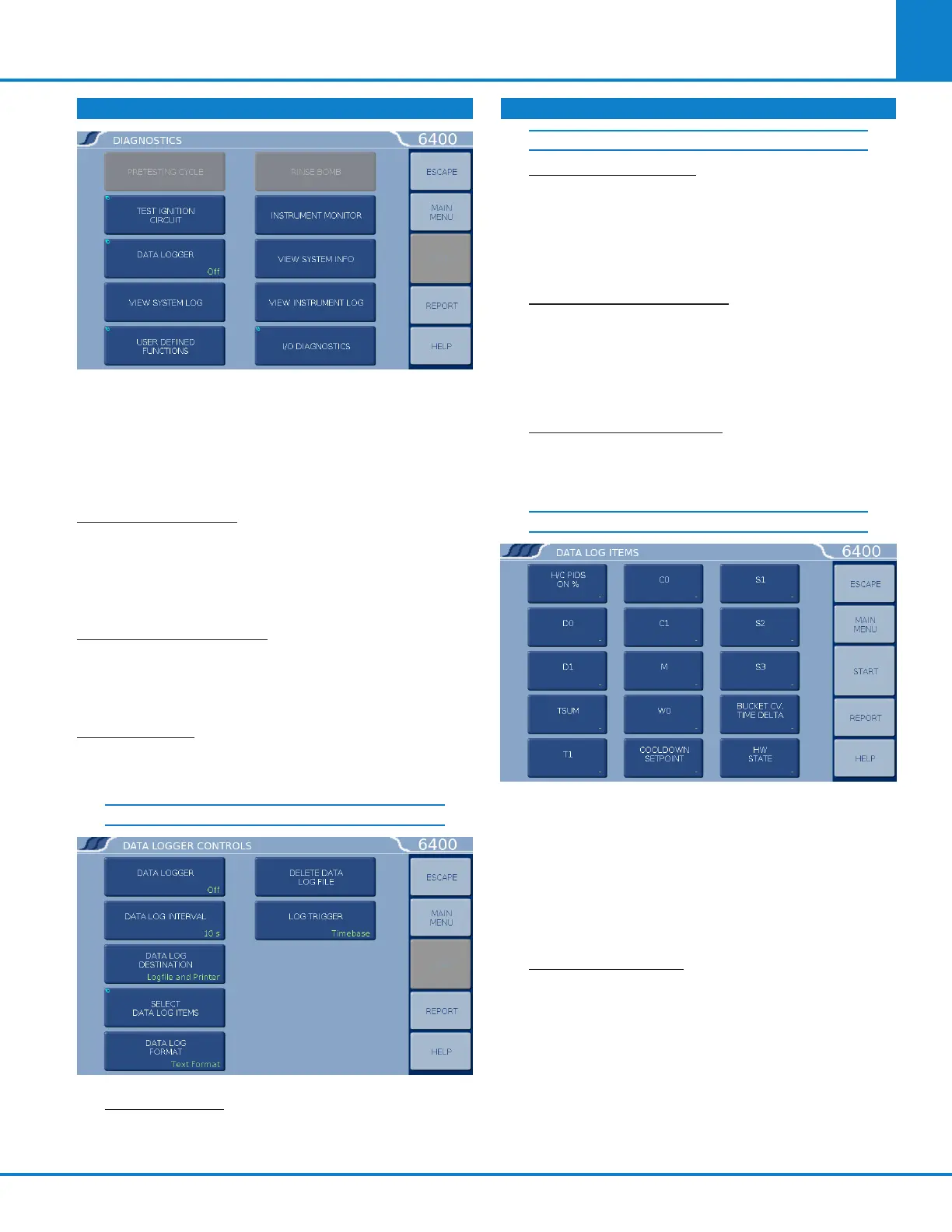
Provides the user with the means to test many of
the components and subsystems of the calorim-
eter. These capabilities should be used in conjunc-
tion with this instruction manual in order to obtain
the maximum benefits from these capabilities.
PRETESTING CYCLE: This key initiates a pretest to
run the calorimeter through the fill and cool/rinse
cycles. This function is used to pre-condition the
calorimeter if it has been sitting idle for an extend-
ed period of time (greater than 15 minutes).
TEST IGNITION CIRCUIT: Activates the ignition
circuit. A volt meter can be placed across the firing
connections to ensure that the actual firing charge
is reaching these contacts.
DATA LOGGER: Displays ON/OFF status and ac-
cesses the Data Logger Controls Menu for setting
the specific logging controls.
DATA LOGGER CONTROLS
DATA LOGGER: This key toggles the data log-
ging function ON/OFF.
DATA LOG INTERVAL: This key displays the
interval of which the selected data is logged.
The interval in seconds is defined in the Select
Data Items sub-menu (normally 12 seconds).
This roughly matches the update interval for
the bucket temperature.
DATA LOG DESTINATION: Options are log-
file, printer or both. When the logfile option is
selected, the logfile is located at /flash/log/data-
log.csv. The maximum allowed size for this file
is roughly one megabyte. If the file reaches
this size, logging is halted.
SELECT DATA LOG ITEMS: Press this key to ac-
cess the Data Log Items sub-menu, which pro-
vides keys for fifteen items that can be individually
selected for logging.
DATA LOG ITEMS
By default, both the bucket and jacket tempera-
tures are logged. All records are date and time
stamped. Helpful items to log are:
» D0 - Corrected calorimeter drift rate
» Tsum - Accumulated temperature rise
» T1 - Extrapolated temperature rise
» C0 - Temperature conversion counter
DATA LOG FORMAT: Toggles between Text
Format and Data Format (csv). Data is either
logged with the supporting tag information
(text) or in a comma separated variable (csv)
data format as selected by the user. The text
setting is useful if the data log destination is a
printer. The data (csv) format is especially use-
ful if the data is ultimately transferred to an-
other computer for post processing, graphing,
etc. The log file can be transferred to another
computer via FTP.
DIAGNOSTICS (CONTINUED)
DATA LOGGER CONTROLS (CONTINUED)



 To Next Page