Menu Descriptions
6400
5
37
FUSE MULTIPLIER: The fuse corrections rep-
resent the number of calories liberated by the
burning fuse wire used to ignite the sample. If
another measurement is used, the correction
factor must be entered here. Press this key to
access the Fuse Multiplier numeric dialog box
and enter this multiplier value.
USE OFFSET CORRECTION (ISO): The thermo-
chemical calculations used for treatment of ni-
tric acid and sulfuric acid corrections in the ISO
and B. S. methods require an offset correction to
compensate for the back titration that is made.
To use these calculations, toggle this to ON and
enter the appropriate value as the offset value.
OFFSET VALUE: The value used when Offset
Correction is turned ON. Press this key to ac-
cess the Offset Value numeric dialog box and
change its value.
HEAT OF FORMATION SULFURIC ACID: Differ-
ent methods use different values for the heat of
formation of sulfuric acid. The value can be set
to match the specific method being followed.
Default = 36.1.
HEAT OF FORMATION NITRIC ACID: Differ-
ent methods use different values for the heat
of formation of nitric acid. The value can be set
to match the specific method being followed.
Default = 14.1.
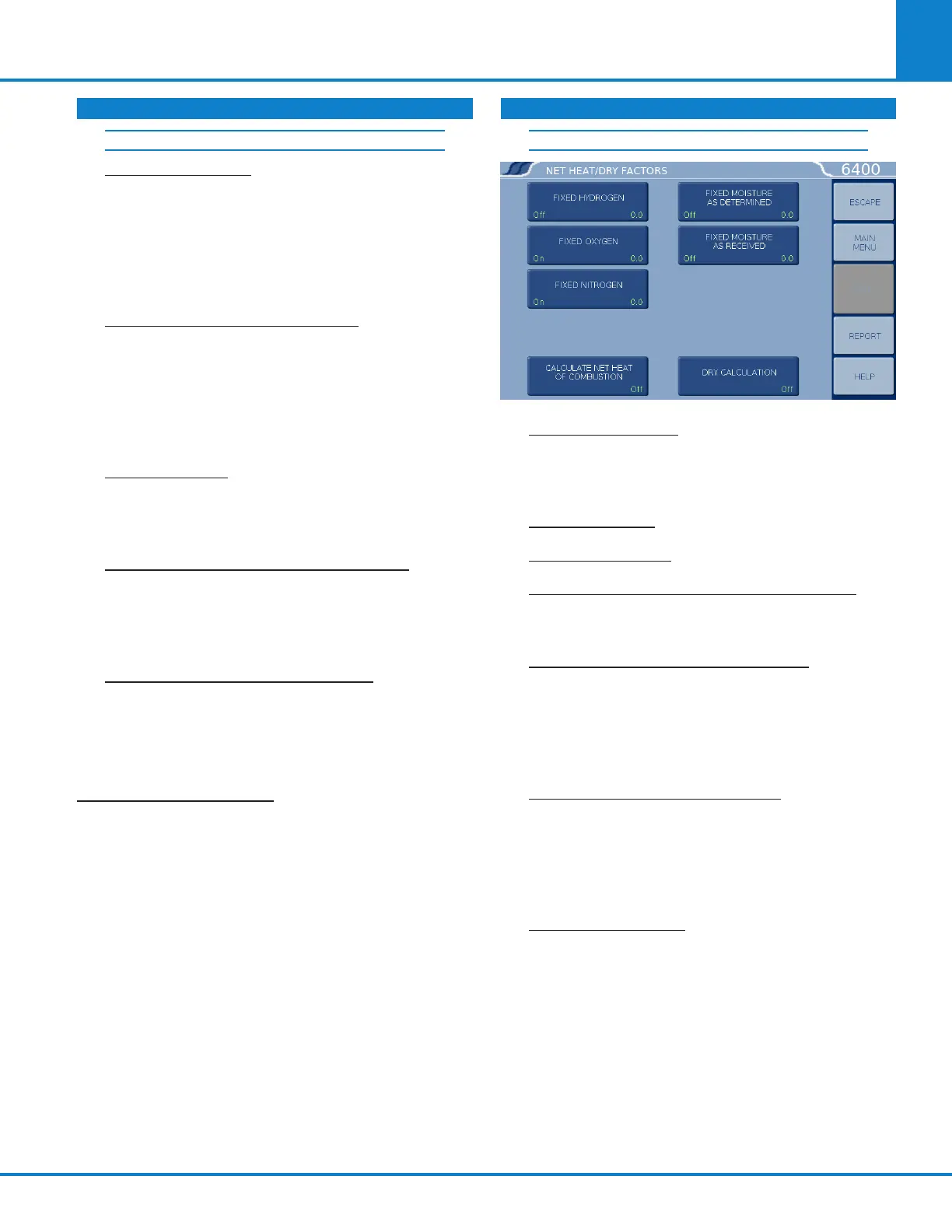
NET HEAT/DRY FACTORS: Accesses the Net Heat/
Dry Factors sub-menu, which provides for setting
the net heat of combustion and Dry Factors Thermo-
chemical Corrections.
NET HEAT/DRY FACTORS
FIXED HYDROGEN: Press the LEFT side to
toggle this setting ON/OFF. Press the RIGHT
side to display the Fixed Hydrogen numeric
dialog box and change its value.
FIXED OXYGEN: ON/OFF and value entry.
FIXED NITROGEN: ON/OFF and value entry.
CALCULATE NET HEAT OF COMBUSTION: ON/
OFF. Turn On to have the calorimeter calculate
the net heat of combustion.
FIXED MOISTURE AS DETERMINED: Press
the LEFT side to toggle ON or OFF whether to
use the entered moisture correction. Press the
RIGHT side to access the Fixed Moisture as De-
termined numeric dialog box and set the value.
Units are weight %.
FIXED MOISTURE AS RECEIVED: Press the
LEFT side to toggle ON or OFF whether to use
the entered moisture correction. Press the
RIGHT side to access the Fixed Moisture as
Received numeric dialog box and set the value.
Units are weight %.
DRY CALCULATION: Toggles the dry calcula-
tion ON or OFF.
THERMOCHEMICAL CORRECTIONS (CONTINUED) THERMOCHEMICAL CORRECTIONS (CONTINUED)
CALCULATION FACTORS (CONTINUED)



 To Next Page