Menu Descriptions
36
5
ACID CORRECTION: Press this key on the LEFT
side to toggle between Fixed HNO
3
, Calculated
HNO
3
, Entered Total, Entered HNO
3
, and Fixed
Total for the acid correction for standardization
runs. Press it on the RIGHT side to access the Acid
Correction numeric dialog box on which the value
can be set. An appropriate Fixed HNO
3
value is 8
cal when one-gram benzoic acid pellets are used to
calibrate the instrument.
FIXED SULFUR CORRECTION: Press this key on
the LEFT side to toggle ON or OFF the fixed sulfur
correction for standardization runs. Press it on
the RIGHT side to access the Fixed Sulfur numeric
dialog box on which the value can be set. When
benzoic acid is used as the calibrant, a fixed sulfur
value of zero should be used.
DETERMINATION
CORRECTIONS
FIXED FUSE CORRECTION: Press this key on
the LEFT side to toggle ON or OFF the fixed fuse
correction for determination runs. Press it on
the RIGHT side to access the Fixed Fuse numeric
dialog box on which the value can be set. An ap-
propriate fixed fuse value is 50 cal.
ACID CORRECTION:
Press this key on the LEFT side
to toggle between Fixed HNO
3
, Calculated HNO
3
,
Entered Total, Entered HNO
3
, and Fixed Total for
the acid correction for determination runs. Press
it on the RIGHT side to access the Acid Correction
numeric dialog box on which the value can be set.
FIXED SULFUR CORRECTION: Press this key on
the LEFT side to toggle ON or OFF the fixed sulfur
correction for determination runs. Press it on the
RIGHT side to access the Fixed Sulfur numeric
dialog box on which the value can be set.
Note: When fixed corrections are turned ON, the
value in the specified field will be used in both the
preliminary and final reports. The calorimeter will not
prompt for actual corrections. If all corrections are
fixed, only final reports will be generated. If any cor-
rection value is entered and the toggle is set to OFF,
then the preliminary report will use the displayed
fixed value, but the final report will use the value en-
tered when prompted during the reporting process.
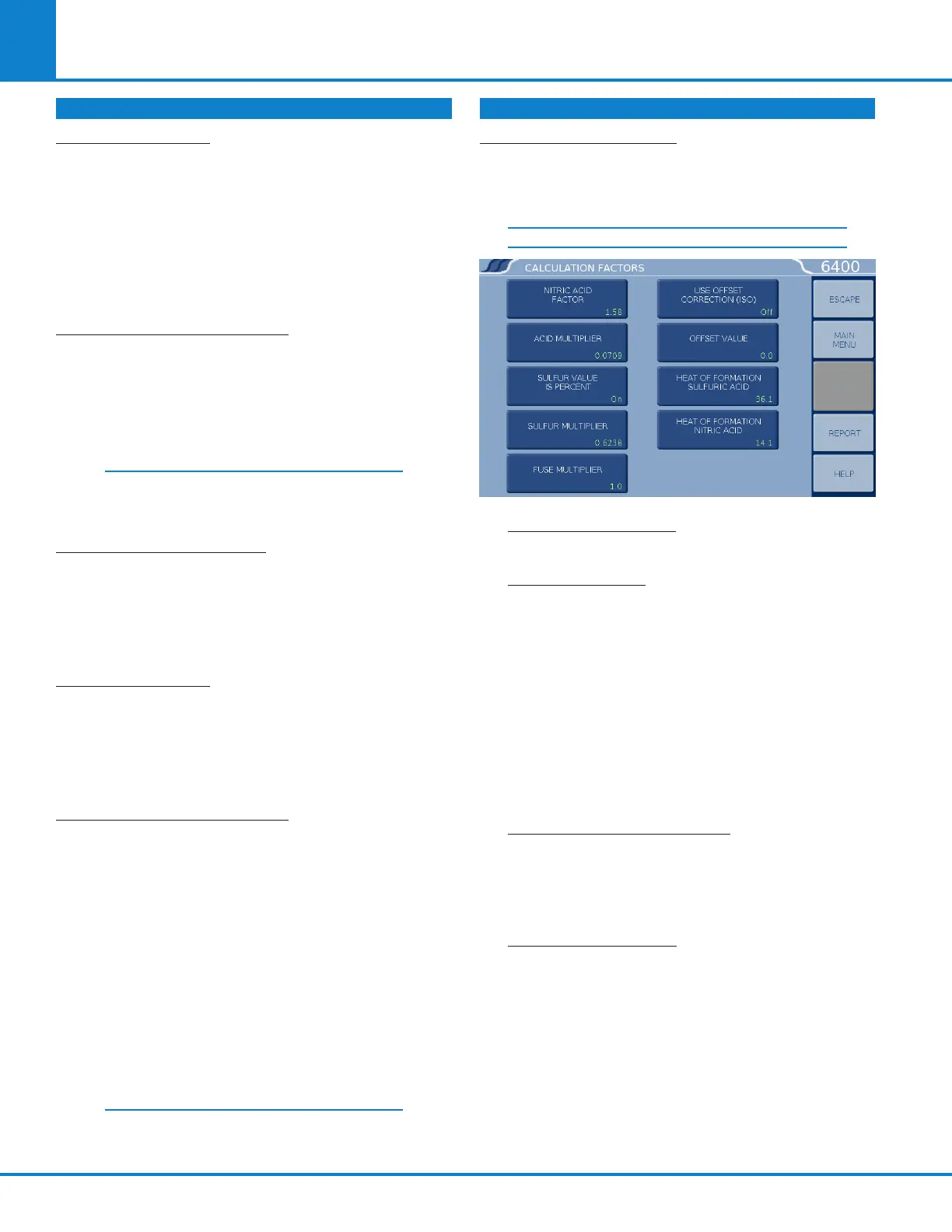
CALCULATION FACTORS: Accesses the Calcula-
tion Factors sub-menu, which provides for setting
a number of options for the way the thermochemi-
cal corrections are applied.
CALCULATION FACTORS
NITRIC ACID FACTOR: The default is 1.58 cal
per 1kcal of released energy.
ACID MULTIPLIER: This multiplier is the normal-
ity of the sodium carbonate used during the
acid correction titration. The default value of
0.0709 allows for direct entry of the acid correc-
tion in calories. If the bomb rinses are titrated
in order to determine the acid correction, press
this key to display the Acid Multiplier numeric
dialog box, where you can change the multi-
plier to represent the concentration of the base
(equivalents/L) or normality used for titration. If
this is the case, the acid correction is entered as
milliliters of base used to titrate the bomb rinses.
SULFUR VALUE IS PERCENT: When set to ON,
the sulfur value is being entered as weight
percent sulfur. If another system is to be used,
this must be turned OFF and the sulfur multi-
plier set accordingly.
SULFUR MULTIPLIER: Values entered by the
user to be used for the sulfur correction are
multiplied by this value to get the product into
units of milliequivalents. The default number
(0.6238) requires that the sulfur value be en-
tered in weight percent.
THERMOCHEMICAL CORRECTIONS (CONTINUED) THERMOCHEMICAL CORRECTIONS (CONTINUED)



 To Next Page