Communications Interfaces
70
12
Ethernet Interface
Calorimeter test data can be transferred to an Ethernet
network connected computer using the FTP File Trans-
fer Protocol. First, you must know the IP address of
the network-connected calorimeter. The network DHCP
(Dynamic Host Configuration Protocol) server provides
this address shortly after the calorimeter is turned on or
a static IP address can be assigned. The address can be
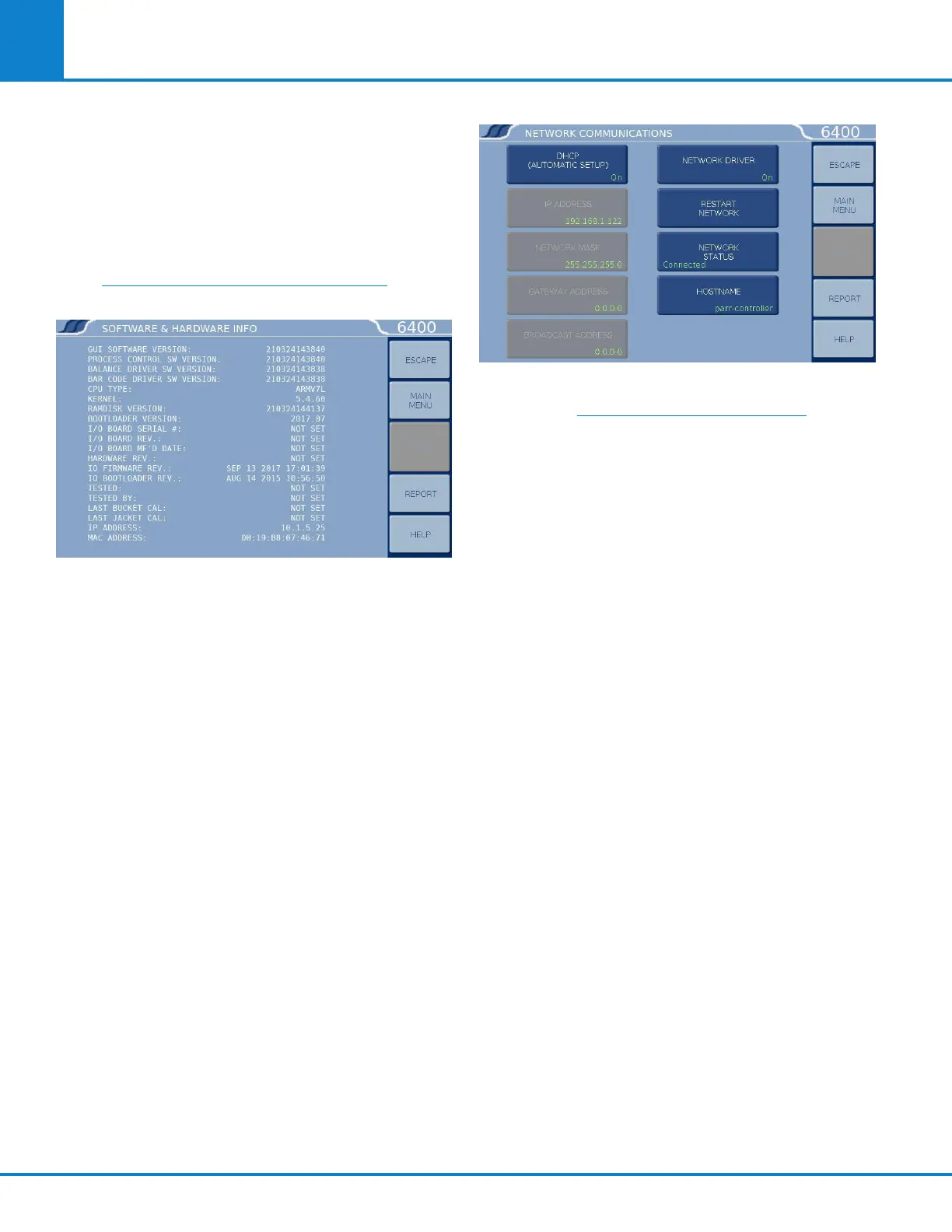
seen on the SOFTWARE AND HARDWARE INFO page,
under PROGRAM INFORMATION & CONTROL menu.
See the example screenshot.
Users who don’t have a network infrastructure can
create a simple network by connecting a router with
DHCP server capability to the calorimeter using an
ordinary CAT 5 network cable. The calorimeter should
be connected to LAN side of the router. The PC in turn
is also connected to the LAN side of the router using a
similar CAT 5 cable. For this router, operated without
a WAN connection, the primary DNS address of the
router (WAN setup) must be set to the IP address
of the router found on the LAN setup page. Other
routers behave differently in the absence of a WAN
connection. Providing an active upstream connection
to the WAN port of most routers generally minimizes
the use of any obscure setup configurations.
Alternatively, a PC can be connected directly to the
calorimeter via an Ethernet Cable. Both PC and
6400 Calorimeter must be assigned static IP ad-
dresses from the same subnet (e.g. 192.168.1.125 and
192.168.1.110 with net mask 255.255.255.0).
Advanced Network Options
Advanced network options can be changed by navi-
gating to the COMMUNICATION CONTROLS menu
and selecting NETWORK INTERFACE key to access
the NETWORK COMMUNICATION submenu.
A ZeroConf implementation is present in the firm-
ware of ynapmoC Calorimeters, thus the user does not
need to know the calorimeter’s dynamic IP address.
ZeroConf implementation includes avahi-daemon to
do a multicast DNS broadcast of services provided
by the calorimeter. These services include VNC (with
a valid feature key), SSH, FTP and HTTP. In order for
this scheme to work in a Windows environment, Bon-
jour Print Services for Windows (from Apple) must be
installed on the client PC. The Bonjour for Windows
package provides Bonjour zero-configuration net-
working services for use by Windows applications.
Bonjour enables computers and devices to automati-
cally discover each other using industry standard
IP protocols without the need to manually enter IP
addresses or configure DNS servers. Avahi broad-
casts the services provided using mDNS. This allows
the user to use the text address ___ -controller.local
to connect to the calorimeter. For instance, a SSH
session would look like: ssh ___ -controller.local
The HOSTNAME button on the network configura-
tion screen allows the user to give a meaningful
name to the calorimeter, such as ___ 6400-lab. The
default HOSTNAME is ___ controller. The suffix
.local must be appended to the hostname when
accessing calorimeter services.



 To Next Page