EasyManua.ls Logo

Pentax 67 II - Adjustment of photo sensor position

Pentax 67 II
107 pages
Print Icon
To Next Page IconTo Next Page
To Previous Page IconTo Previous Page
Loading...
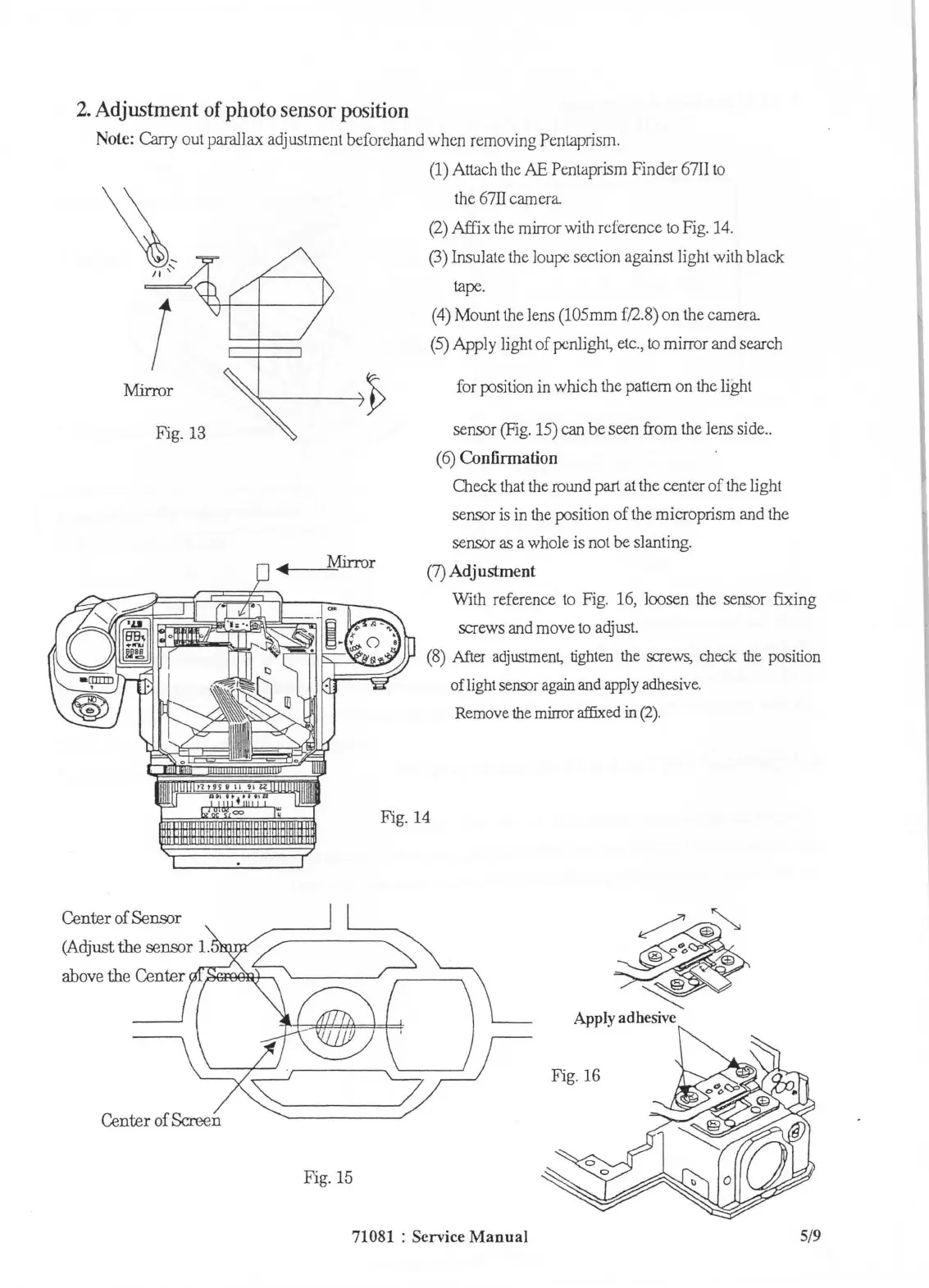
2.
Adjustment
of
photo
sensor
position
Nole:
Carry
out parallax adjustment beforehand when removing Pentaprism.
~~
II
'
(
Mirror
Fig.
13
Center of Sensor
(Adjust
the
sensor
1.
above the Center
Center of
Scn,:.en
Fig. 15
(1)
Attach
the
AE
Pentaprism Finder
67II
to
the
67II
camera
(2)
Affix
the
mirr
or
with
reference
to
Fig.
14
.
(3)
Insulate
the
loupe
section against light
with
black
tape
.
(4)
Mount
the
Jens
(105mm
f/2.8)
on
the
camera
(5)
Apply light of penlight,
etc.,
to
mirror
and
search
for
j:DSition
in
wruch
the
pattern
on
the
light
sensor
(Fig.
15)
can
be seen from
the
Jens
side
..
(6)
Confirmation
Check
that
the
round
part
at
the
center of
the
light
sensor
is
in
the
J:DSition
of
the
microprism
and
the
sensor as a whole is
not
be slanting.
(7)
Adjustment
With reference
to
Fig.
16,
loosen
the
sensor fixing
screws
and
move
to
adjust.
(8)
After
adjustment,
tighten
the
screws,
check
the
position
of light
seillDr
again
and
apply
adhesive.
Fig.
14
Remove
the
mirror
affixed in
(2).
~
~
Apply
adhesive
Fig.
16
71081 : Service
Manual
5/9

Table of Contents

Related product manuals