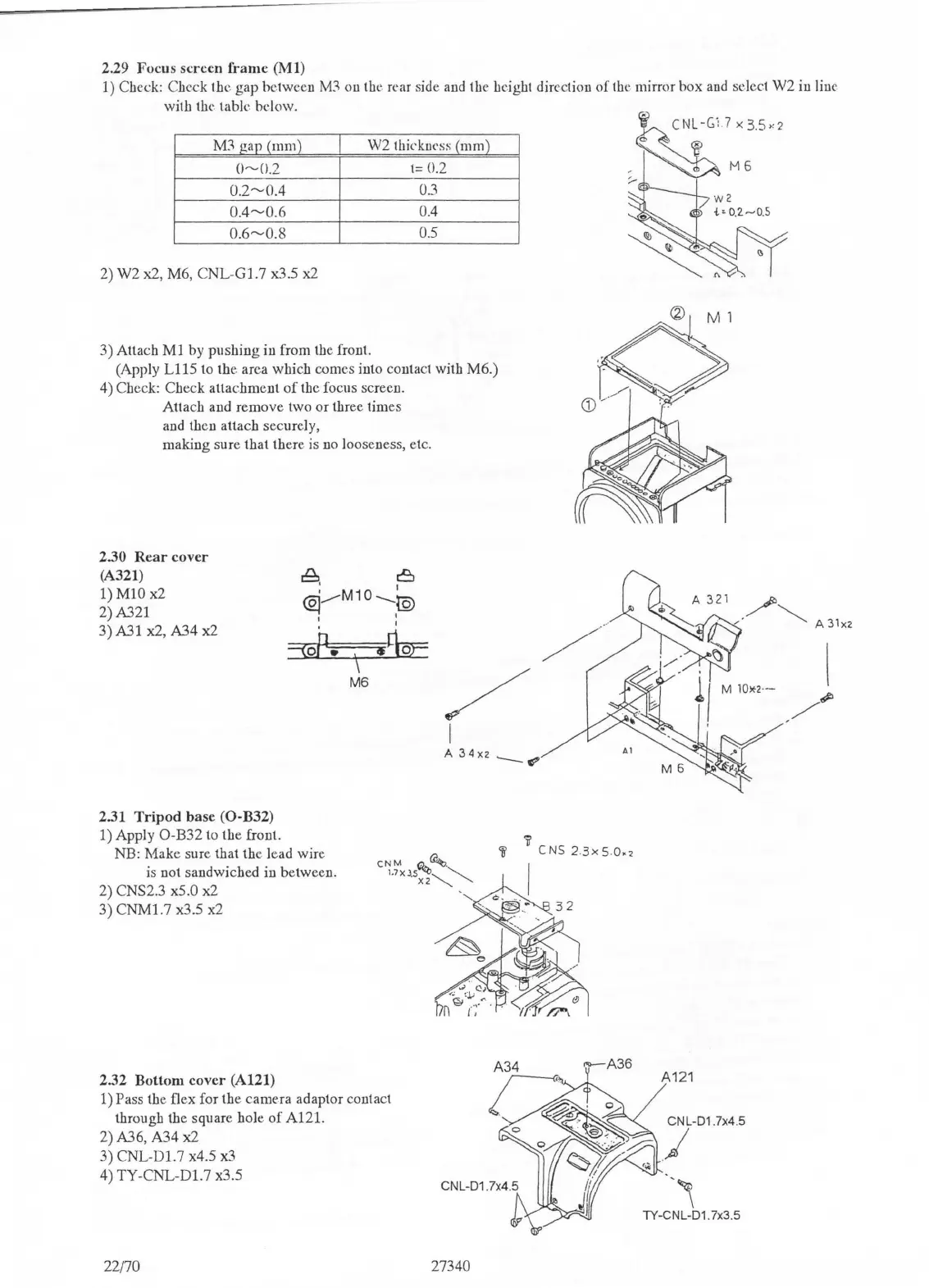
2.29
Focus
screen
frame
(Ml)
1)
Check: Check the gap between
M3
on the rear side and the height direction
of
the mirror box
and
select W2 in line
with
the table below.
M'.'\
ga11
(mm)
W2 thickness
(mm)
0~0.2
1= 0.2
0.2~0.4
0.3
0.4~0.6
0.4
0.6~0.8
0.5
2) W2 x2, M6,
CNL-Gl.7
x3.5 x2
3) Attach
Ml
by pushing in from the front.
(Apply
Ll
15 to the area which comes into contact with M6.)
4) Check: Check attachment
of
the focus screen.
Attach and remove two or three times
and then attach securely,
making sure that there is no looseness, etc.
2.30
Rear
cover
(A321)
1) MIO x2
2) A321
3) A31 x2, A34 x2
2.31
Tripod
base
(0-B32)
1) Apply O-B32 to the front.
~
.
8
@j__.....-M10--.._~
I I
I
,~oP-t;;.=~.~
\
M6
/
I
A34x2.__~
'11
Cl~L-GU
X3.5
.:2
~
, M 6
;:,-
NB: Make sure that
the.
lead wire
is
not sandwiched in between.
i
l'
CNS2
.
3xs
.
o.,
2) CNS2.3 x5.0 x2
I
3)
CNMl.7
x3.5 x2
2.32
Bottom
cover
(A121)
A34
A121
1) Pass the flex for the camera adaptor contact
through the square hole
of
A121.
CNL-01 .7x4.5
2) A36, A34 x2
3)
CNL-Dl.7
x4.5 x3
J
4)
TY-CNL-Dl.7
x3.5
-
~
TY-CNL-01. 7x3.5
22170
27340


 To Next Page
 Loading...