Setup & User Guide
| 104
DOC-246-GDE-Pivot3 Acuity 2.3 Setup & User Guide-v1.0.docx
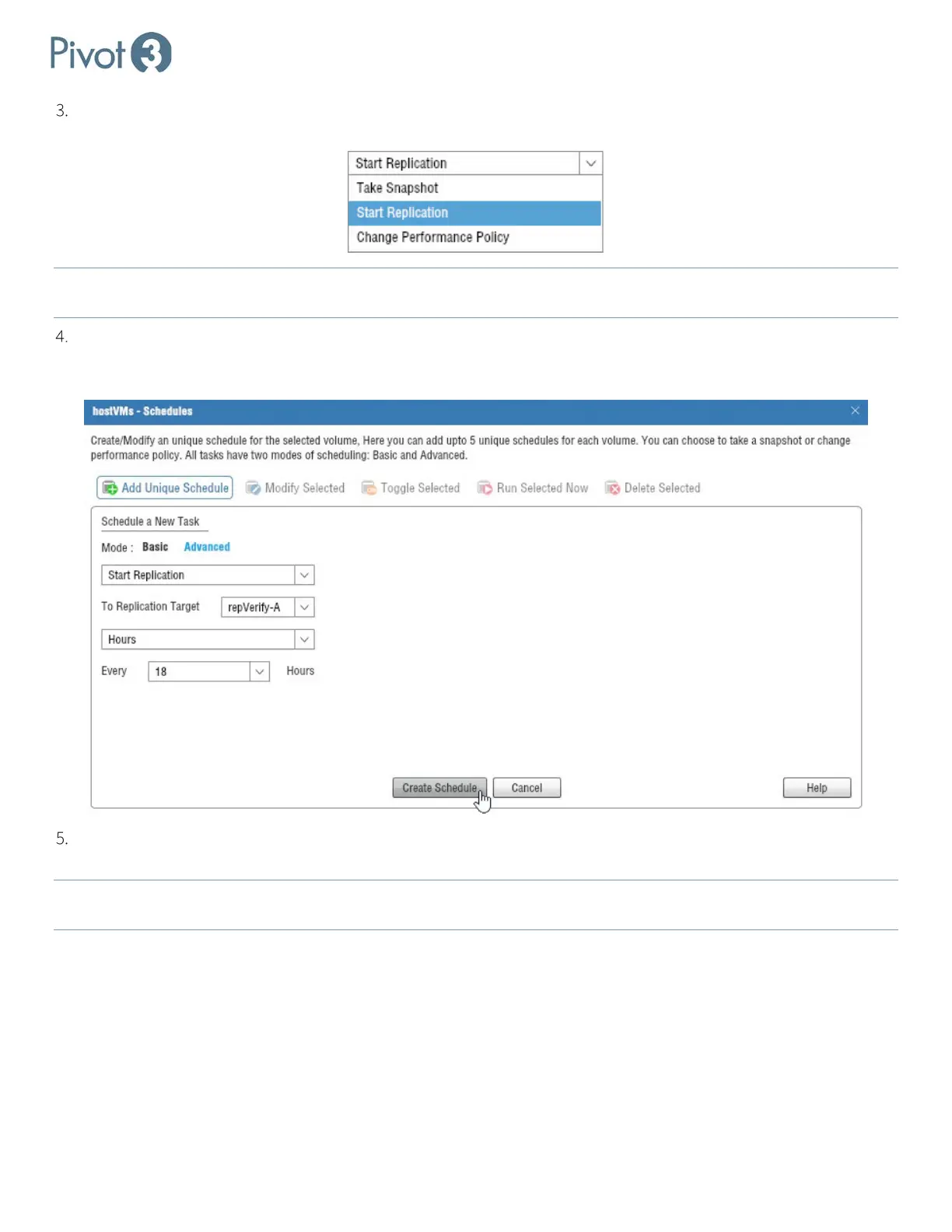
Users can Schedule a New Task in Basic or Advanced modes. Regardless of mode, choose Start Replication from
the drop-down menu.
NOTE: For more information on Basic and Advanced mode options, consult subsection
Schedules on a Volume or an
Application Group in Section 12.
Choose a Replication Target from the available drop-down. Choose a repetition interval from the options (Run Once,
Minutes, Hours, Days, Weeks, or Months) and then define the more granular details regarding that interval from the
options given. Once all fields have been satisfactorily populated, click
Create Schedule.
Retention is set on a scheduled task. If there are multiple schedules on a volume, each schedule can have its own
retention setting and more snapshots and replications may be maintained than originally perceived.
NOTE: Protection Policies can also be created to replicate snapshots to a target vPG. For more information, consult sub-
section Creating a Custom Policy in Section 12.



 To Next Page