61
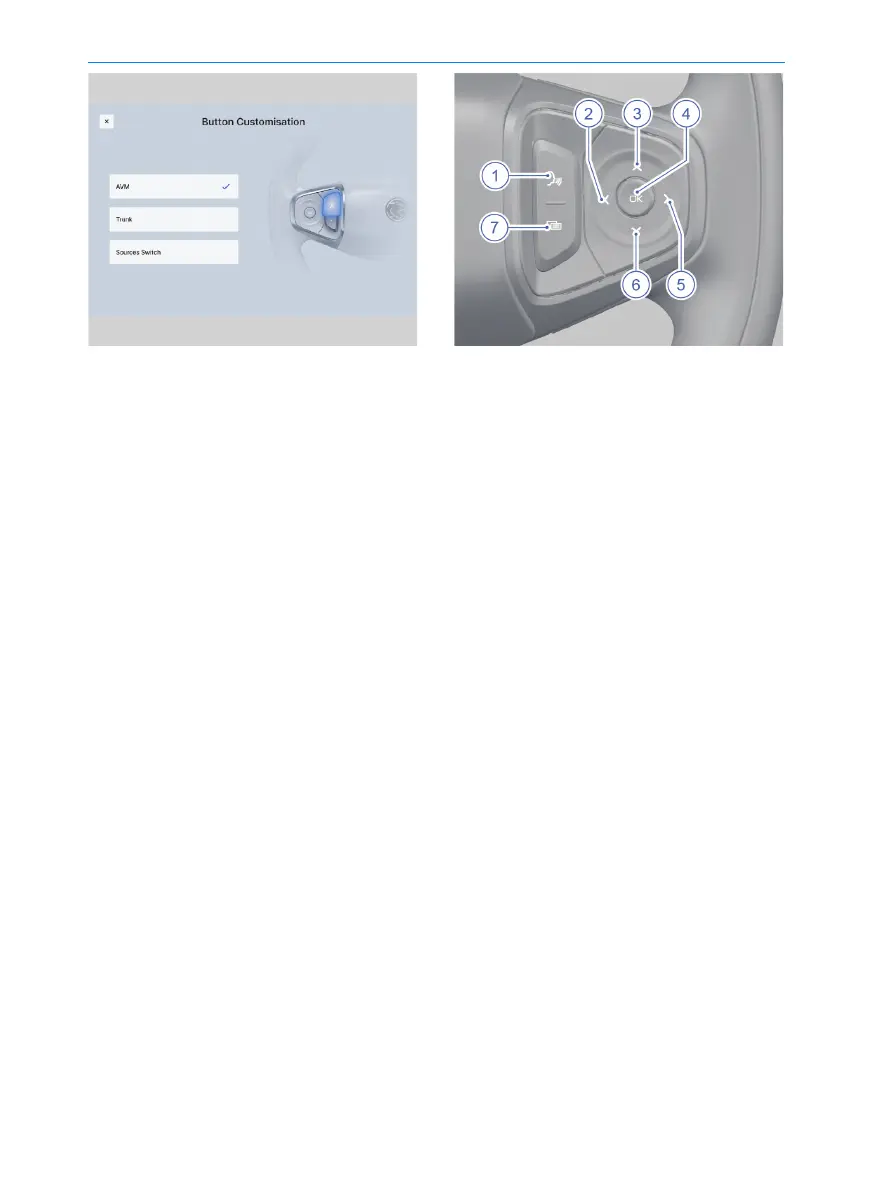
Click the following on the multimedia
display: Vehicle Settings → Vehicle
Control → Vehicle Preferences in
sequence, and then select the Button
Customisation in this interface. Select
the functions to be associated with the
Button Customisation according to your
needs.
5. Cancel button: Cancel the related
functions of Intelligent Cruise Control
(ICC)/Adaptive Cruise Control (ACC).
6. Speed decrease button:
• Short press: cruise speed - 5 km/h.
• Long press: cruise speed -1 km/h
continuously.
7. OK button: Press this button to activate
cruise (available in the Intelligent Cruise
Control (ICC)/Adaptive Cruise Control
(ACC) function).
1. Voice button:
Turning ON voice command function:
Short press this button to turn on the
voice command function.
2. Left button:
To hang up an on-going call: Short
press the left button to hang up
Bluetooth calls.
When the meter instrument menu is
closed: Short press the left button to
play previous song or channel.
3. Up button:
When the meter instrument menu is
opened: Short press the up button to
switch to the previous item in the meter
instrument menu.
When the meter instrument menu is
closed: Short press the up button to
increase the sound volume of the
multimedia or Bluetooth phone audio
source.
4. Confirm button:
When a warning interface pops up in
the meter instrument: Press the
confirm button to turn off any pop up
visual warning interface.
When an audio source is playing:
Press the confirm button to pause the
playback of multimedia audio source.
About the Vehicle



 To Next Page