Connecting to the Quantum Meter:
1.
Connection to the 9660 Digital Switch must be accomplished prior to using the Mini-Pro software.
'1
2. Any terminal application may be used to establish connection, Windows Terminal, Hyperterminal, Procomm
Plus etc.
3. The following terminal parameters must be changed to ensure proper connection in conjunction with the
Quantum Meter.:
Baud Rate
-
1200, Data Bits
-
8, Stop Bits
-
1,
Parity
-
None, Flow Control
-
None, Parity CK
-
No,
Carrier DT
-
No, Error Control
-
No.
4.
The most important thing to understand is, Mini-Pro software does not use flow control. Flow control must
be disabled on the initiating modem only. Do not for any reason make changes to the modem used by the
9660 Digital Switch.
5.
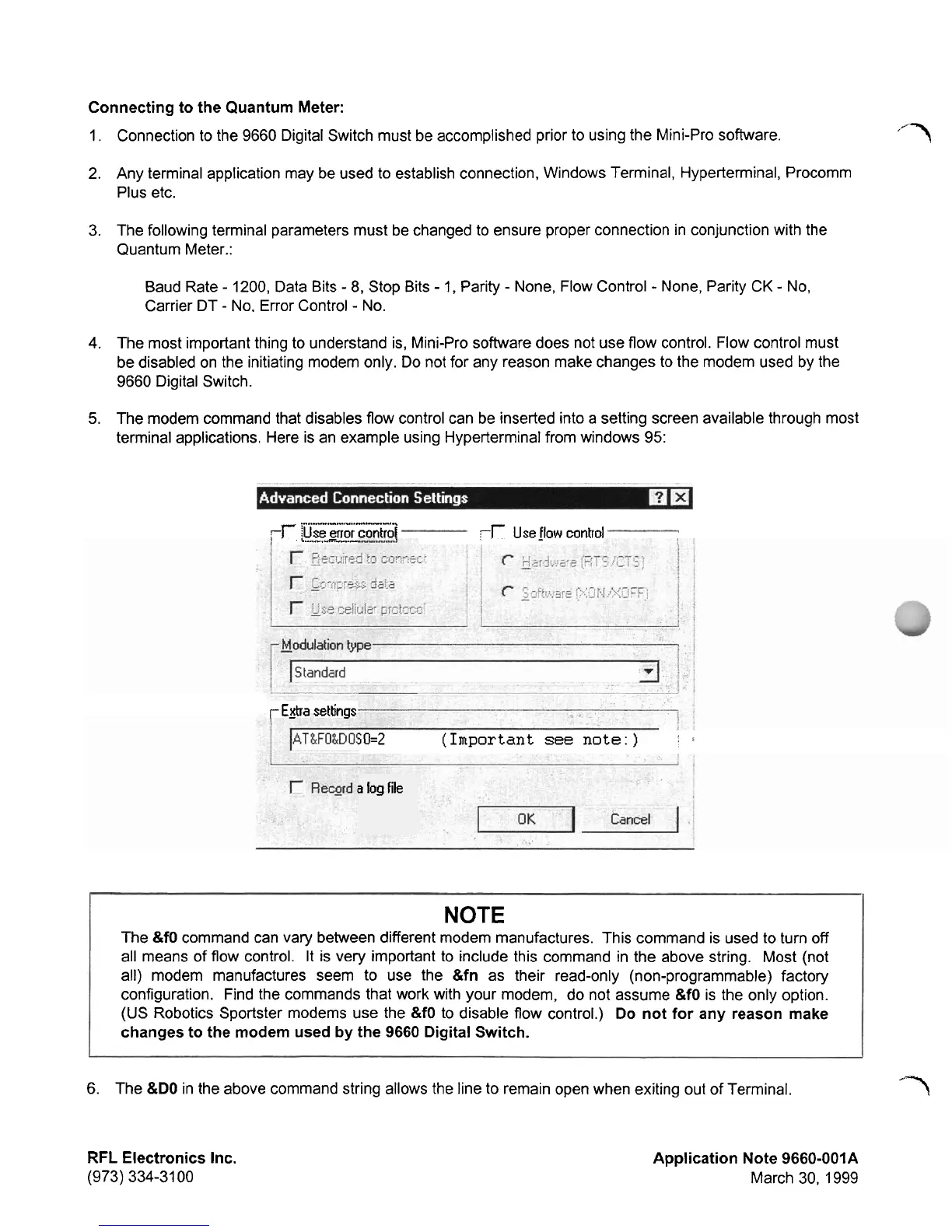
The modem command that disables flow control can be inserted into a setting screen available through most
terminal applications. Here is an example using Hyperterminal from windows
95:
.-,...-.-...,
"..,"
..-.-...
-r
Use
grot
conhoi
,
5..
"-.-.
-.-
-r
Use
jlow
control
r
Egra
settings
5
0=2
(Important
see
note:)
'
3
log file
NOTE
The
&fO
command can vary between different modem manufactures. This command is used to turn off
all means of flow control.
It is very important to include this command in the above string. Most (not
all) modem manufactures seem to use the
&fn
as their read-only (non-programmable) factory
configuration. Find the commands that work with your modem, do not assume
&fO
is the only option.
(US Robotics Sportster modems use the
&fO
to disable flow control.)
Do not for any reason make
changes to the modem used by the 9660 Digital Switch.
6. The
&DO
in the above command string allows the line to remain open when exiting out of Terminal.
'7
RFL
Electronics Inc.
(973) 334-31 00
Application Note 9660-001A
March 30, 1999



 To Next Page