4. INSTALLATION
12.
CONNECTING AN
EXTERNAL
WATER TANK
To avoid having to regularly fill the internal water tank (see Chapter 5 - Instructions for Use), it
is possible to connect the sterilizer to an optional external tank that the user will less frequently
fill, or to a commercially-available, water purification system with accumulation tank.
With this option, the autoclave automatically activates a pump that fills the internal tank when it
reaches the MIN level. Be sure to monitor the external tank as the Bravo unit can not monitor
the water level in the external tank.
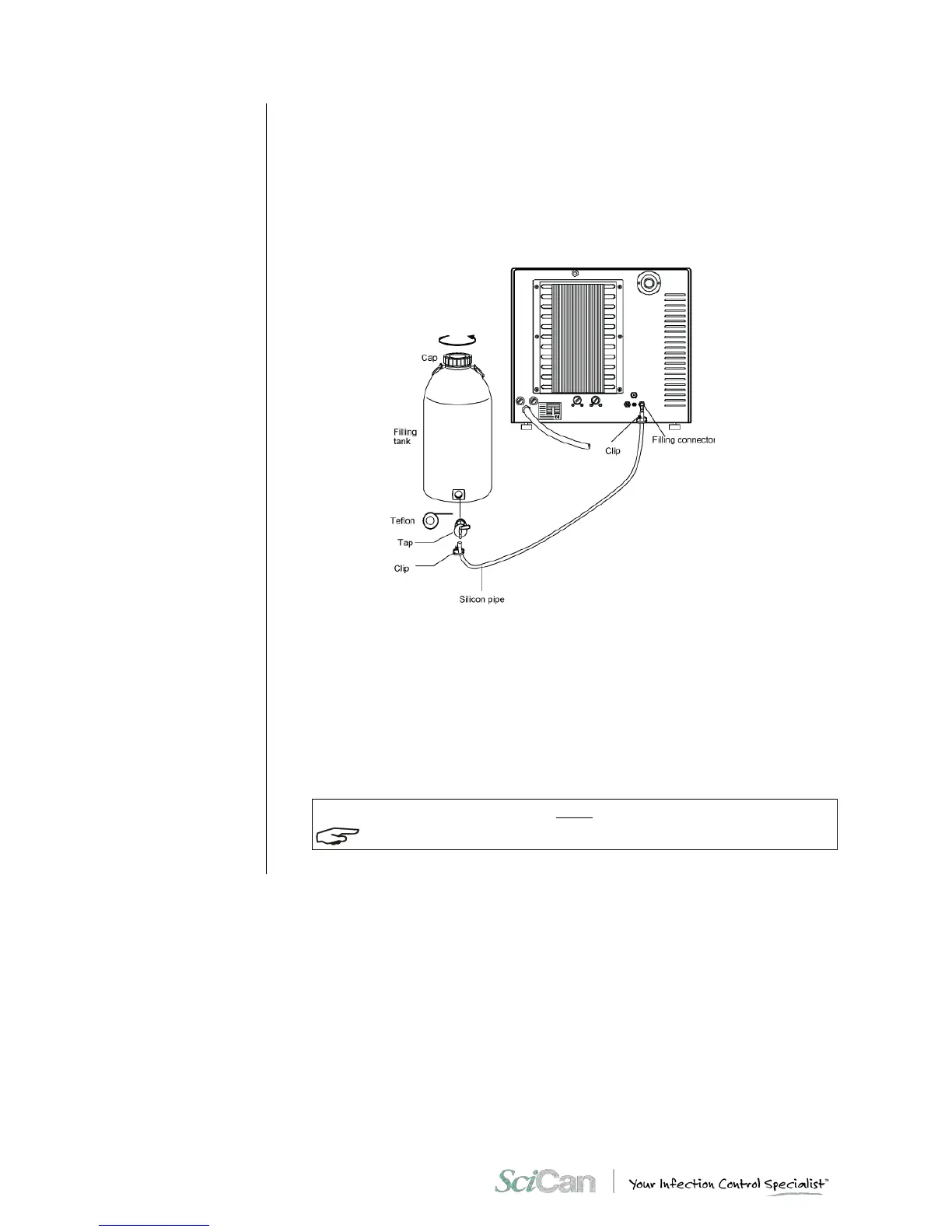
To connect the external tank, follow the instructions below:
– Install the tap provided on the tank; use Teflon tape or connector sealant for a perfect seal.
– Use the tank’s silicone tube (or other suitable tube) and insert it on the filling connector
taking care to push it completely on.
– Lock the tube to connector with the plastic tie provided.
– Insert the other end of the tube on the tap of the tank.
– Make sure that the tube runs freely from the device to the tank, without being bent, crushed
or obstructed in any way.
– Loosen the cap to facilitate the flow of water.
– Open the tap on the filling tank.



 To Next Page