Periodic sterilizer
calibration and 3000
cycle maintenance
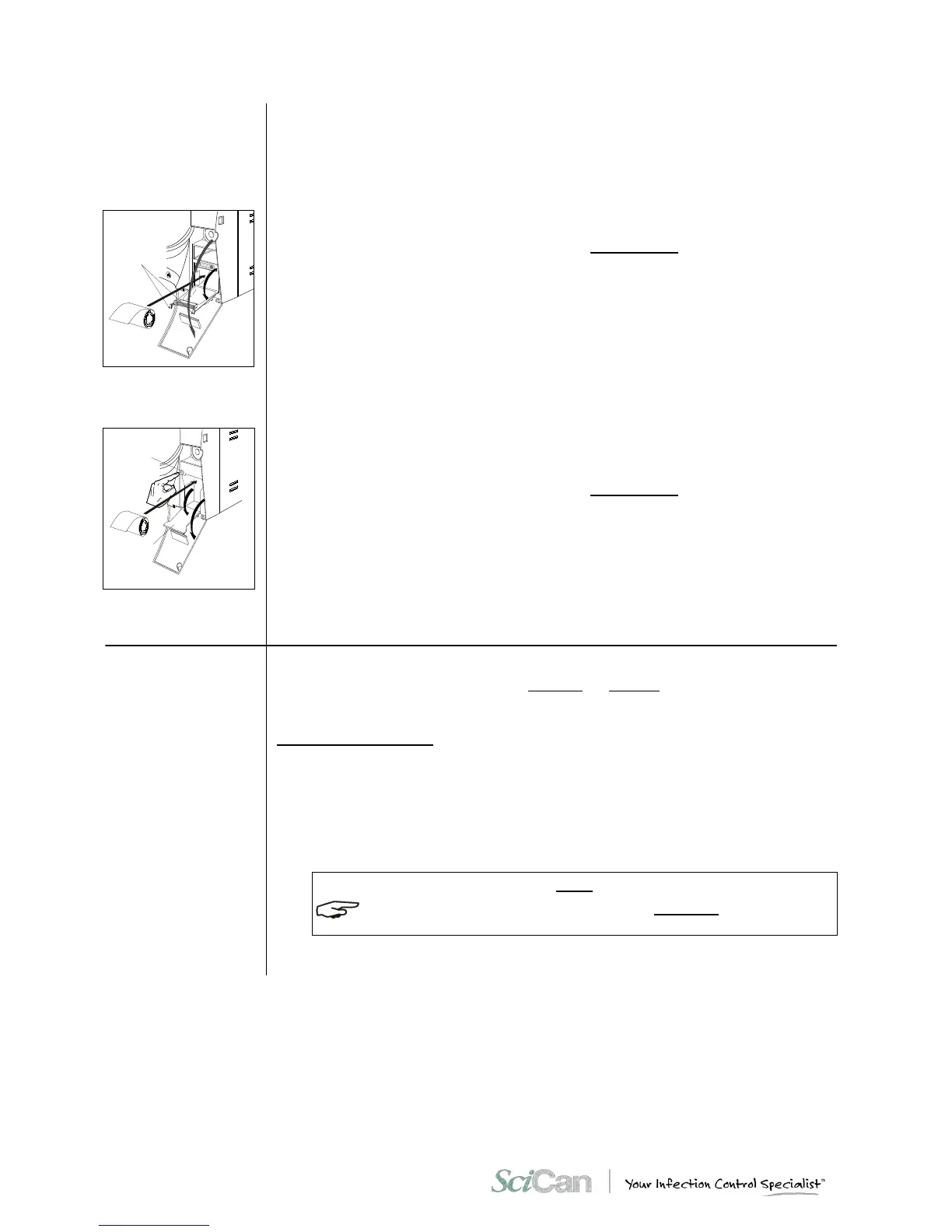
To replace the printer paper:
Printer type1:
1. Open the door (1) of the service compartment to access the printer.
2. Push the tongues (2) to open the printer door and access the paper compartment.
3. Remove the empty roll and place a new roll of thermal paper so that the paper unrolls
from the top.
The roll must have the following dimensions:
- width 57 mm (2.24”) / diameter max 45 mm (1.77”)
4. Unroll about 15 cm (6”) of paper and close the compartment door,
5. Thread the paper in the service compartment door slot and close.
Printer type2:
1. Open the door (1) of the service compartment to access the printer,
2. Push the button (2) on the left to open the printer door (3) and access the paper
compartment,
3. Remove the empty roll and place a new roll of thermal paper so that the paper unrolls
from the top;
The roll must have the following dimensions:
- 57 mm (2.24”) / diameter max 45 mm (1.77”)
4. Unroll about 15 cm (6”) of paper and close the compartment door (the paper will
automatically advance outside the window for several centimeters),
5. Thread the paper in the service compartment door slot and close.
To ensure proper performance of the unit, calibrate the sensors (pressure and temperature),
verify the performance of all major components at least every three years or 3000 cycles
Ensuring the sterilizer is routinely maintained and properly verified over time is the
responsibility of the user.
The 3000 cycle maintenance and calibration procedure requires the use of special equipment
(high-precision reference instruments, calibration tools, dedicated software, etc.) suitably
verified and calibrated in addition to specific experience and training. It is therefore
recommended to contact Technical Service to perform this maintenance



 To Next Page