46 User’s Manual
5.3 Database
5.3.1 Loading Data from Database
The VScope program has a built in database support. For this reason all of the data that
acquired by the program is stored as records in a database rather than in separate files. This
allows for greater flexibility with data manipulation, record searching and analysis.
Large number of Records in Database will slow program considerably. Start new
database often to reduce this problem. Or do not save to database and only export data to SEG-Y
or SEG-2 files.
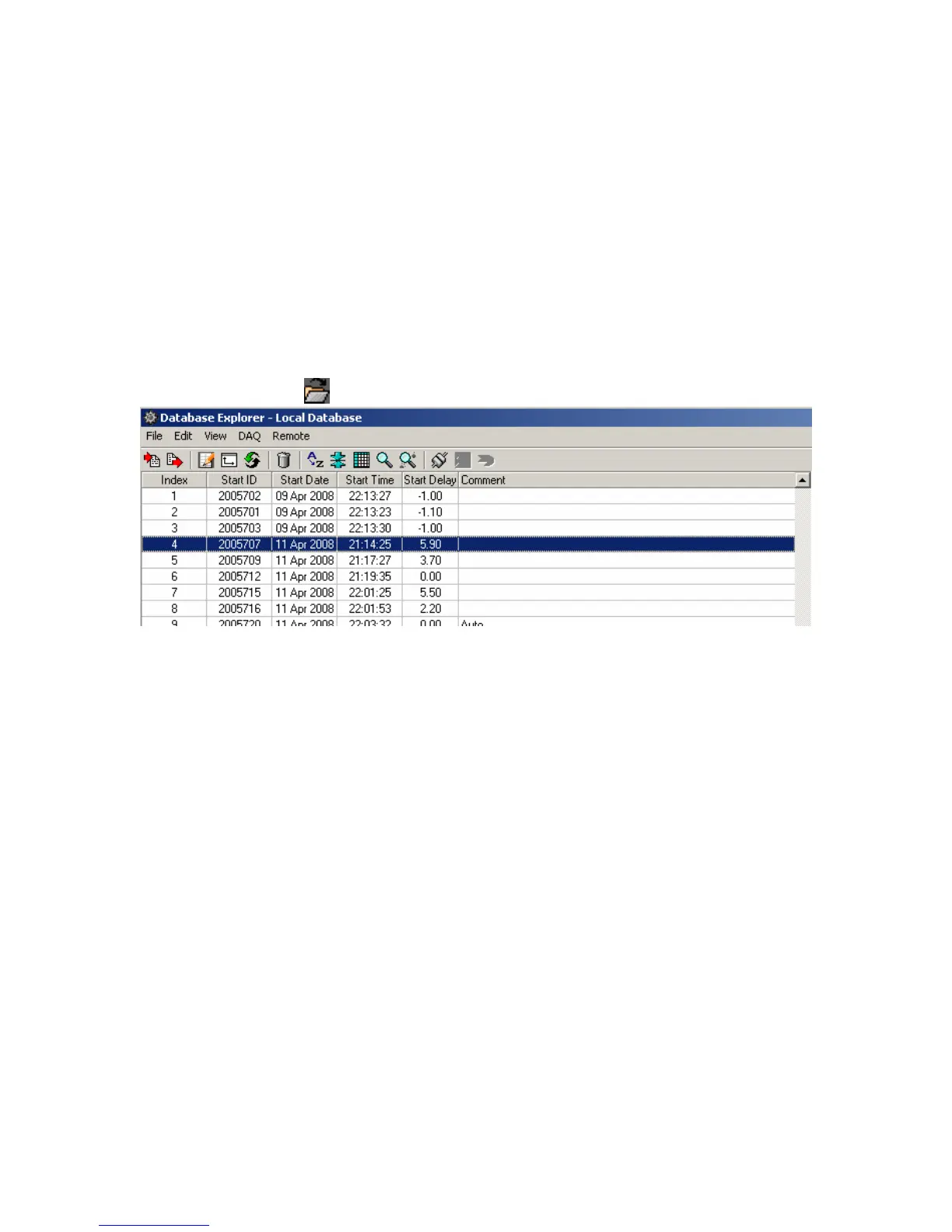
The user can see all of the records in the current project database and select any record
for analysis by clicking Open button or selecting menu File->Open (Ctrl O).
Figure 6.3 Database Explorer
All records in a Database window are arranged into a table. It shows the following
columns:
• Index - Number used to index the database. It is incremented every time a data
record is stored.
• Start ID – Identifies the Start ID of the record. The start ID is incremented for each
new start command.
• Date - Date when data was stored to database.
• Time - Time when data was stored to database.
• Start Delay – Is used for continuous recording option. A single start command and
Start ID will initiate multiple records; the Start Delay is used to identify these
multiple records. It is the time from when the original start command is received to
when the trigger occurred.
• Comment - Comment for data record. When recording and saving data to database
automatically, comment from previous record is copied to current record.



 To Next Page