© 2019 Safe Fleet | All rights reserved | Part #: 700-1123 R4
p. 44
TH8 Installation and Conguration Guide
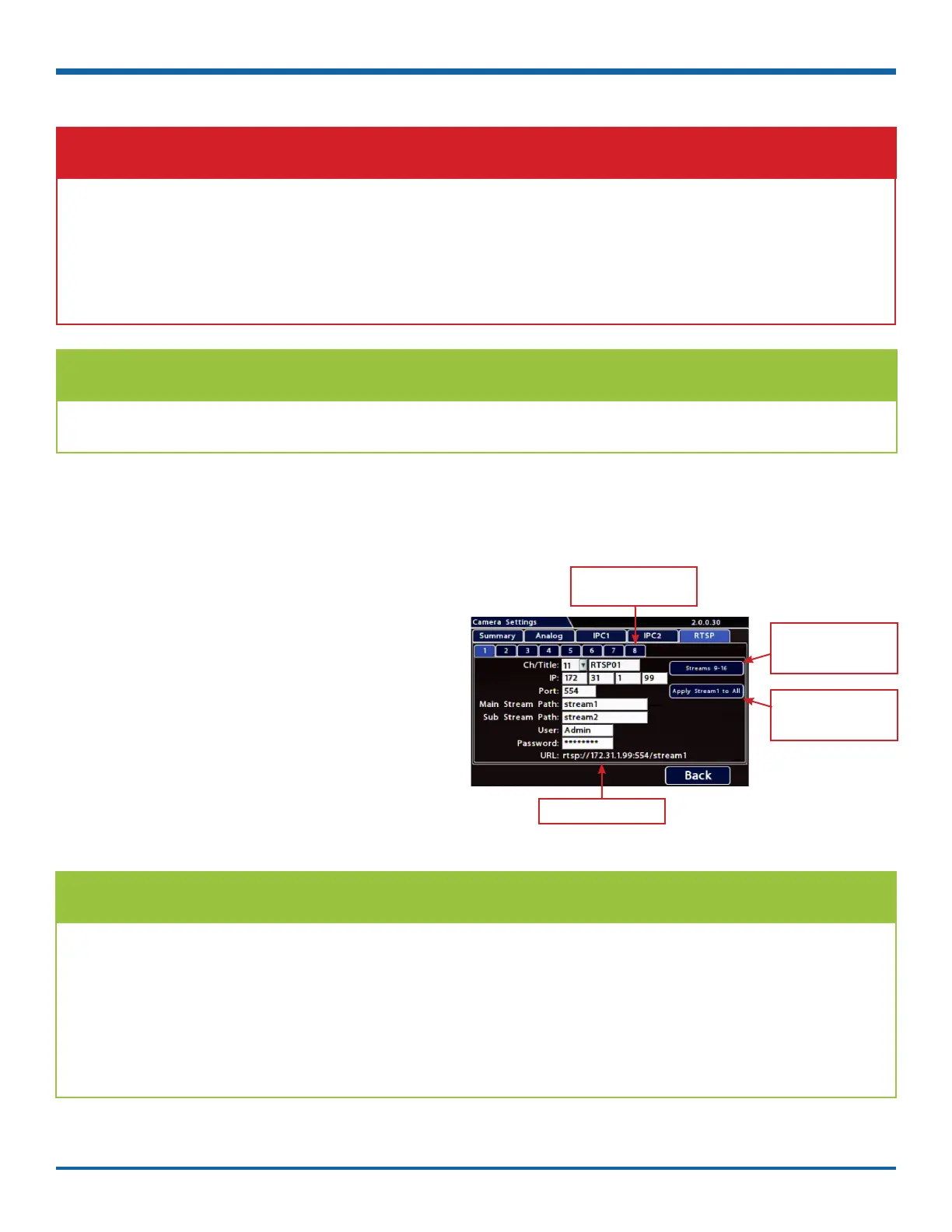
To congure an RTSP device:
1. Click the RTSP tab.
2. Use the Ch dropdown menu to select a
logical channel (denes the display location in
live and playback grid views).
3. <> Click the Title eld and enter a
name for the stream pair.
4. Enter IP, port, and path data for the RTSP
server, including credentials if required.
5. Click a numbered tab to select other stream
pairs and repeat steps 2 through 4 as required.
6. Click Back to save RTSP settings.
TIP: Turn Off Unused Audio
Set Audio OFF for inputs where audio feeds are not required, such as exterior cameras.
TIP: RTSP Connection Strings
The IP, port, and path data you enter in the Camera Settings RTSP screen dene a connection to the
camera's RTSP server (the DVR acts as the client).
Check the Safe Fleet Community (see "Product Information" on page 78) to nd RTSP connection string
details for supported cameras, or contact Technical Support for more information.
Note: the system does not build the connection string until you exit the Camera Settings page. The next
time you open the RTSP tab, the connection string appears at the bottom of the screen (labeled URL).
Click to work with the
dened set of RTSP
streams
Click to apply settings
selected for stream1 to
all streams.
Click a numbered tab to
select a stream pair
RTSP connection string
If any analog camera ports (CAM 1 - CAM 8) are unused, disable their associated camera input settings to
prevent the DVR from generating Video Loss (VLoss) events for those camera inputs.
In the DVR Conguration menus, disable settings for unused camera inputs as follows:
• Record Camera Analog FPS OFF
IMPORTANT: Turn off unused analog camera channels



 To Next Page