© 2019 Safe Fleet | All rights reserved | Part #: 700-1123 R4
p. 45
TH8 Installation and Conguration Guide
IMPORTANT: Update TH4C Settings
On the TH4C companion DVR:
• Congure the NetworkSettings Setting Type to
DHCP (for more information, see the
).
• If Record-Off Delay Time or Power-Off Delay
Time are used, congure these settings on the
TH4C to match the TH8. For more information, see
"Recording Settings" on page 52.
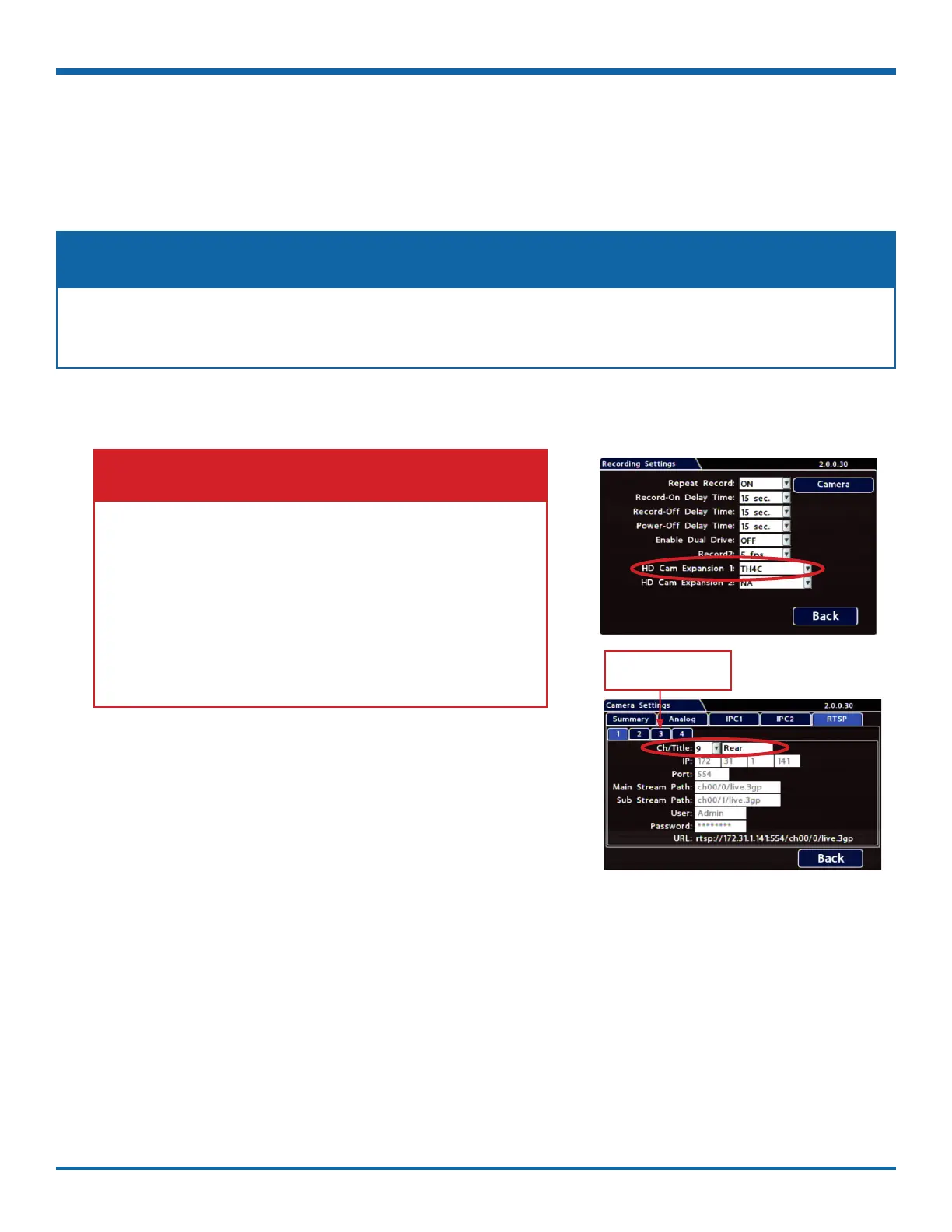
Click a numbered tab to
select a stream pair
1. Ensure the TH4C POE-LAN port is connected to a TH8 HD
Cam Expansion port with a CAT5e cable.
2. In the TH8 Recording Settings, select the TH4C option for
the HD Cam Expansion port (for details, see "IP Cameras and
RTSP Video Sources" in "Recording Settings" on page 52).
3. Click Camera, and select the RTSP tab.
4. Click numbered tabs 1 through 4 to congure each TH4C
camera stream using the Ch/Title dropdown menus:
• Ch - select a logical channel (the display location for live
and playback grid views)
• Title - enter a name for the camera stream
5. Click Back to save Camera settings.
To congure streams from a companion DVR (e.g.TH series):
The TH8 can receive camera feeds as RTSP streams from a supported companion DVR. For example, to set up
the TH8 to receive 4 stream pairs from a TH4C DVR:
The following TH8 cameras are not compatible with the TH4C, which supports maximum 720p resolution:
HD3, CHW8, C3Q9PD, C3W9PD
NOTE: Limited TH4C Camera Support



 To Next Page