MX-2300/2700 N/G SIMULATION 7 – 100
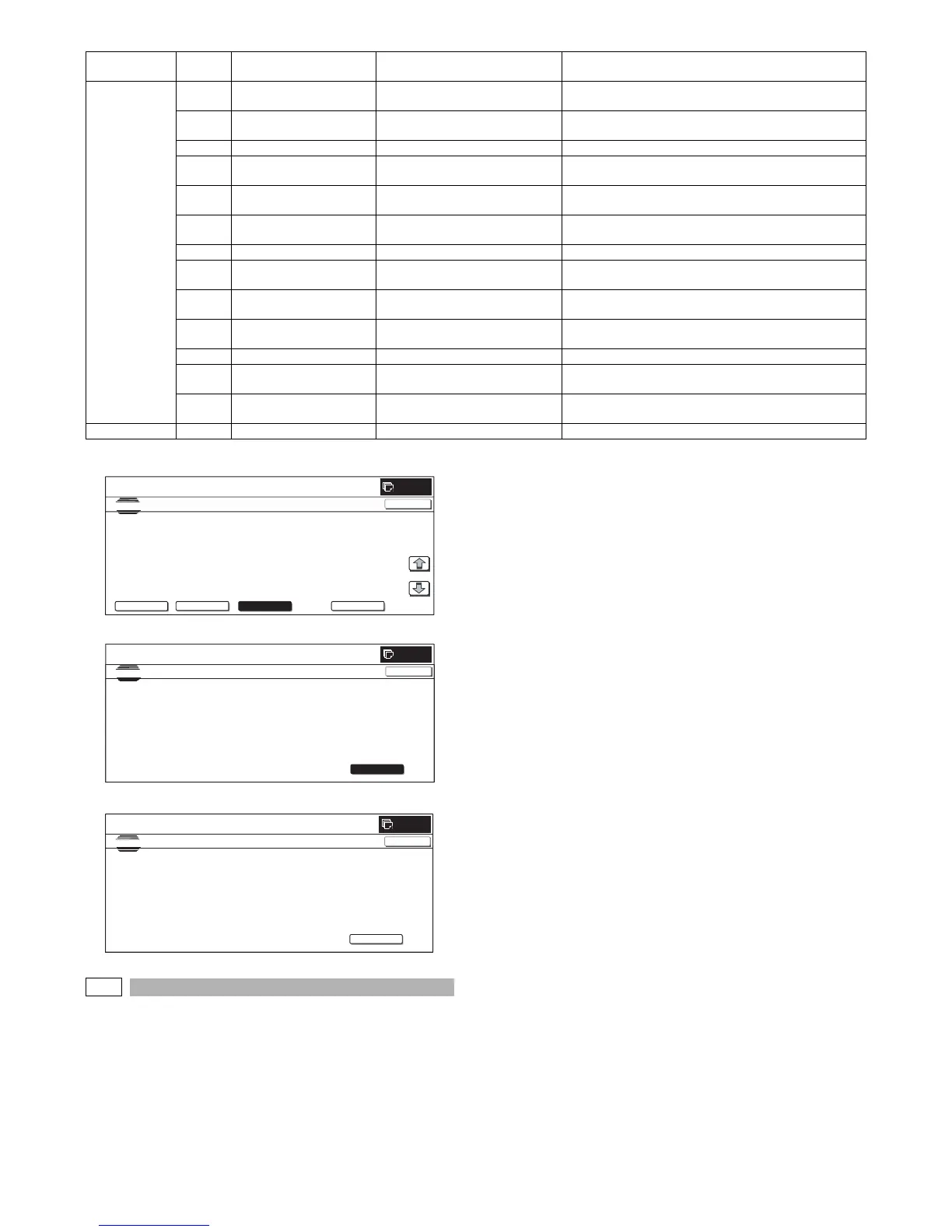
(Initial screen or when in normal end)
(Adjustment screen)
(Error end screen)
50-24
Purpose : Adjustment
Function (Purpose) : Used to display the data acquired with the
auto registration adjustment simulation
(SIM50-22).
Section :—
Item : Image quality
Operation/Procedure
1) When the machine enters Simulation 50-24, the following
screen is displayed.
* Select the kind of display with [NEXT] and [BACK] buttons.
* Specify the color with [K], [C], [M], and [Y] buttons. (Depend-
ing on the selected kind of data, selection of a color button
cannot be made. In that case, the key entry is disabled.)
* If there is a page over [↑], an active display is shown and the
page moves up. If there is no page upward, the display
grays out and the operation is invalid.
If there is a page under [↓], an active display is shown and
the page moves down. If there is no page downward, the
display grays out and the operation is invalid.
* When [CLOSE] button is pressed, the display is shifted to the
copy basic screen of simulation.
* Copying can be performed also by pressing [COLOR]/[BLACK]
key.
<Display content>
1) Registration adjustment confirmation screen
Use [K][C][M][Y] button to display the initial screen (No color
specified/C/M/Y).
Press [NEXT] button to display the next category.
Press [BLACK] button to display the previous category.
2) Phase adjustment status check screen
Press [K][C][M][Y] button to display the initial screen (K/C/M/
Y).
Press [NEXT] button to display the next category.
Press [BACK] button to display the previous category.
3) Sensor calibration status check (No color specification)
Press [K] button to display the initial screen of K.
Press [NEXT] button to display the category.
Press [BACK] button to display the previous category.
4) Sampling status check (1) (KCMY/No color specification)
Press [K][C][M][Y] button to display the initial screen (K/C/M/
Y).
Press [NEXT] button to display the next category.
Press [BACK] button to display the previous category.
5) Sampling status check (2) (KCMY)
Press [K][C][M][Y] button to display the initial screen (K/C/M/
Y).
Press [NEXT] button to display the next category.
Press [BACK] button to display the previous category.
Main scan
adjustment
error
73 MAIN MAGENTA FRONT Result value error main scan
MAGENTA F
The variation of the calculation result value is over the
specified allowable range.
75 MAIN MAGENTA REAR Number error main scan MAGENTA
R
The number of pitch data is not the specified number.
76 MAIN MAGENTA REAR Pitch error main scan MAGENTA R The pitch data is not in the specified allowable range.
77 MAIN MAGENTA REAR Adjustment value error main scan
MAGENTA R
The calculation result value is not in the specified allowable
range.
78 MAIN MAGENTA REAR Result value error main scan
MAGENTA R
The variation of the calculation result value is over the
specified allowable range.
80 MAIN YELLOW FRONT Number error main scan YELLOW
F
The number of pitch data is not the specified number.
81 MAIN YELLOW FRONT Pitch error main scan YELLOW F The pitch data is not in the specified allowable range.
82 MAIN YELLOW FRONT Adjustment value error main scan
YELLOW F
The calculation result value is not in the specified allowable
range.
83 MAIN YELLOW FRONT Result value error main scan
YELLOW F
The variation of the calculation result value is over the
specified allowable range.
85 MAIN YELLOW REAR Number error main scan YELLOW
R
The number of pitch data is not the specified number.
86 MAIN YELLOW REAR Pitch error main scan YELLOW R The pitch data is not in the specified allowable range.
87 MAIN YELLOW REAR Adjustment value error main scan
YELLOW R
The calculation result value is not in the specified allowable
range.
88 MAIN YELLOW REAR Result value error main scan
YELLOW R
The variation of the calculation result value is over the
specified allowable range.
Other error 99 OTHER Other error Other error
Error
code
Error display Error content Detail of content
0
SIM ULATI ON
NO.50-22
TEST
AUTO ADJUSTMENT OF REGISTRATION&DLUM POSITION
EXECUTE
MAIN F MAIN R SUB P HAS E
C 105.0 (+0.2) 110.0 (-0.1) 103.0 (+0.4) 4 (3)
M 100.0 (+0.0) 99.0 (-0.2) 99.0 (+0.2)
Y 98.0 (+0.3) 98.0 (+0.1) 105.0 (+0.0)
1/1
CLOSE
REGIST DRUM POS ALL
0
SIMULATION NO.50-22
TEST
AUTO ADJUSTMENT OF REGISTRATION&DLUM POSITION
CLOSE
EXECUTE
NOW EXECUTING…
0
SIMULATION NO.50-22
TEST
AUTO ADJUSTMENT OF REGISTRATION&DLUM POSITION
CLOSE
EXECUTE
PRESS [EXECUTE] TO START
ERROR : TONNER EMPTY 01



 To Next Page