SIMPRO-100
Front-Panel Operation
5
PRIM-2400C 81
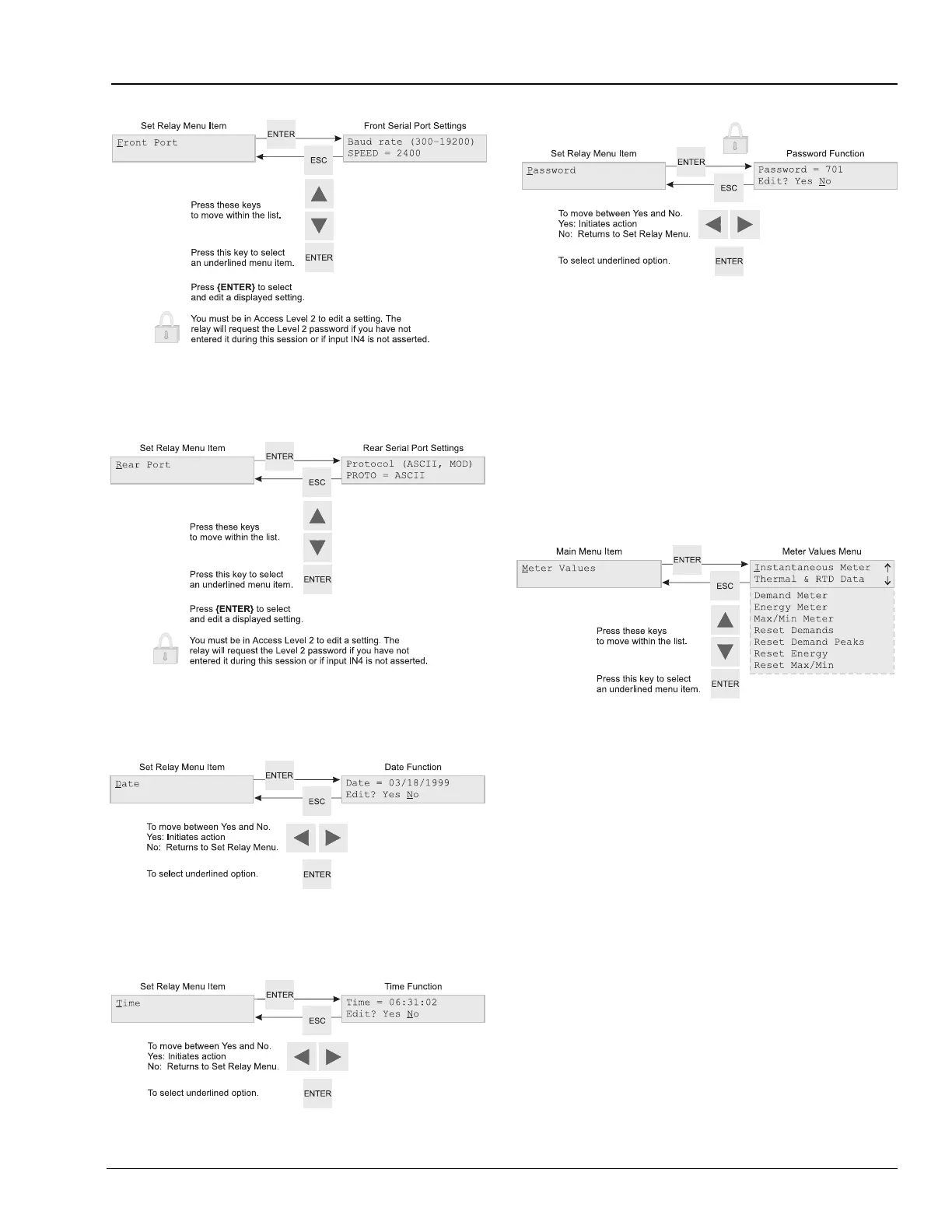
Figure 5.16 Set Relay\Front Serial Port Settings
Figure 5.17 Set Relay\Rear Serial Port Settings
Figure 5.18 Set Relay\Date Function
Figure 5.19 Set Relay\Time Function
Figure 5.20 Set Relay\Password Function
Note: Edit the Access Level 2 password using
the steps described in Section 5.4.2.2,
page 78 for password entry. Remember
that the relay password is case sensitive.
To disable Access Level 2 password
protection, set:
Password = DISABLE
Figure 5.21 Main Menu: Meter Values Function
The Meter Values menu includes functions to
display and reset meter data. Display functions
are Instantaneous Meter, Thermal and RTD Data,
Demand Meter, Energy Meter, and Maximum/
Minimum Meter. Reset functions are Reset
Demands, Reset Demand Peaks, Reset Energy,
and Reset Maximum/Minimum. When you select
a display function such as Instantaneous Meter in
Figure 5.22, the relay displays a list of meter
values you can move through using the up and
down arrow buttons. When you select a reset
function such as Reset Demand Peaks in
Figure 5.23, the relay displays a confirmation
message. If you select yes, the relay resets the
indicated meter values.














 To Next Page