6
ASCII Serial Port Operation
SIMPRO-100
86 PRIM-2400C
6.3 Connect Your PC to
the Relay
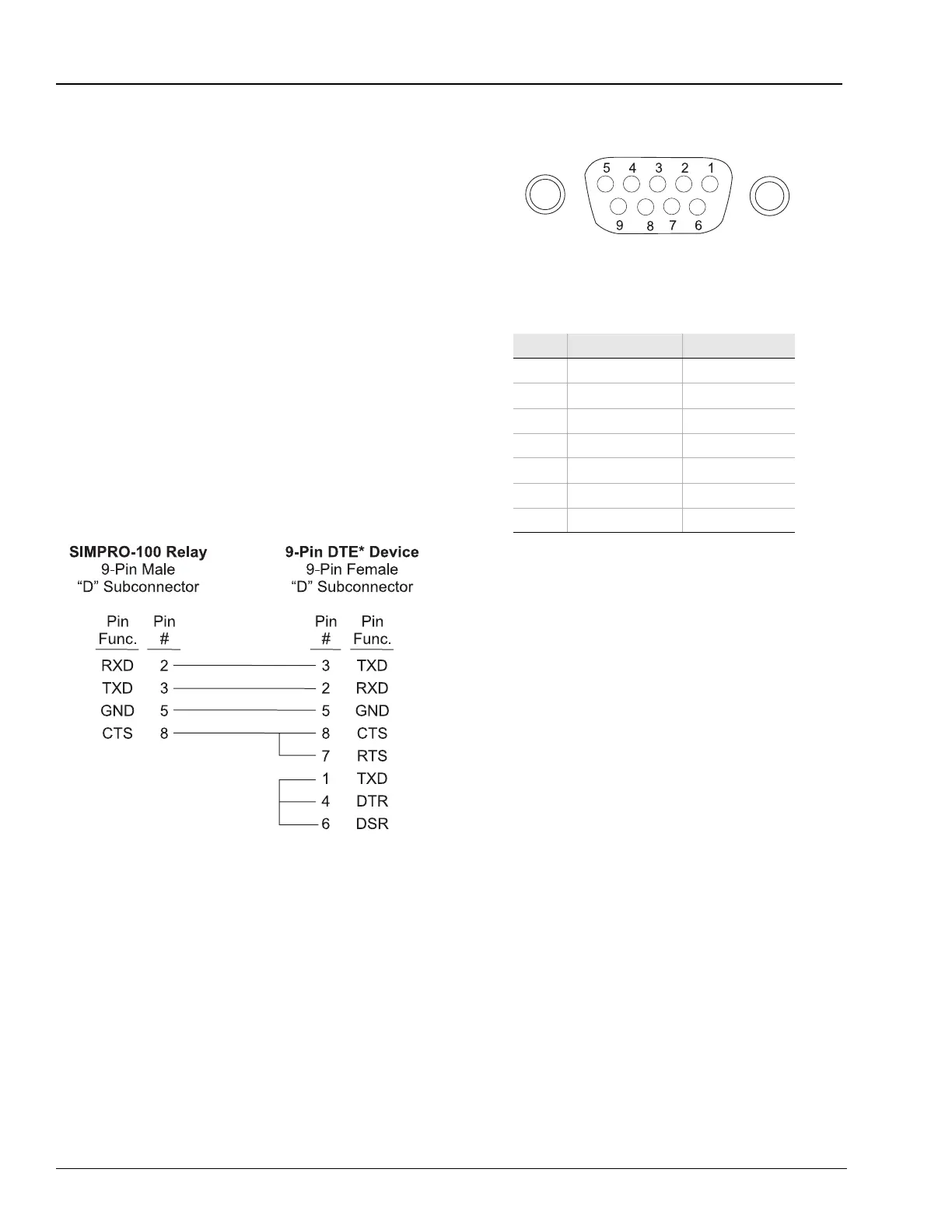
Connect your PC serial port to the SIMPRO-100
Relay serial port using a cable having the pinout
shown in Figure 6.1 or a null-modem cable.
Note: If you use a null-modem cable connection
to the relay EIA-232 serial port, be aware
that the relay does not use the DTR and
DSR signals. If your communication
device requires these signals, please use
a cable wired as shown in Figure 6.1.
For best performance, Siemens Cable SIM-232
should not be more than 50 feet (15 meters) long.
For communications up to 500 meters and for
electrical isolation of communications ports, use
the SIM-FOT fiber-optic transceiver or any
compatible device.
Figure 6.1 Cable SIM-232 Pinout
Figure 6.2 DB-9 Connector Pinout for EIA-232
Serial Ports
Table 6.1 Pin Functions and Definitions For
SIMPRO-100 Relay EIA-232 Serial Ports
Pin Pin Function Definition
1, 4, 6 N/C No Connection
2 RXD, RX Receive Data
3 TXD, TX Transmit Data
5, 9 GND Ground
SHLD Shield Ground
7 RTS Request to Send
8 CTS Clear to Send














 To Next Page