SIMPRO-100
Control Equations & Relay Logic
B
PRIM-2400C 151
B.13 Speed Switch
Control Equation
Setting
The speed switch control equation, SPEEDSW,
defines the relay input contact that is connected
to the motor speed switch. The factory default
setting allows you to connect the speed switch
contact to input IN3 at the relay or input IN7 at the
external RTD module, if installed. The Speed
Switch Trip logic, (Section 4.4.8, page 58), uses
the result of the SPEEDSW control equation.
B.14 Event Triggering
Control Equation
The event report trigger control equation, ER,
triggers standard event reports for conditions
other than trip conditions. When setting ER sees
a logical 0 to logical 1 transition, it generates an
event report (if the relay is not already generating
a report that encompasses the new transition).
The factory setting shown in Table B.3 on
page 142 includes a rising-edge operator [/] in
front of each of the alarm elements. This is used
to trigger an event report at alarm inception.
Falling-edge operators are used to generate an
event report at frequency element dropout, when
the system frequency has stabilized at or near the
nominal frequency.
B.15 Contact Output
Control
Control equation settings and their respective
fail-safe settings directly control the contact
outputs OUT1, OUT2, and OUT3. The control
equation settings let you program individual
contact outputs using single Relay Word bits for
element testing purposes or to create more
complex functions by combining Relay Word bits
and control equation operators.
B.16 Remote Control
Switches
Remote control switches do not have settings;
they are operated via the serial communications
port only (see Section 6.8.4, page 90).
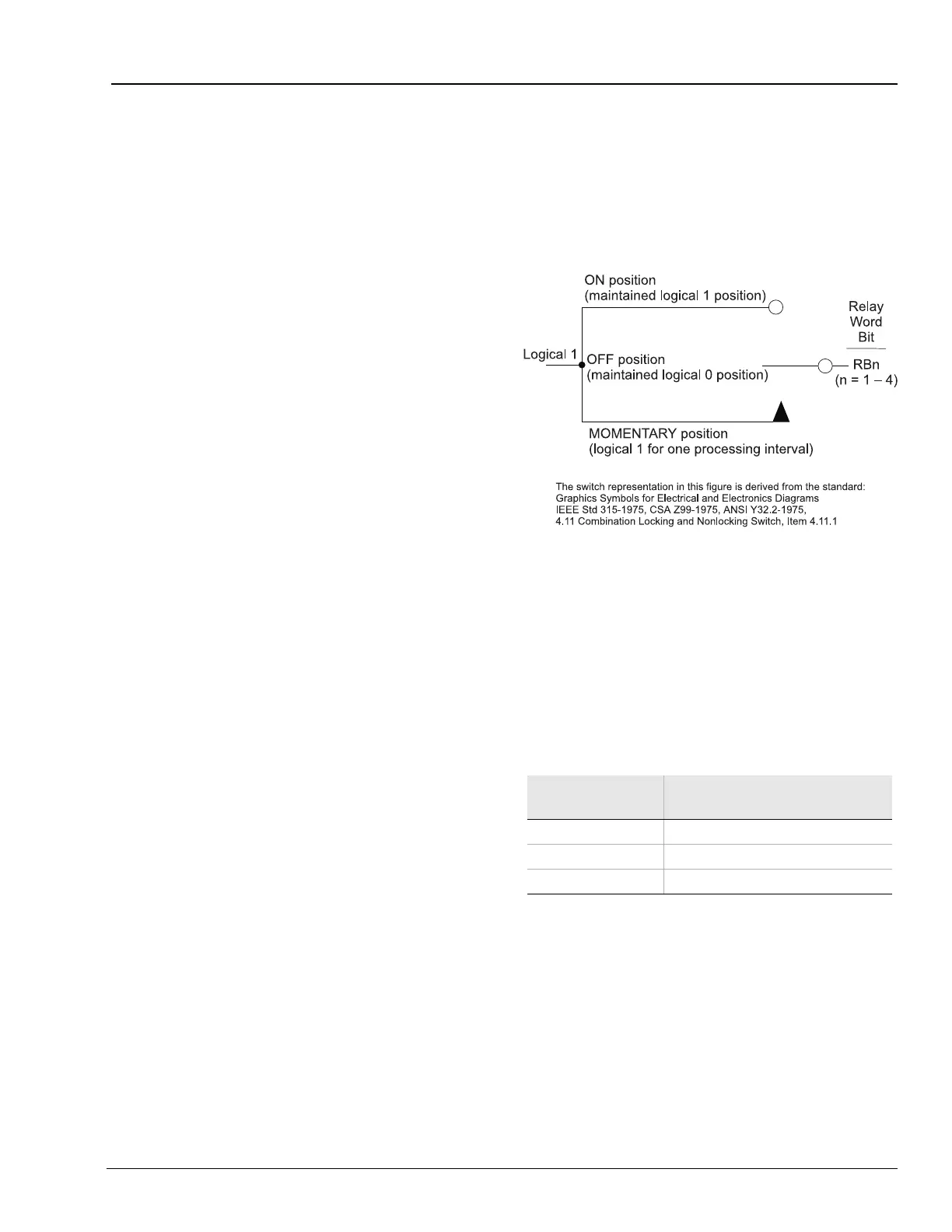
Figure B.9 Remote Control Switches Drive Remote
Bits RB1 – RB4
The outputs of the remote control switches in
Figure B.9 are Relay Word bits RBn (n = 1 – 4),
called remote bits. Use these remote bits in
control equations.
Any given remote control switch can be put in one
of three positions shown in Table B.4.
Table B.4 Remote Control Switch
Control Switch
Position
Description
ON logical 1
OFF logical 0
MOMENTARY logical 1 for one processing interval














 To Next Page