6.2.2 Changing the operating mode
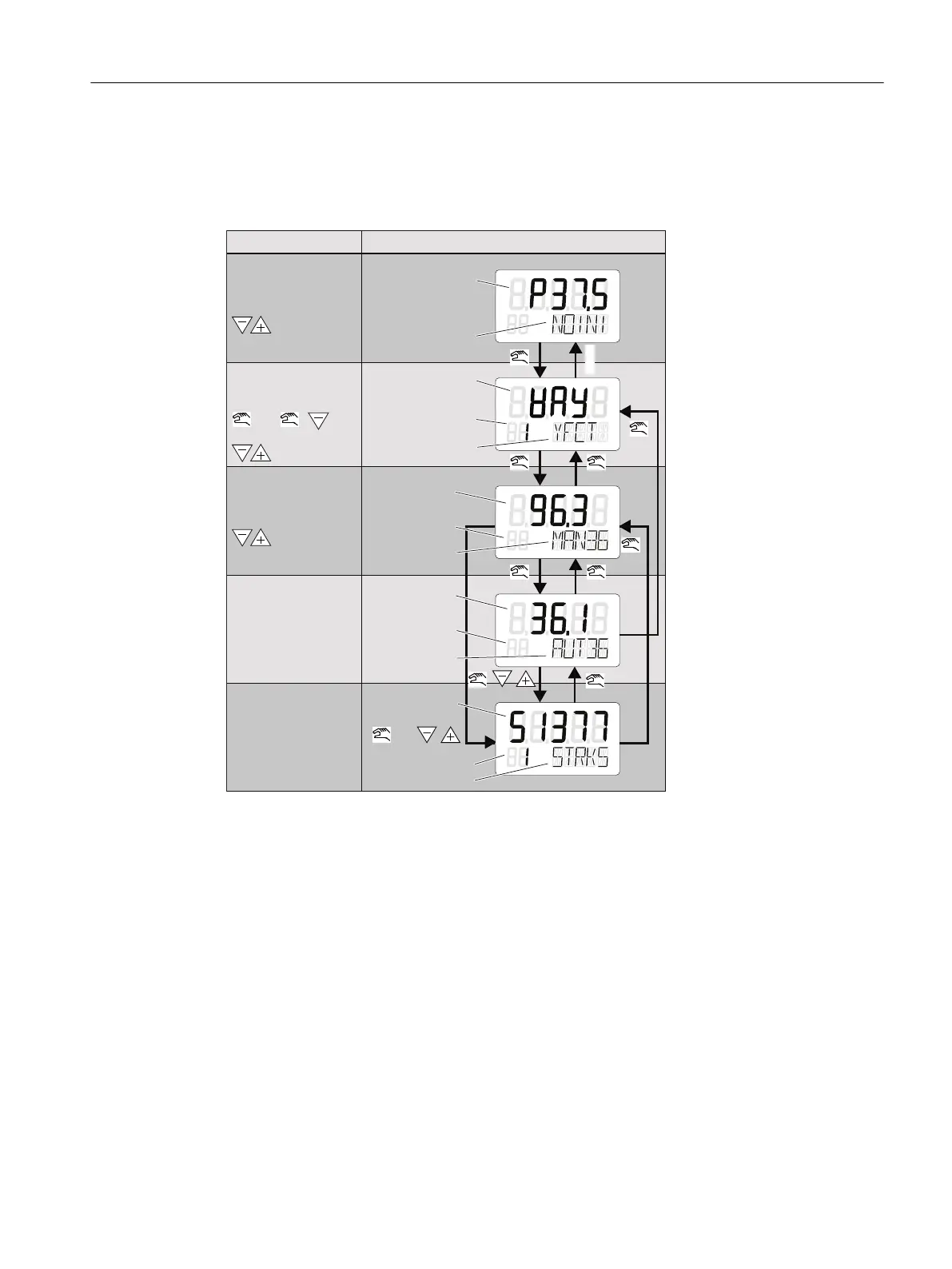
The following picture illustrates the available operating modes and switching between the
operating modes.
+ +
+ +
> 5 s
> 5 s
> 5 s
> 5 s
> 2 s
> 2 s > 2 s
> 2 s
1 x 1 x
PRST
+
Operating mode
Display (1)
P manual mode
Change position using:
Change position using:
Configure
Change parameter
name using:
or
Change value using:
Position of
potentiometer
[%]
Not initialized
Parameter value
Parameter number
Parameter name
Manual mode
Automatic mode
Diagnostics
Position[%]
Error code
Mode and
setpoint [%]
Position [%]
Error code
Mode and
setpoint [%]
Diagnostics value
Diagnostics number
Diagnostics name
Figure 6-3 Switching between the operating modes
See also
Display (Page 97)
Operation
6.2 Operating modes
SIPART PS2 with PROFIBUS PA
Operating Instructions, 05/2019, A5E00127926-AC 101


 To Next Page
 Loading...