Scale parameters and functions
8.16 DR 16 simulation value
SIWAREX WP231
Manual, 07/2014, A5E31238908A-02
109
DR 16 simulation value
8.16.1
Specifying a weight value using data record DR 16 disables the measuring input of the
SIWAREX module and "simulates" a weight with the specified value. The SIWAREX module
must first be released for simulation mode in DR 3 and then switched to simulation mode
with command no. 3.
● Release simulation mode in DR 3
● Enter the weight to be simulated
● Transfer the data record to the SIWAREX module
● Start the simulation using command "Weight simulation on (3)"
● Stop the simulation using command "Weight simulation off (4)"
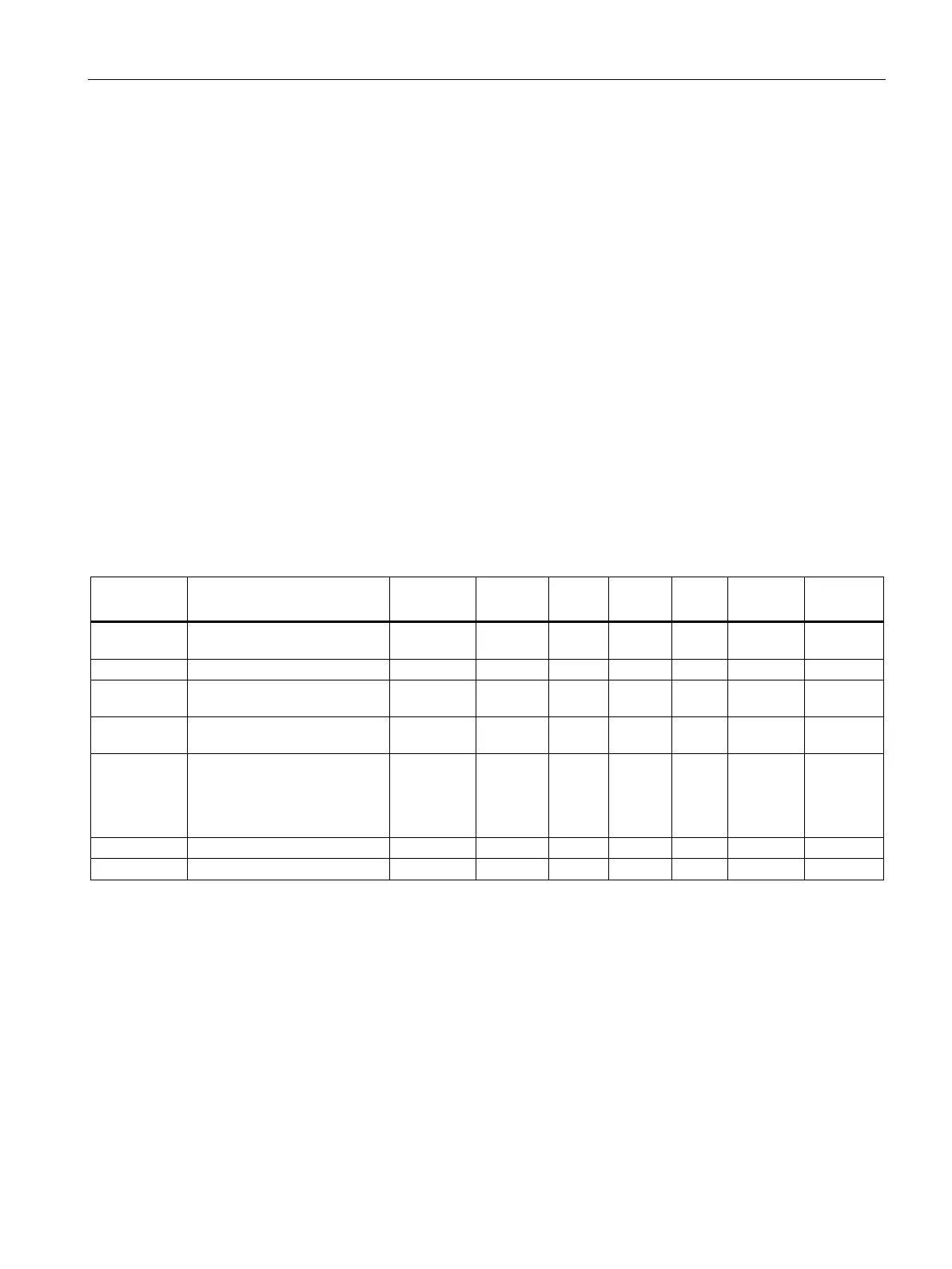
Table 8- 17 Assignment of data record 16
Data record
number
Contains no. of data record USHORT 2 r 16 - - 1592
Length Data record length information USHORT 2 r 16 - - 1593
Application Information about which applica-
tion the data record belongs to
USHORT 2 r 101 - - 1594
Version identi-
fier
Information about current data
record version
USHORT 2 r 1 1 65635 1595
Weight simula-
tion specifica-
tion
(Page 110)
Weight value specification (only
relevant if simulation mode is
enabled)
FLOAT 4 rw 0 maxi-
mum
weigh-
ing
range
maximum
weighing
range
1596
Reserve 1 Reserve SHORT 2 rw 0 0 - 1598
Reserve 2 Reserve USHORT 2 rw 0 0 - 1599
Weight simulation specification
Only use weight simulation values which are within the measuring range of the scales. The
word "TEST" is displayed on the main display during simulation and a status bit is set. From
the start of simulation onward, all parameterized limits, inputs and outputs etc. refer to the
simulation weight.


 To Next Page