Commissioning
7.6 5 minute quick setup with SIWATOOL
SIWAREX WP231
52 Manual, 07/2014, A5E31238908A-02
5 minute quick setup with SIWATOOL
General information on using the SIWATOOL program can be found in chapter "Service with
the SIWATOOL program (Page 55)".
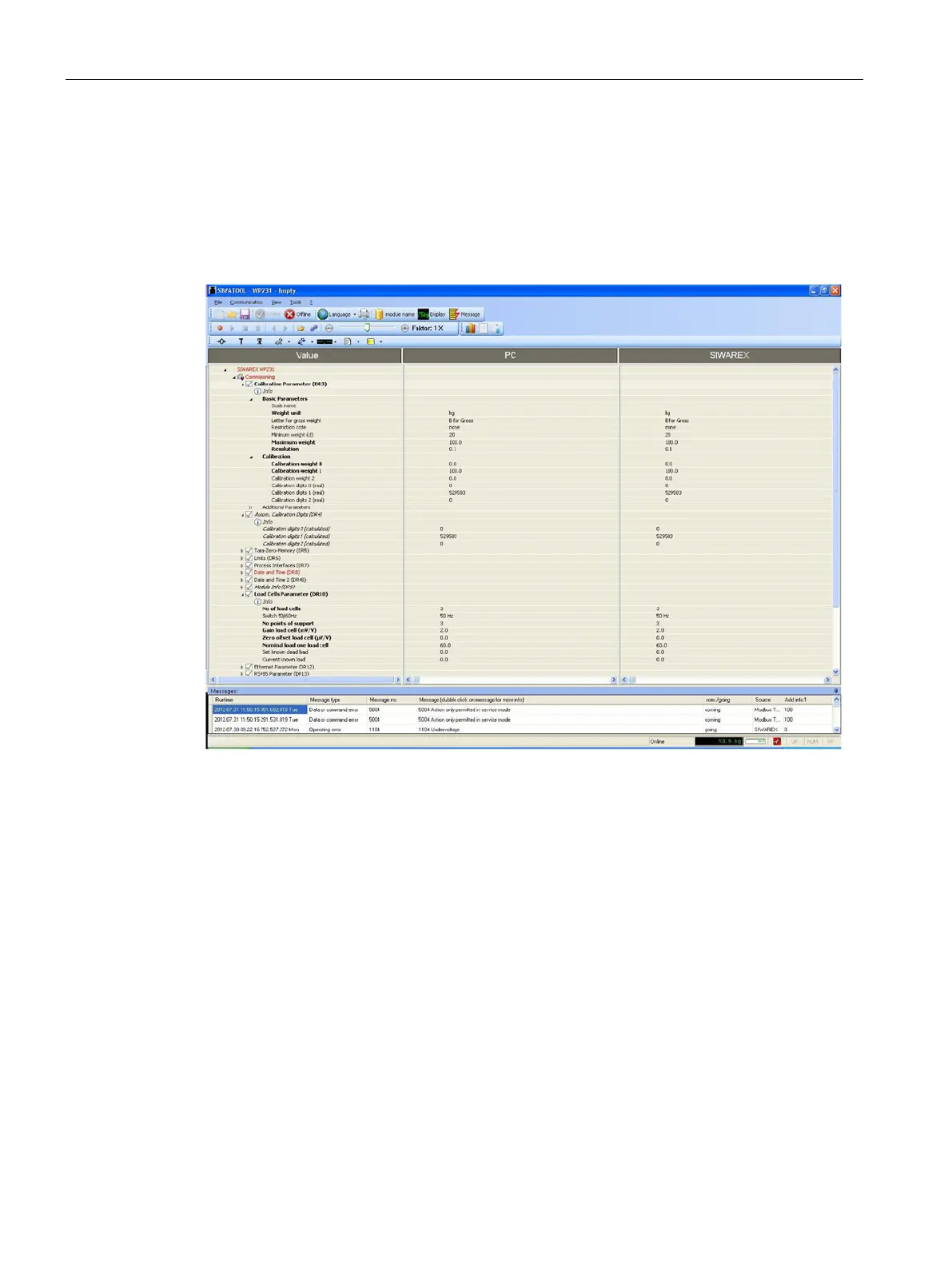
For the quick setup, the required parameters are marked in bold font in data records DR 3
and DR 10. The procedure is described below.
Figure 7-8 Quick setup with marked parameters
Service mode must be activated in order to change the calibration parameters. You can find
the command in the "Service Commands" group (spanner icon).
The quick setup is based on the standard settings of the weighing module. Therefore, the
standard parameter settings must be reset prior to the quick setup. Firstly, service mode is
activated; the standard parameters are subsequently loaded using the "Load standard
parameters (12)" command.


 To Next Page