Connection
6.9 Connection of Siebert display via RS485
SIWAREX WP231
Manual, 07/2014, A5E31238908A-02
39
Connection of Siebert display via RS485
A Siebert display S102 with the order no. S102-W6/14/0R-000/0B-SM can be connected to
the RS485 interface of the weighing module. Connect a 24 V DC supply to the Siebert
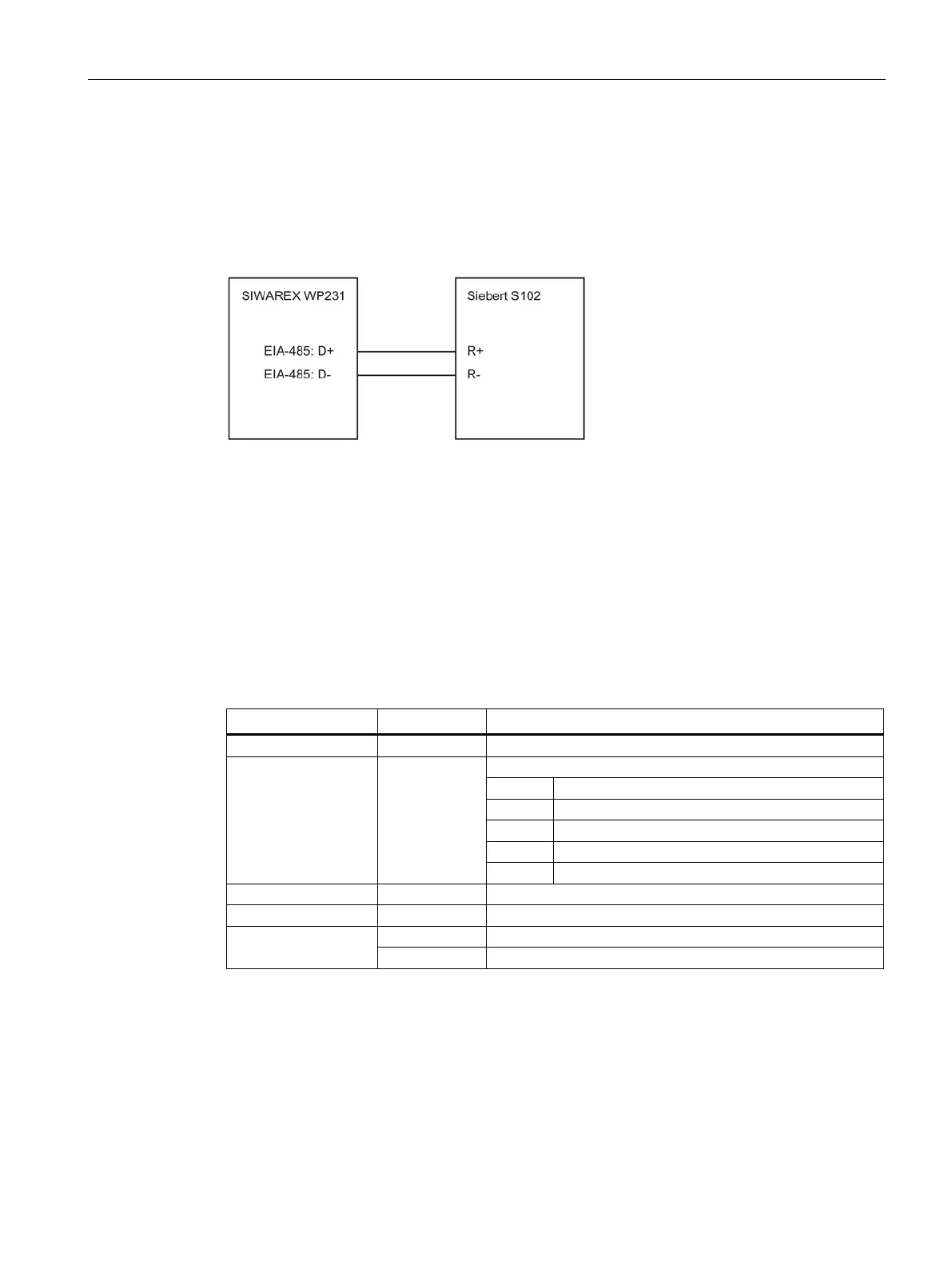
display, and connect the latter to the RS485 interface of the weighing module as shown in
the following diagram.
Figure 6-6 Connection of Siebert display S102
The RS485 interface in the DR13 of the SIWAREX WP231 is set as follows:
● Baud rate: 9 600 bit/s
● Character parity: Even
● Number of data bits: 8
● Number of stop bits: 1
The S102 is set as follows:
Table 6- 7 Settings of Siebert display S102
1 Interface
RS485 interface
9 Station address
01
Address meaning:
01 Verifiable weight
02 Total
03 Net
04 Tare
t Timeout
e.g. timeout after 2 seconds
C
No decimal point
F Segment test
No segment test when switching on
Segment test when switching on


 To Next Page