Command lists
10.2 Command lists
SIWAREX WP231
140 Manual, 07/2014, A5E31238908A-02
The commands for the electronic weighing system described here can be transmitted by
several interfaces:
● by the Operator Panel via the controller to the SIWAREX module
● by the Operator Panel directly to the SIWAREX module
● by SIWATOOL directly to the SIWAREX module
● by the digital inputs after corresponding assignment in data record DR 7
A data or command error is signaled if a command cannot be executed or if the sent data
record is rejected.
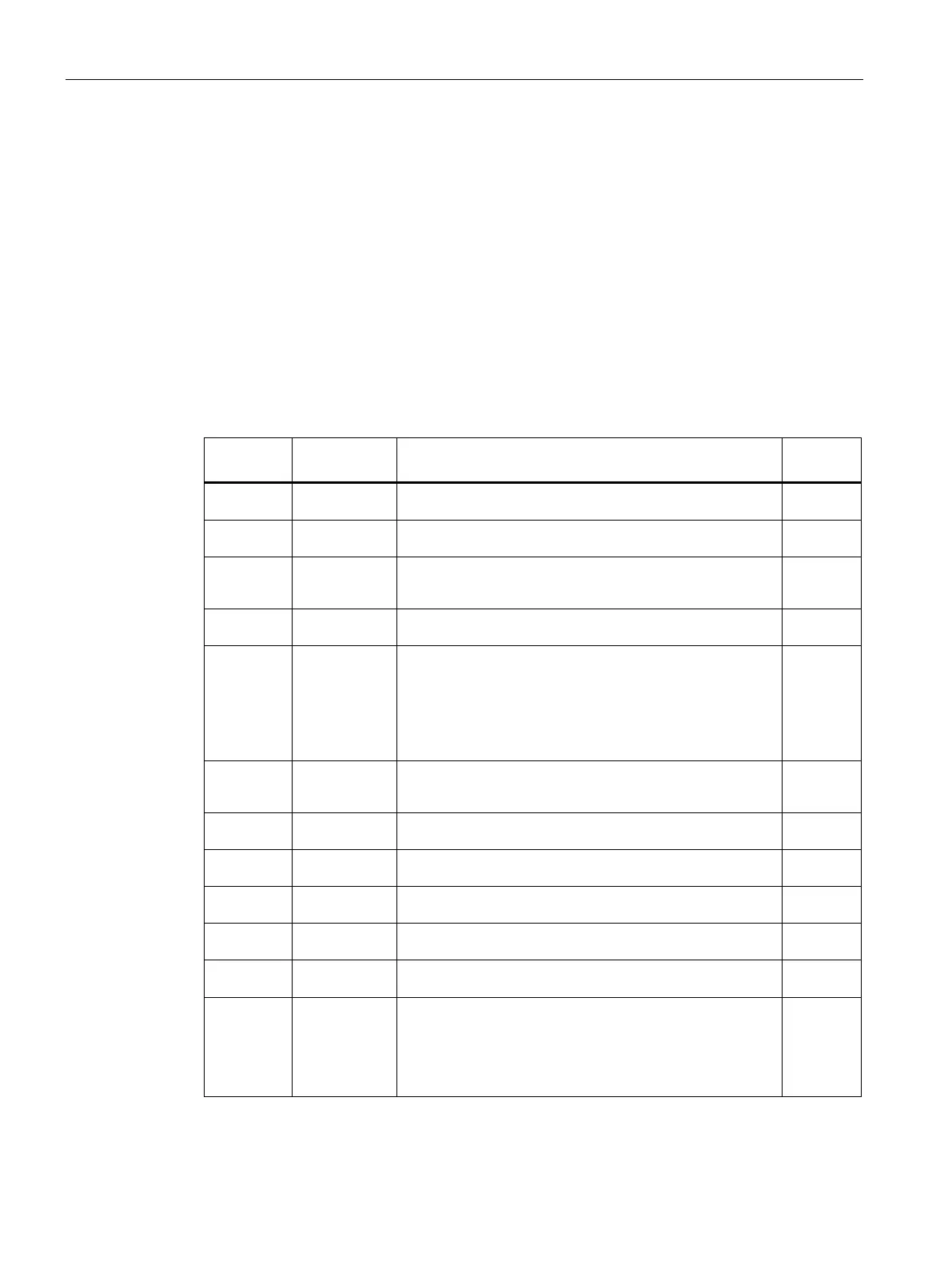
Table 10- 1 Commands 1 ... 99: Service commands
1 Service mode
On
Turn on service mode
2 Service mode
Off
Turn off service mode
3 Test mode On
(simulation)
Turn on test mode. The simulation value from data record 16 is
used instead of the measured value for calculation of the process
values.
4 Test mode Off
(simulation)
Switch off test mode.
11 Load factory
setting
The command resets the SIWAREX to the "ex works" status.
During this process:
- all parameters and saved data (including protocol memory and
logbook) as well as the restore point are loaded with the default
values
- all message buffers (diagnostics buffer, trace memory, etc.) are
reset
P
12 Load standard
parameters
Like "Load factory settings" (command code 11), but interface
settings for Ethernet and Modbus RTU are not reset to the factory
setting.
P
31 Load restore
point
All parameters saved in the restore point are activated. P
51 Create restore
point
Saves the parameters of the restore point to the memory. P
60 Calibration point
0 valid
Calibration point 0 valid / save values for calibration point 0. P
61 Calibration point
1 valid
Calibration point 1 valid / save values for calibration point 1. P
62 Calibration point
2 valid
Calibration point 2 valid / save values for calibration point 2. P
81 Characteristic
shift
Move calibration characteristic. The command defines the current
weight of the scale as the new zero point (0 kg) and shifts the
complete characteristic without changing the gradient. The com-
mand can be used, for example, in order to compensate parts
used for mounting calibration weights on the scale at the end of
the calibration.
P


 To Next Page