Messages
9.5 Message list
SIWAREX WP231
136 Manual, 07/2014, A5E31238908A-02
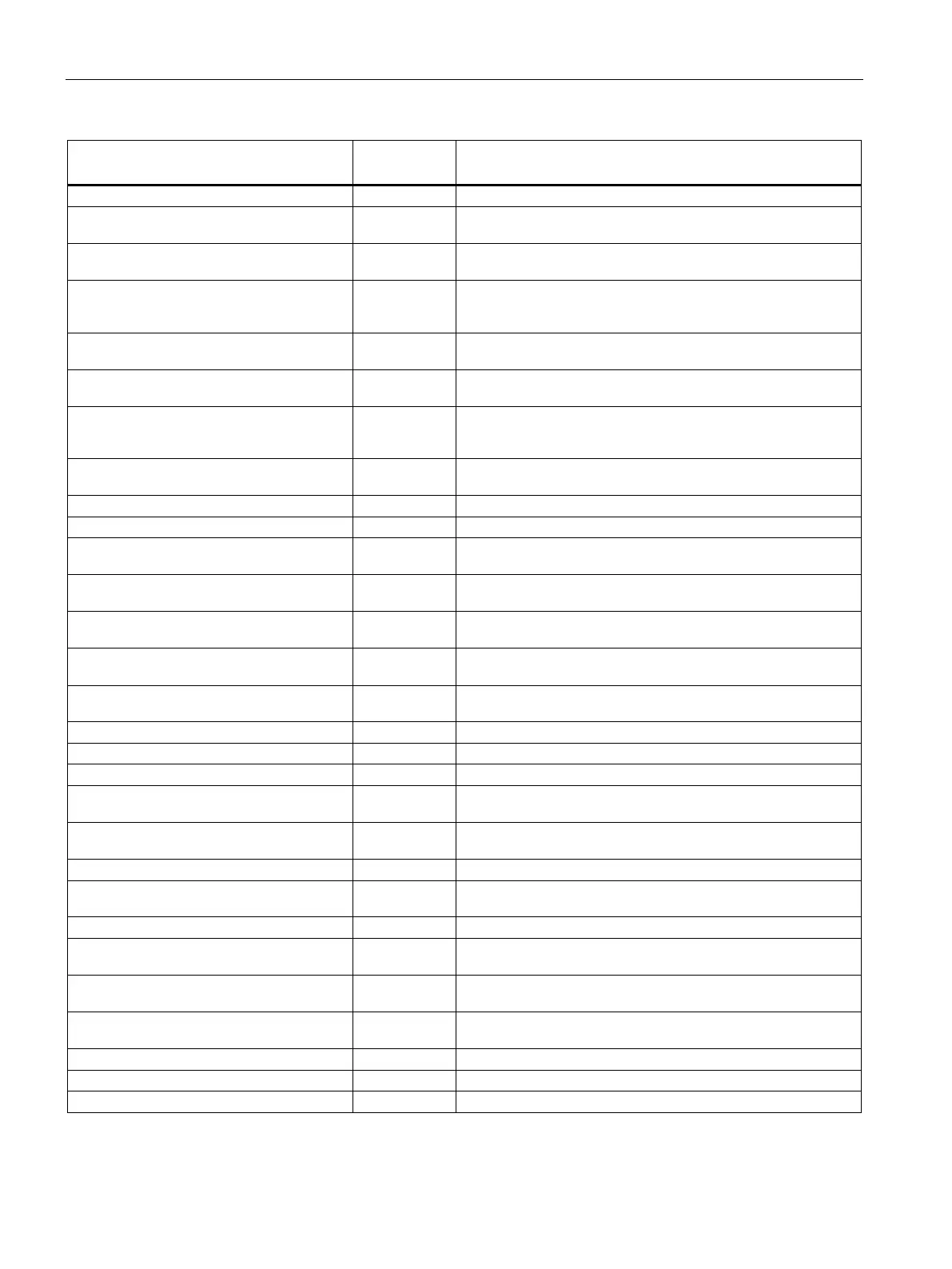
Data and operating errors
(code 5000 to 8999)
5003 Cannot exit service mode 5003 Cannot exit calibration mode; calibration incomplete
5004 Command or data transmission only
available in service mode
5004 Activation of service mode is required to execute command or trans-
mit data
5006 Command or data transmission not possi-
ble because of BUSY
5006 Command can currently not be executed because module is BUSY
(data record or command transmission already active, …)
5007 Command or data transmission not possi-
ble because module is faulty or SIMATIC CPU
stop
5007 Command can currently not be executed because of a problem or
SIMATIC CPU stop
5102 Command not possible because there is
no standstill
5102 Scale command (set to zero, tare, log, … ) cannot be executed be-
cause standstill is missing.
5103 Command not possible because legal
trade display is missing
5103 Command not possible because legal trade display is missing or not
visible.
5104 Command not possible because range is
exceeded
5104 Command (e.g. set to zero, tare, calibrate command) cannot be
executed because the permitted range has been exceeded. The
ranges are defined in DR 3.
5105 Load cell parameters not plausible 5105 Load cell parameters in data record DR 10 are not plausible (number,
support points, load specifications, etc.).
5107 Characteristic cannot be moved 5107 Characteristic cannot be moved due to possibility of range violation.
5108 ID does not exist 5108 Requested logbook ID not present in memory.
5199 Error in command to DI 5199 Processing of a command triggered at the DIs is not possible. The
cause can be determined in data record DR 32.
6002 Logging not possible because weight is
too small
6002 Logging is not possible because the limits for the minimum weight or
maximum weight were not observed.
7000 Permitted number range violated 7000 The permitted number range, such as for weight values, was violat-
ed.
7001 Regulation code not known 7001 Regulation code for application requiring official calibration not
known.
7002 Specifications of string lengths not plausi-
ble
7002 The string header in a specified string variable is not plausible.
7003 Specification of date / time not plausible 7003 Specifications for date and time are not plausible.
7004 Assignment of DIs/DOs incorrect 7004 An error occurred while assigning the digital inputs or digital outputs.
7006 Reserved 7006 Reserved
7007 The calibration weights or calibration digits
are not plausible
7007 Specifications for calibration weights or digits in data record DR 3 are
incorrect (minimum distance, reversal of incline).
7008 Set to zero or tare parameter not plausible 7008 The specifications for set to zero (data record DR 3) or tare specifica-
tions (data record DR 15) are not plausible.
7009 Standstill range / standstill wait time 7009 Standstill range or standstill wait time are not plausible.
7010 Scale interval / rounding 7010 Scale interval or selection for rounding to decimal places is not plau-
sible.
7011 Filter parameters 7011 Specification of filter parameters is not plausible.
7013 Interface assignment for calibratable HMI
not plausible
7013 The assignment of the interface to the calibratable HMI is incorrect.
7014 Specified time not plausible 7014 Specified time value is not plausible or may be signaled in connection
with additional errors
7016 Parameter assignment of analog output
not plausible
7016 The parameters for the analog output (data record DR 7) are not
plausible.
7017 MAC address cannot be changed 7017
7018 Error in IP mask 7018 The specified IP addresses (DR12) are not plausible.
7019 RS485 parameter error 7019 The specified RS485 interface parameters (DR13) are not plausible.


 To Next Page