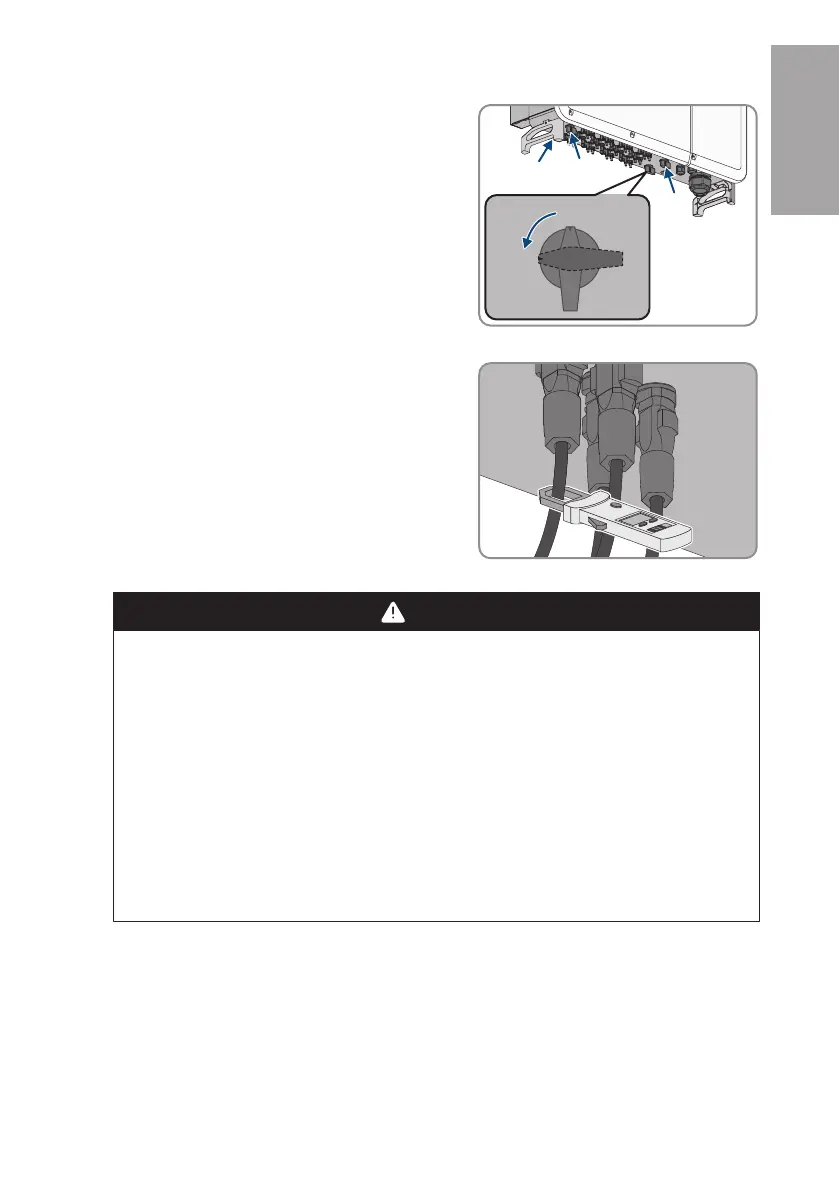
5 Disconnecting the Inverter from Voltage Sources
SMA Solar Technology AG
Replacement Manual STPxxx-60-DC-SPD-RM-xx-11 13
2. Switch off all four DC load-break switches of the
inverter and secure against reconnection.
3. Wait until the LEDs have gone out.
4. Use a current clamp to ensure that no current is
present in the DC cables.
5. Note the position of the DC connector.
6.
DANGER
Danger to life due to electric shock when touching exposed DC
conductors or DC plug contacts if the DC connectors are damaged or
loose
The DC connectors can break or become damaged, become free of the DC cables, or no
longer be connected correctly if the DC connectors are released and disconnected
incorrectly. This can result in the DC conductors or DC plug contacts being exposed.
Touching live DC conductors or DC plug connectors will result in death or serious injury due
to electric shock.
• Wear insulated gloves and use insulated tools when working on the DC connectors.
• Ensure that the DC connectors are in perfect condition and that none of the DC
conductors or DC plug contacts are exposed.
• Carefully release and remove the DC connectors as described in the following.
ENGLISH






 To Next Page