6 Removing the Left Enclosure Lid
SMA Solar Technology AG
Replacement Manual STPxxx-60-DC-SPD-RM-xx-11 15
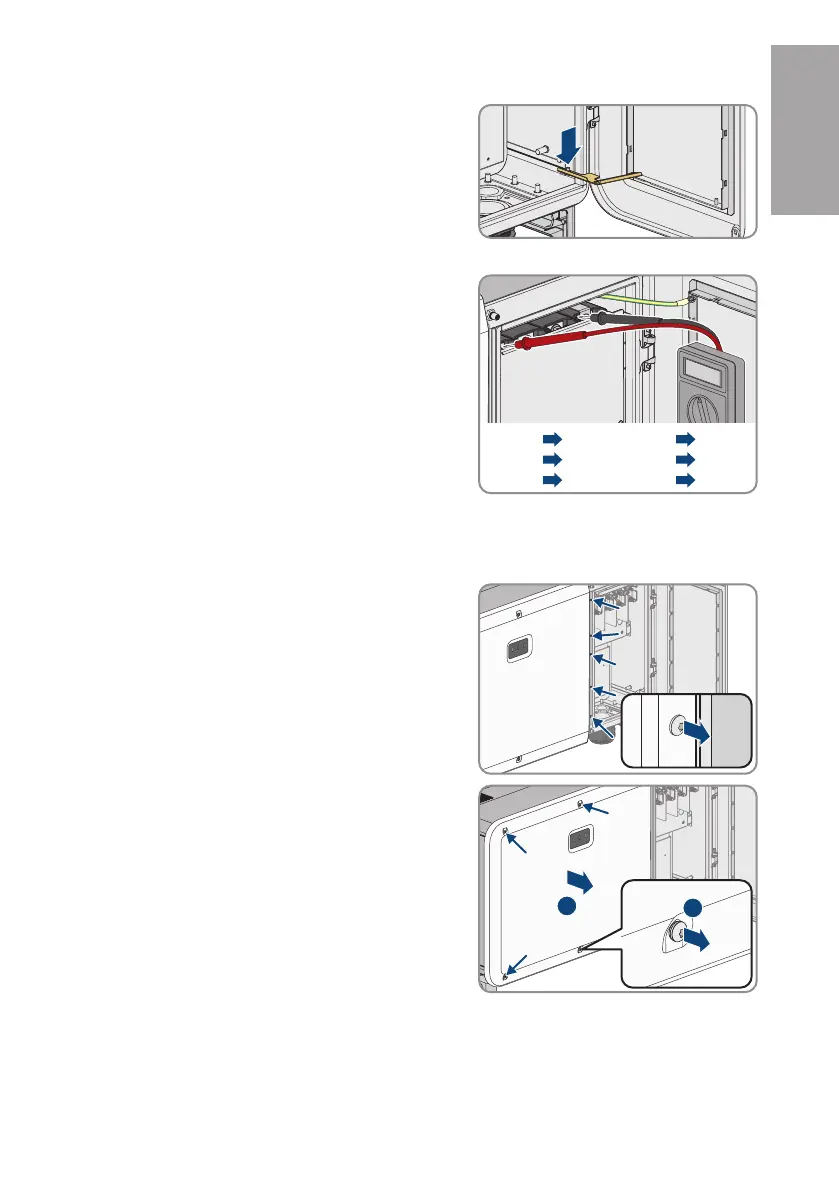
13. Engage the end of the limiting lever in the cable
compartment with the thread.
☑ The cable compartment cover has been secured and remains open.
14. Verify a de-energized state of the AC connection
between L1 and L2, L2 and L3, L1 and L3 und L1
and grounding conductor, L2 and grounding
conductor and L3 and grounding conductor using a
suitable measuring device. For this purpose, hold the
test probe to the conductors' ring terminal lugs.
L1 PE
L2 PE
L3 PE
L1 L2
L2 L3
L1 L3
6 Removing the Left Enclosure Lid
1. Disconnect the inverter from all voltage sources (see Section5, page12).
2. Remove the 5 screws between the cover of the
cable compartment and the left enclosure lid (TX30).
3. Remove the 4 remaining screws of the left enclosure
lid (TX30) and take it off.
ENGLISH






 To Next Page