5 Disconnecting the Inverter from Voltage Sources
SMA Solar Technology AG
Replacement ManualSTPxxx-60-DC-SPD-RM-xx-1114
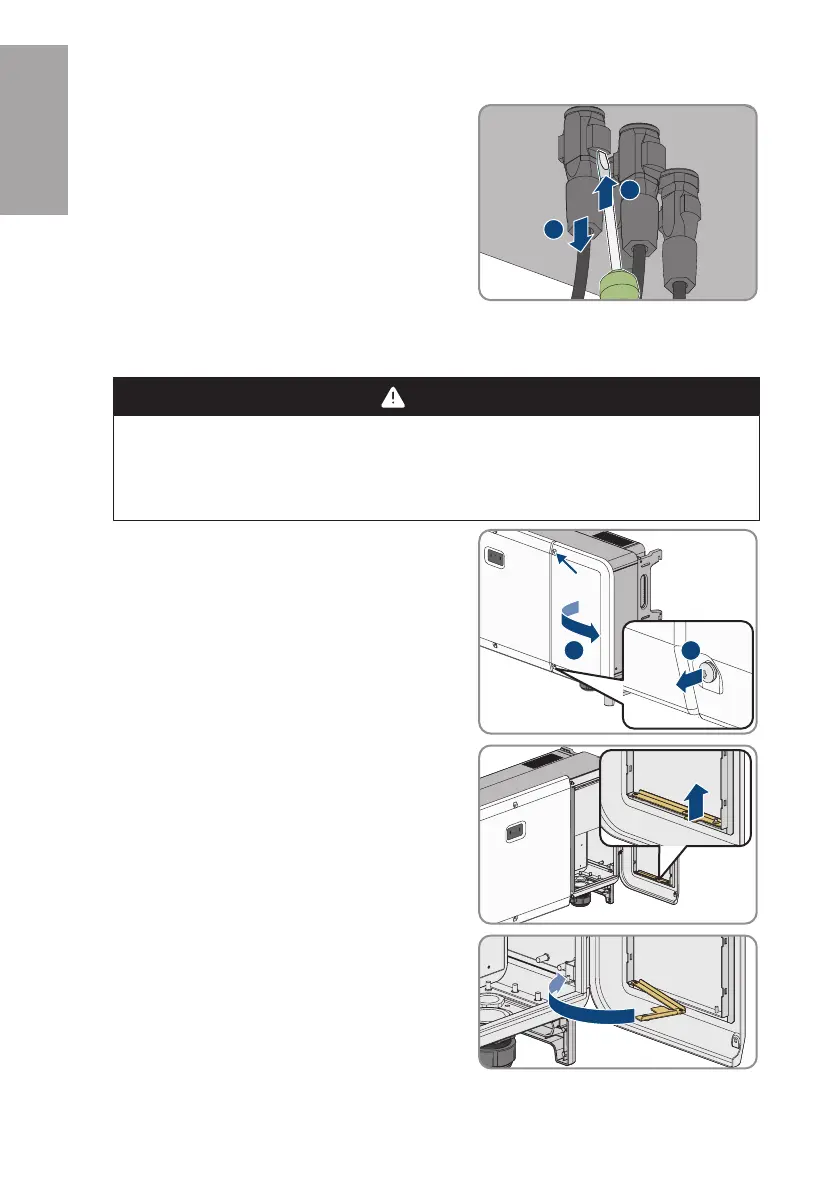
7. Release and remove the DC connectors. To do so,
insert a flat-blade screwdriver or an angled
screwdriver (blade width: 3.5mm) into one of the
side slots and pull the DC connectors out. When
doing so, do not lever the DC connectors out, but
insert the tool into one of the side slots only to
release the locking mechanism, and do not pull on
the cable.
8. Ensure that the DC connectors on the product and those that are equipped with DC
conductors are in perfect condition and that none of the DC conductors or DC plug contacts
are exposed.
9.
DANGER
Danger to life due to high voltages
Once disconnected from voltage sources, residual voltages can remain in the product that
should be allowed to discharge completely.
• Wait 5 minutes beforeopening the inverter.
10. Loosen the 2 screws on the cable compartment
cover using the enclosed internal Allen key (TX30)
and open the cable compartment.
11. Lift the limiting lever on the inside of the cover on the
right and remove from the thread.
12. Fold the limiting lever on the joint and turn it towards
the cable compartment.
ENGLISH






 To Next Page