5-22
4. Flange Back Check
Subject Siemens star
(2.0 m from the front of the lens)
(Luminance : approx. 200 lux)
Measurement Point Check operation on TV monitor
Measuring Instrument
Specified Value Focused at the TELE end and WIDE end.
Switch setting:
1) NIGHT SHOT ..................................................................OFF
2) VIDEO LIGHT ................................................................OFF
Checking method:
1) Place the Siemens star 2.0m from the front of the lens.
2) To open the IRIS, decrease the luminous intensity to the
Siemens star up to a point before noise appear on the image.
3) Select page: 6, address: 40, and set data: 02.
4) Select page: 6, address: 41, and set data: 01.
5) Shoot the Siemens star with the zoom TELE end.
6) Turn on the auto focus.
7) Check that the lens is focused (Note).
8) Select page: 6, address: 21, and set data: 10.
9) Shoot the Siemens star with the zoom WIDE end.
10) Observe the TV monitor and check that the lens is focused.
Note: When the auto focus is ON, the lens can be checked if it is focused
or not by observing the data on the page 1 of the adjustment remote
commander.
1) Select page: 0, address: 03, and set data: 0F.
2) Page 1 shows the state of the focus.
1 : 00 : XX
Odd: Focused
Even: Unfocused
Processing after Completing Adjustments
1) Select page: 6, address: 21, and set data: 00.
2) Select page: 6, address: 40, and set data: 00.
3) Select page: 6, address: 41, and set data: 00.
4) Select page: 0, address: 03, and set data: 00.
5. Picture Frame Setting
Subject Color bar chart
(Color reproduction adjustment frame)
(1.5m from the front of the lens)
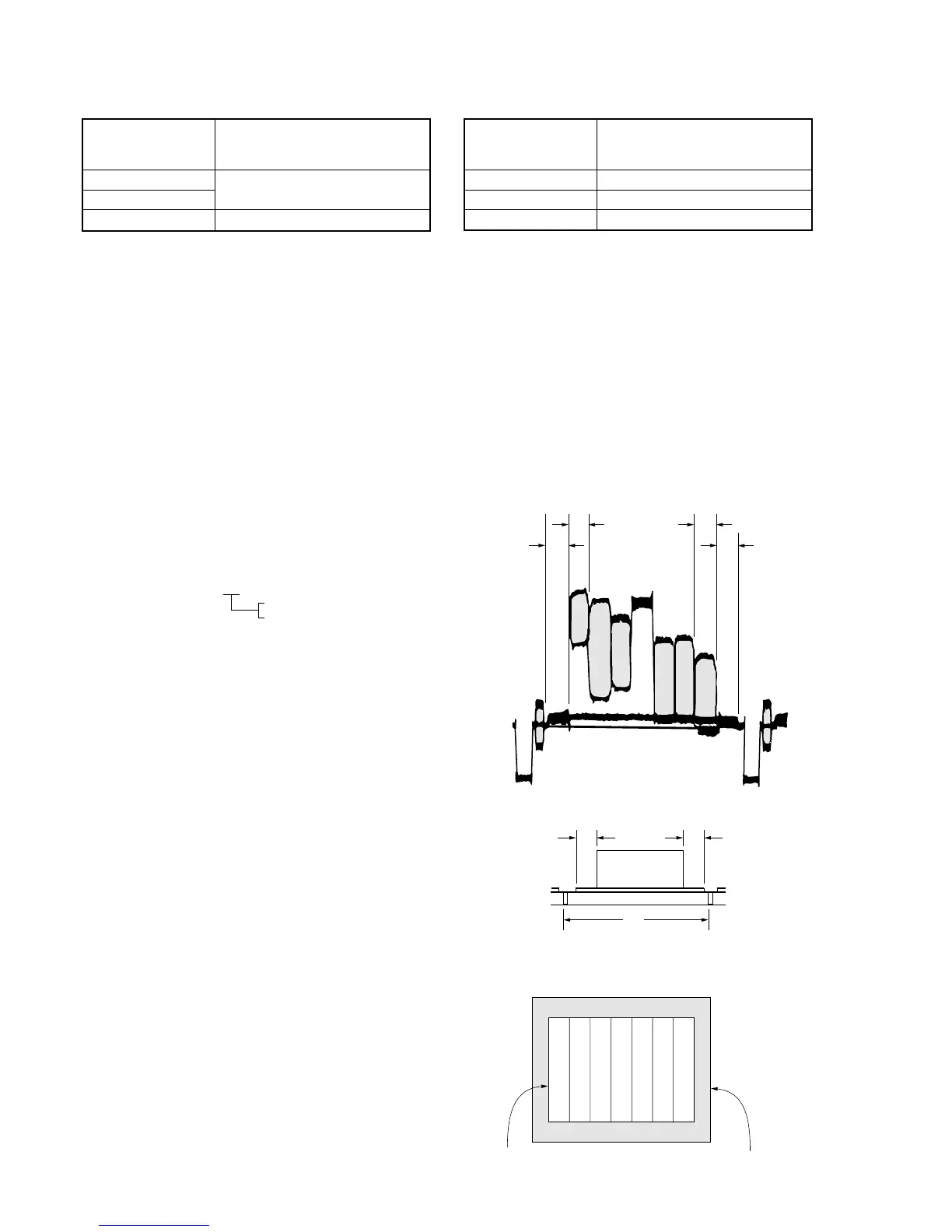
Measurement Point Video output terminal
Measuring Instrument Oscilloscope and TV monitor
Specified Value A=B, C=D, E=F
Switch setting:
1) NIGHT SHOT ..................................................................OFF
2) DIGITAL ZOOM (Menu display) ...................................OFF
3) STEADY SHOT (Menu display) .....................................OFF
4) VIDEO LIGHT ................................................................OFF
Setting method:
1) Adjust the zoom and the camera direction, and set to the
specified position.
2) Mark the position of the picture frame on the monitor display,
and adjust the picture frame to this position in following
adjustments using “Color reproduction adjustment frame”.
A=B
C=D
A
BC
D








 To Next Page