5-51
3. IR Audio Deviation Adjustment (VC-234 board)
Mode VTR recording
Signal Audio signal :
400Hz, –7.5dBs : L or R of AUDIO
terminal
Video signal :
No signal : VIDEO terminal
Measurement Point AUDIO L terminal and AUDIO R
terminal of IR receiver jig
(Terminated at 47kΩ)
Measuring Instrument Audio level meter
Adjustment Page F
Adjustment Address 7F
Specified Value Signal level: –7.5 ± 2.0 dBs
Level difference of L and R: Below 2dB
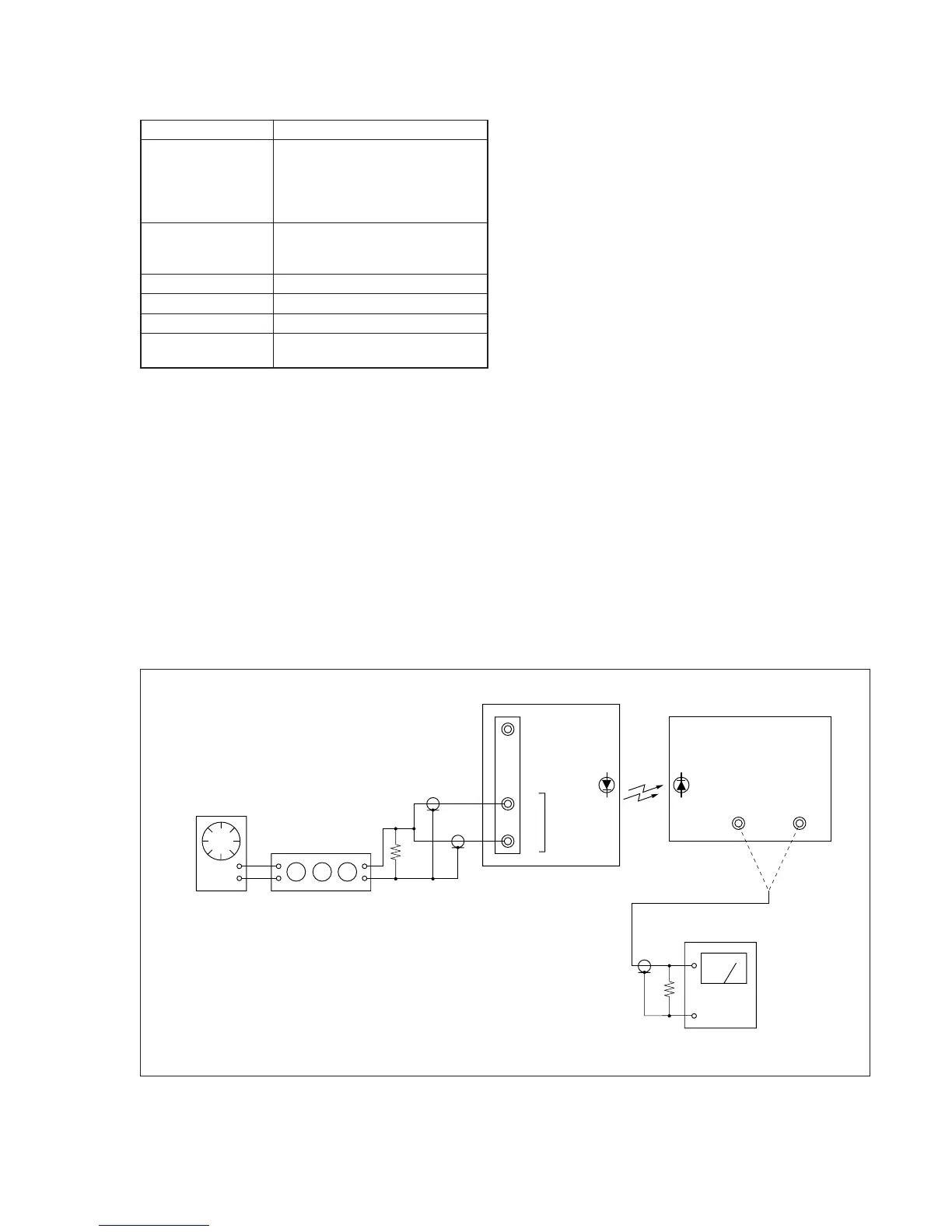
Connection of Equipment
Connect the measuring device as shown in the following figure,
and adjust.
Adjusting method:
1) Select page: 0, address: 01, and set data: 01.
2) Connect the audio level meter to the AUDIO L terminal of the
IR receiver jig.
3) Select page: F, address: 7F, change the data and set the 400Hz
audio signal level to the specified value.
4) Press the PAUSE button of the adjustment remote commander.
5) Connect the audio level meter to the AUDIO R terminal of the
IR receiver jig.
6) Check that the 400Hz audio signal level is within the specified
value. If outside, repeat from step 2).
7) Select page: 0, address: 01, and set data: 00.
600
Ω
Video
L
R
Audio
AUDIO OUT
L
47k
Ω
47k
Ω
(1-249-437-11)
600
Ω
(270
Ω
(1-249-410-11) + 330
Ω
(1-249-411-11))
Audio oscillator
Main unit
Attenuator
Audio level meter
R
IR receiver jig
Fig. 5-3-17.








 To Next Page