1-24
DNW-A75/A75P
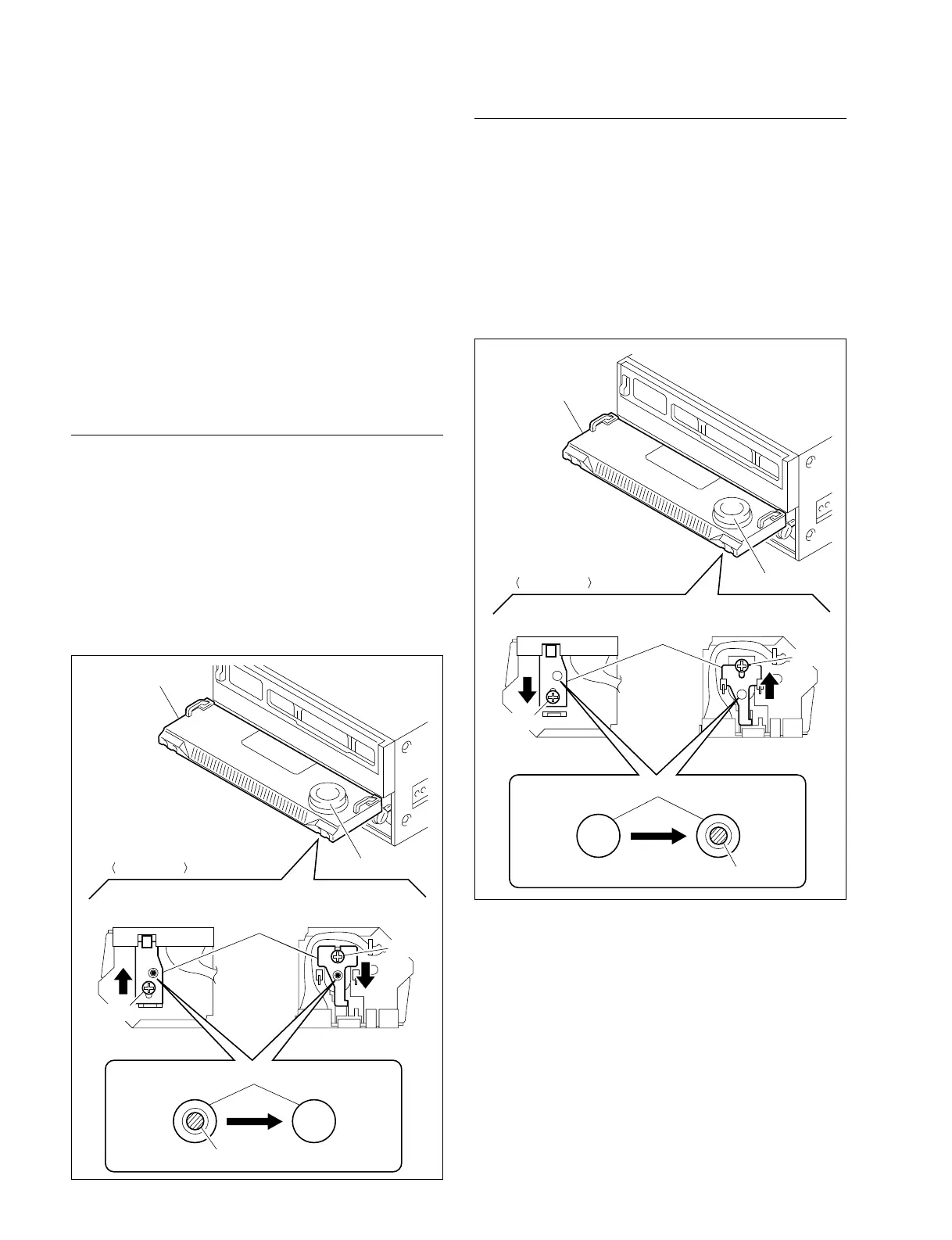
Allowing Search Dial Pressing
1. Open the lower control panel (Operation side up).
2. Loosen a screw on the backside of the search dial as
shown in the figure.
3. Slide the mode selection plate in the direction indicat-
ed by the arrow as far as it will go.
4. Check to see that the shaft of the search dial is seen in
the round hole of the mode selection plate, and then
tighten the screw.
1-11. Switching Search Dial Mode
1-11. Switching Search Dial Mode
There are two kinds of operation to switch the search dial
on the lower control panel between jog mode and shuttle
mode.
. SHUTTLE/JOG button selecting
To enter the shuttle mode, press the SHUTTLE button.
To enter the jog mode, press the JOG button.
. Search dial pressing
When you press the dial, this unit toggles between
shuttle and jog modes.
It is possible to prohibit a manner of toggling.
Prohibiting Search Dial Pressing
1. Open the lower control panel (as shown in the figure.)
2. Loosen a screw on the backside of the search dial as
shown in the figure.
3. Slide the mode selection plate in the direction indicat-
ed by the arrow as far as it will go.
4. Check to see that the shaft of the search dial is not seen
in the round hole of the mode selection plate, and then
tighten the screw.
Lower control panel
Search dial
Front (Lower)
Screw
Screw
Back (Upper) Back (Upper)
Mode selection
plate
Front (Lower)
Round hole
Prohibition
state
Search dial shaft
Allow state
• Old type • New type
Back View
Lower control panel
Search dial
Front (Lower)
Screw
Screw
Back (Upper) Back (Upper)
Mode selection
plate
Front (Lower)
Round hole
Prohibition
state
Search dial shaft
Allow state
• Old type • New type
Back View



 To Next Page