2-28
DNW-A75/A75P
2-16. Battery for Memory Backup
The unit is equipped with a battery for the memory (IC710) backup on the SS-83 board. When replacing,
be sure to use the specified part.
Replacement part: BT710/SS-83 board
Part description: M4T28-BR12SH1 (lithium battery)
Part No.: 1-767-156-11
Recommended replacement period: Every seven years
In the memory, the following data is stored. When the battery is dead, or replaced with a new one,
resetting current menu, menu banks 1 to 4, and calender/clock is required. For details on how to reset the
current menu and menu banks, refer to the operation manual supplied with the unit.
When the battery is dead or replaced, error logs are all cleared.
. Current menu
. Menu banks 1 to 4
. Calender/Clock
. ID-code data
Replacement
n
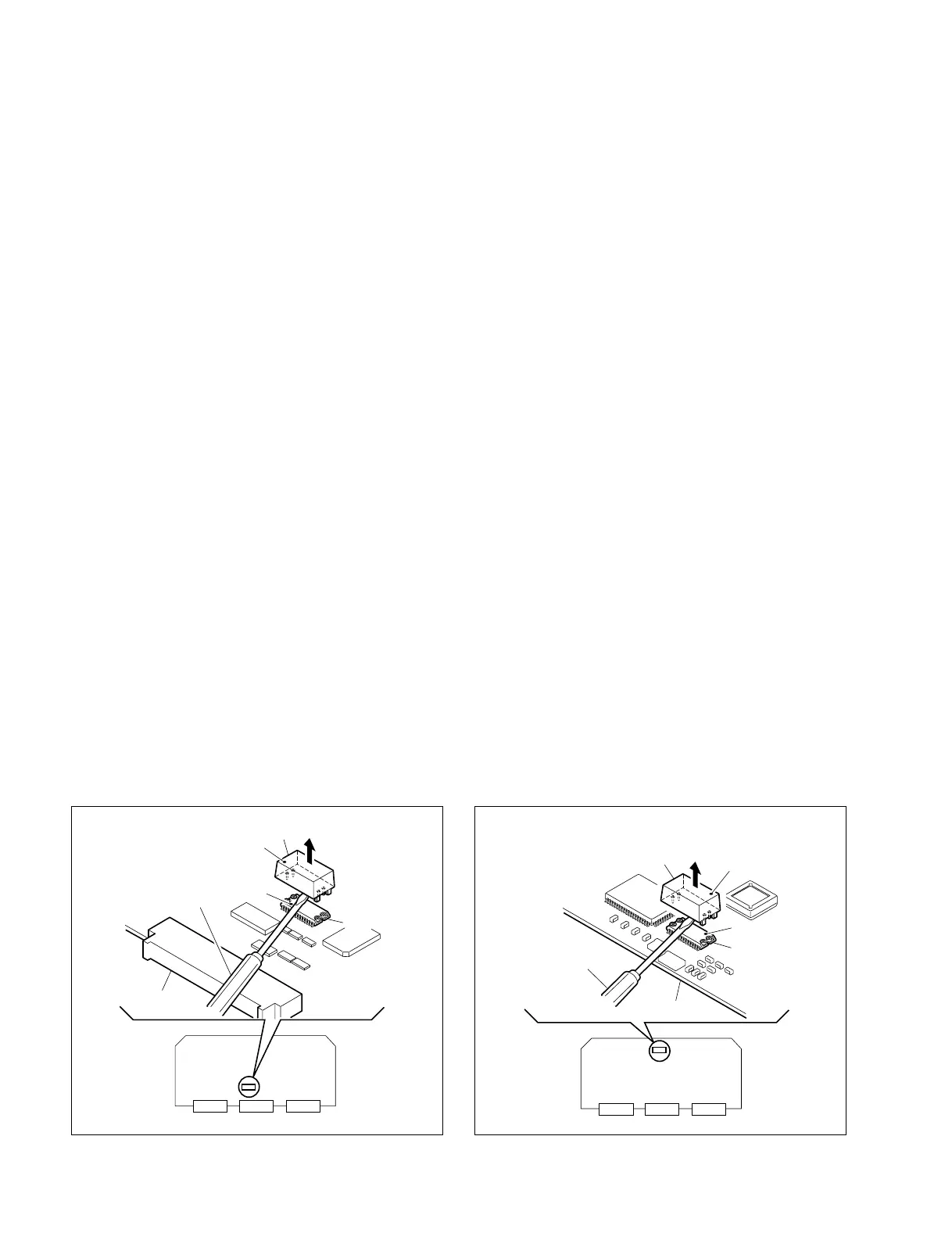
When replacing the battery, ensure that a mark on the battery is correctly oriented as shown in the
following figure.
1. Remove the SS-83 board. (Refer to Section 2-13.)
2. Insert a flat blade driver between BT710 and IC710 to remove the battery.
3. Carefully install a new battery, ensuring that the mark’s on the BT710 and IC710 are aligned.
4. Reset the current menu and menu banks. (Refer to the operation manual.)
5. For the ID-code data-using unit:
Set the ID-code data. (Refer to the operation manual, the setup menu ITEM-603.)
6. Reset the calender/clock. (Refer to Section “4-3-3. Setting Mode”.)
Board No. suffix -13 and higher Board No. suffix -11, -12
2-16. Battery for Memory Backup
H
6
SS-83 board
Driver
IC710
Mark
Mark
BT710
G
2
SS-83 board
Mark
Driver
BT710
IC710
Mark



 To Next Page