2-29
DNW-A75/A75P
2-17. Setup Menu (F-Series)
POWER
PHONES CH-1 CH-2
REC VIDEO INPUT SELECT AUDIO SELECT
CH-3 CH-4 VIDEO
DISPLAY
ASSEMBLE
FULL/FINE
ON
0•
-10•
-20•
dB
-30•
-40•
-60•
OFF
0•
-10•
-20•
dB
-30•
-40•
-60•
0•
-10•
-20•
dB
-30•
-40•
-60•
0•
-10•
-20•
dB
-30•
-40•
-60•
2•
0•
-2•
-4•
DIGITAL VIDEOCASSETTE RECODER DNW-A75
SDTI
(VIDEO & AUDIO)
CH-1
PULL FOR VARIABLE
PB
CH-2 CH-3 CH-4
SDI
COMPONENT
(Y-R,B)
INPUT
TC
VITC
LTC
AUTO
VITC
REMOTE
INT
EXT
PRESET
REGEN
DF
NDF
ON
FREE
RUN
REC
RUN
COMPOSITE
TC GENERATOR
VIDEO
VI TC UB INTRP
A IN DF LTC VITC 8F 4F 2F
A OUT TCG TOTAL REMAIN 525 625
EVENT
%
DOLBY
NR
CONFI ON
PB EE
MEMORY
PREVIEW AUTO EDIT
OUT
IN
STANDBY
PLAYER
RECORDER
VAR
FORWARD
JOGSHUTTLE
PREROLL
REC
EJECT REW PLAY F FWD STOP
REVERSE
PB MENU SET
HOLD
CTL/TC/UB
RESET
CH
CONDITION
CAPSTAN
LOCK
1 2 3 4
MONITOR
ANALOG / DIGITAL
FEED
CH-1 CH-2 CH-3 CH-4
TOTAL/REMAIN
MIXING
EXT
SDI
REC CH
AES/EBU
L
ANALOG
R
1(9P)
2(50P)
RS-232C
INSERT
TIME CODE
DELETE
REVIEW
DMC EDIT
IN
AUDIO
OUT
ENTRY
PREREAD
CONFI
SERVO
ALARM
MARK
LIST
GOOD SHOT
REC/
ERASE
EDIT
INHIBIT
KEYREC
BETACAM SX
SHUTTLE/
VAR JOG
TRIM
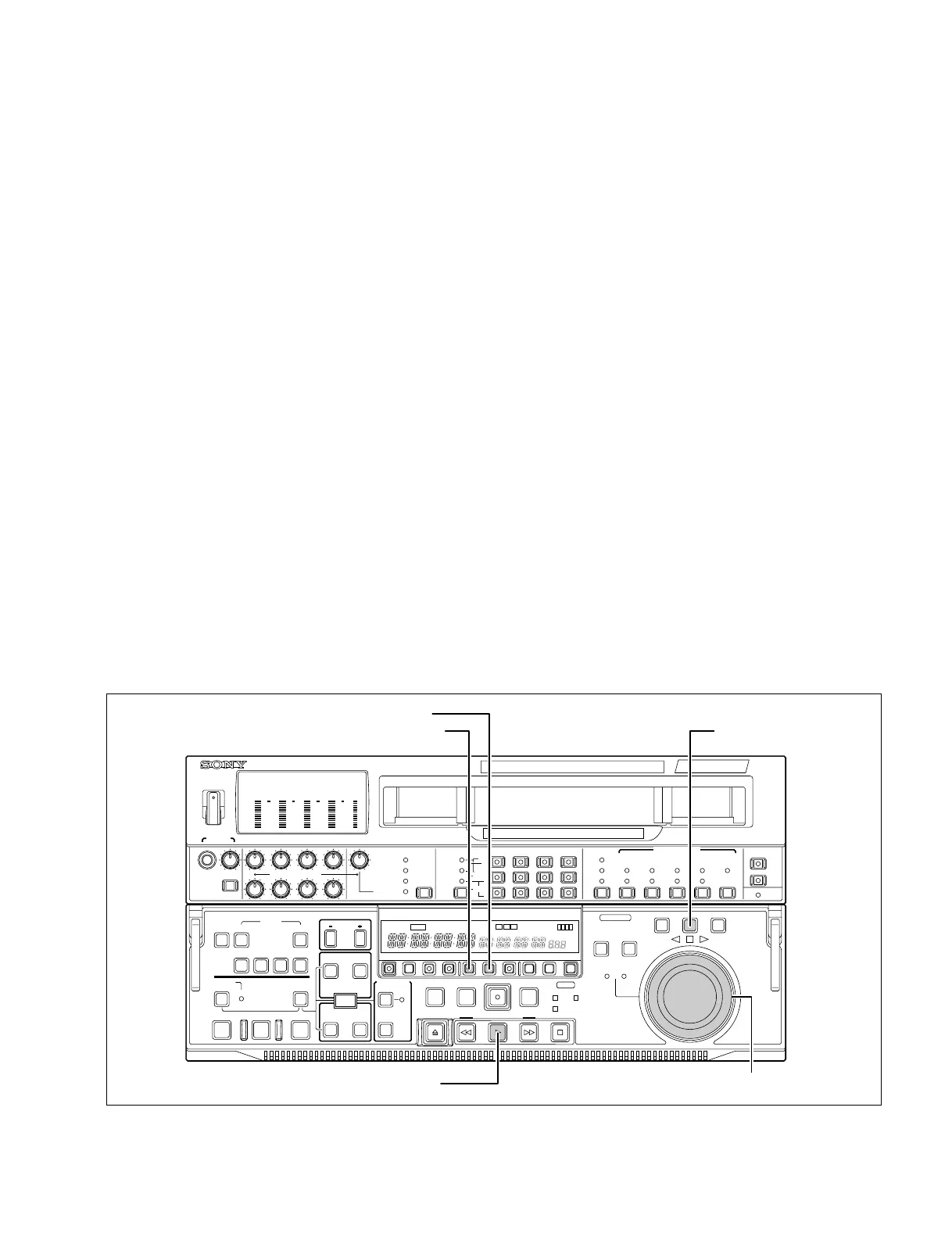
MENU button
SET button
JOG button
Search dial
PLAY button
2-17. Setup Menu (F-Series)
This section explains the F-series items on the setup menu, which are for use during adjustment or
maintenance.
For details on other-series items, refer to the operation manual supplied with the unit.
2-17-1. Menu Operation
Preparation
The menus for F-series items are usually not accessible. To display them, internal switch setting for the
SS-83 board is required. For details on the switch function, refer to Section 1-10.
. S1100-1/SS-83 board 8 ON (Displays the extended menu of the setup menu)
Activating the menu
1. Press the MENU button.
2. Press the JOG button to enter the JOG mode.
3. Turn the seach dial while pressing the PLAY button.
Basic operation
. To select ITEM
Turn the seach dial while pressing the PLAY button to display the desired ITEM in the time data
display area.
. To change DATA
Turn the seach dial while pressing the JOG button.
. To enter the setting value
Press the SET button.



 To Next Page