2-23
DNW-A75/A75P
7. When removing the AU-260, EQ-75, or SDI-41 board,
disconnect the harnesses or cables from the following
connectors on its board.
AU-260 board
CN100 (B-1).............................. 3P Red
CN200 (F-1) .............................. 3P Yellow
EQ-75 board
CN100 (B-7).............................. 6P White
CN500 (A-4) ............................. 4P White
CN600 (G-3) ............................. 4P Red
CN1500 (A-5) ........................... 4P Black
CN1600 (G-5) ........................... 4P Yellow
SDI-41 board
CN100 (C-1/A-1
*1
) ................... 1P Red
CN101 (A-1/B-1
*1
) ................... 1P Yellow
CN700 (E-1/F-1
*1
) .................... 1P Green/Orange
*2
CN701 (D-1/E-1
*1
) ................... 1P Orange/Green
*2
CN800 (F-1/G-1
*1
).................... 1P Blue
*1: At the suffix -11
*2: At the suffix -11 or -13
When removing the DPR-118 board with BKNW-118
(DPR-119 board), disconnect the two cables from the
following connectors on the DPR-119 board.
DPR-119 board
CN1 ........................................... 1P Orange
CN3 ........................................... 1P Green
When removing the DPR-150 board of BKNW-124,
disconnect the two cables from the following connec-
tors on the DPR-150 board or the piggybacked DIF-
109 board onto the DPR-150 board.
DPR-150 board (DIF-109 board)
CN200 ....................................... 1P Orange
CN201 ....................................... 1P Green
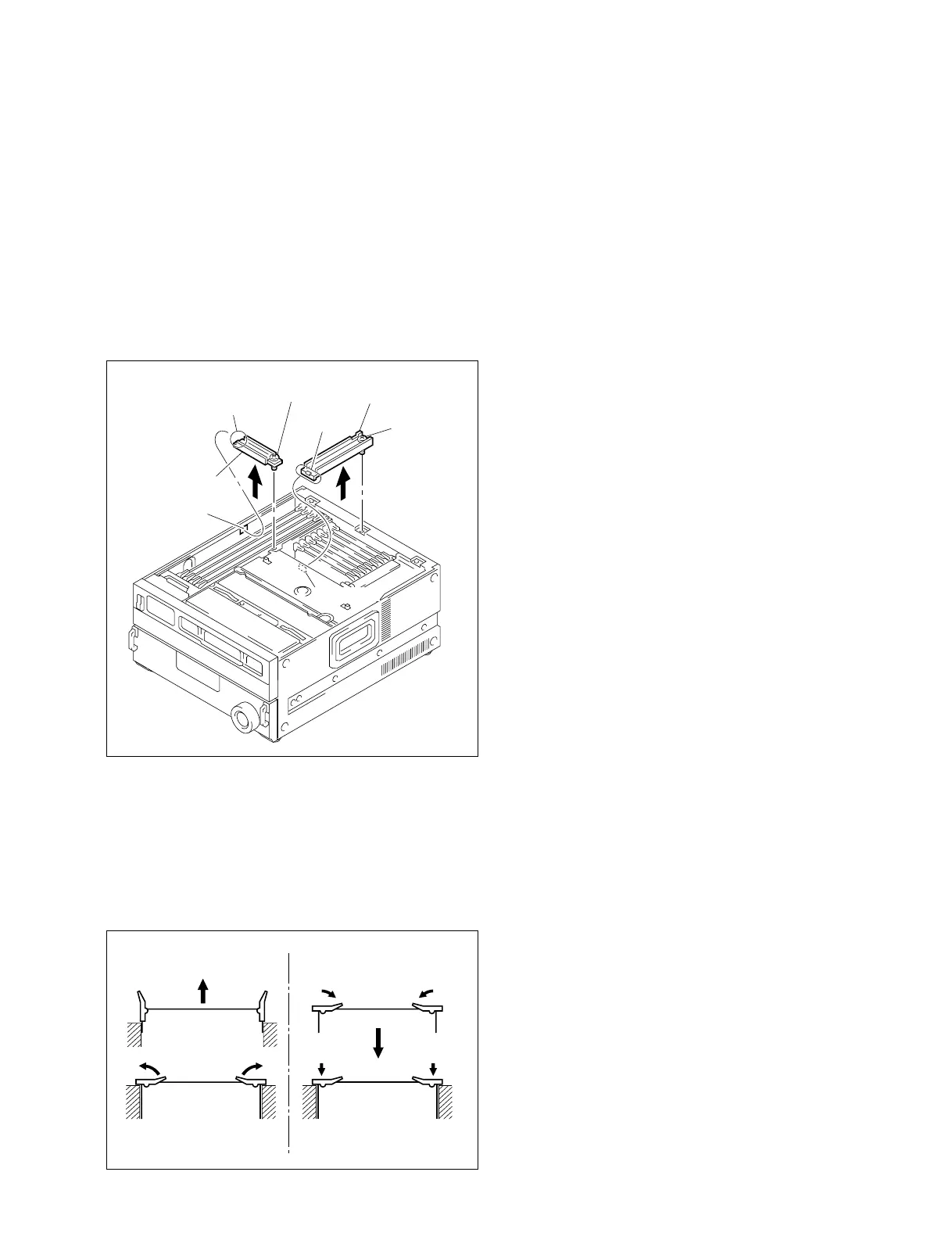
When reattaching the board, install in the reverse order of
removal.
m
. After inserting the board, push in the two folded eject
levers simultaneously to firmly connect the plug-in
board to the connector on the motherboard (MB-818
board).
. To reattach the board retainer, tighten the screw after
inserting the protrusion of the board retainer into the
square hole of chassis.
2-13. Removing/Reattaching Plug-in Boards
2-13. Removing/Reattaching Plug-in
Boards
n
When the plug-in board is replaced, refer to “6-3. Plug-in
Boards List”.
1. Turn off the power.
2. Remove the upper lid. (Refer to Section 2-3-1.)
3. To remove the board retainer (L) or (S), fully loosen
the screw of it.
4. When removing the TBC-23A or TBC-24 board,
disconnect the harness from its board.
TBC-23A board : CN1 (E-1) ....................... 14P White
TBC-24 board : CN1 (E-1) ....................... 14P White
5. Open the eject levers on both end of the board in the
direction of the arrows.
6. Hold the eject levers and slowly pull the board out.
Protrusion
Protrusion
Screw
(with stopper)
Board retainer (S)
Board retainer (L)
Square hole
Screw
(with stopper)
Square hole
2
11
11
2
33
Pulling out Insertion



 To Next Page