2-33
DSR-70/70P
A
B
P 2.6x5
P 2.6x5
Lock lever
LCD panel
LCD top frame assembly
B 2x4
CN4
CN3
CN1
CN2
CN5
B 2x4
DP-290 board
Harness
Harness
Harness
Harness clamp
Coating lead pin
Coating lead pin
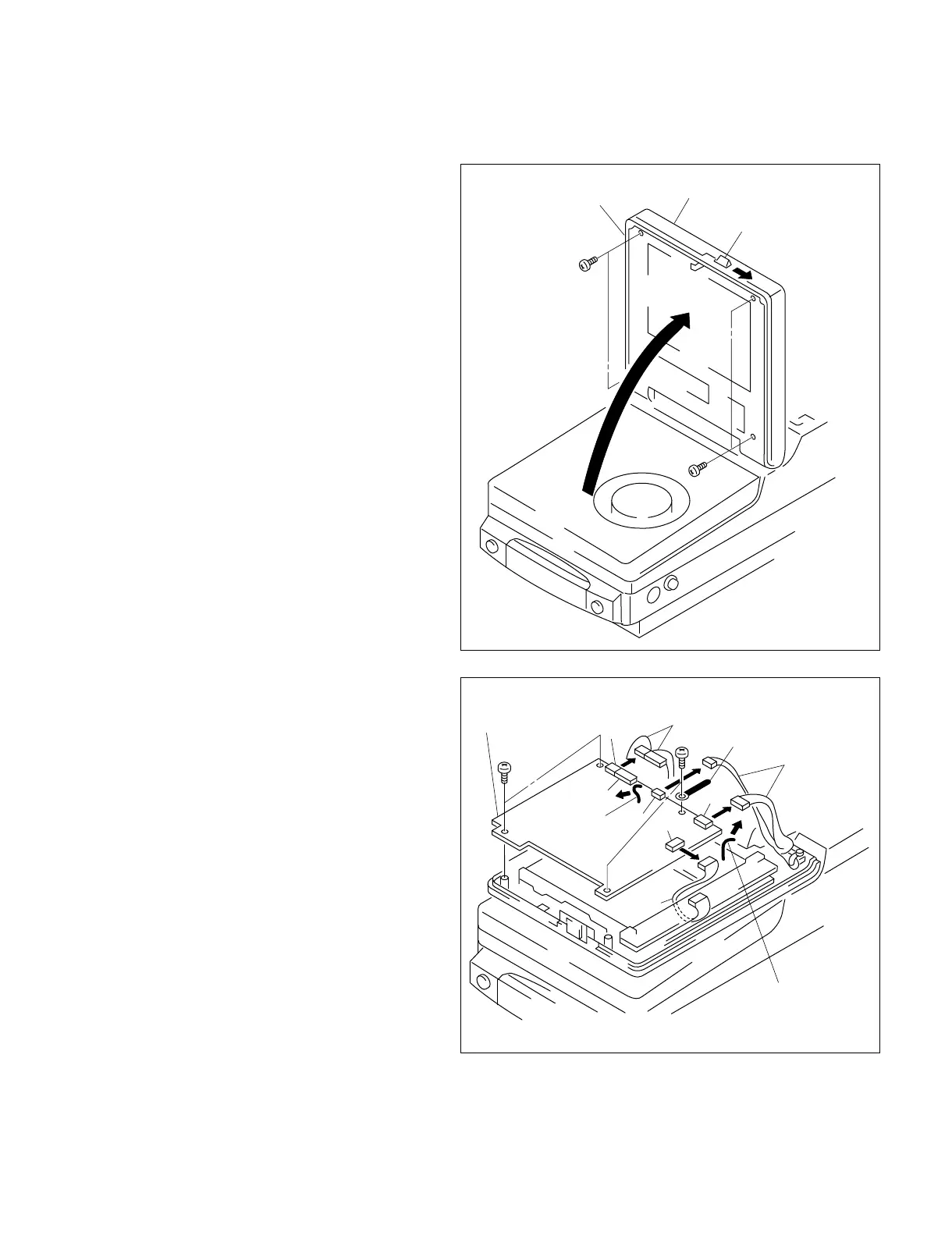
2-8-12. DP-290 Board
1. Push the lock lever in the direction of arrow A,
and open the LCD panel in the direction of the
arrow B.
2. Remove the four screws from the LCD panel.
Then tilt the LCD panel to the original position,
and remove the LCD top frame assembly.
3. Remove the harness from the two coating lead
pins and from the harness clamp respectively.
Remove the harness from the five connectors
(CN1, CN2, CN3, CN4 and CN5) on the DP-290
board.
4. Remove the four screws and remove the DP-290
board.
5. Attach the DP-290 board by reversing the
removal procedure.



 To Next Page