2-41
DSR-70/70P
Manual
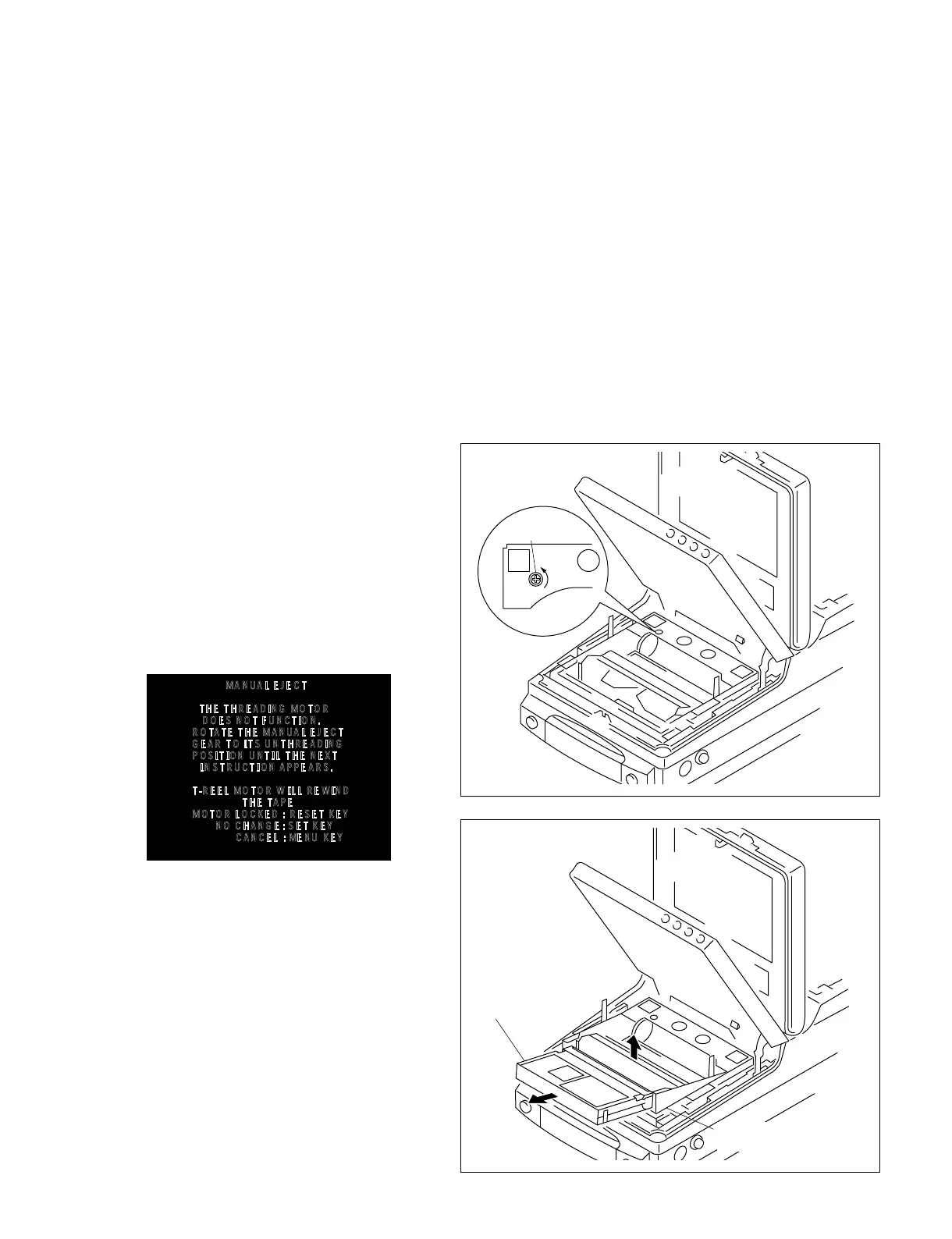
EJECT gear
Cassette tape
Cassette compartment
MANUAL EJECT
THE THREADING MOTOR
DOES NOT FUNCTION.
ROTATE THE MANUAL EJECT
GEAR TO ITS UNTHREADING
POSITION UNTIL THE NEXT
INSTRUCTION APPEARS.
T-REEL MOTOR WILL REWIND
THE TAPE
MOTOR LOCKED : RESET KEY
NO CHANGE : SET KEY
CANCEL : MENU KEY
2-11. HOW TO EJECT A CASSETTE TAPE WHEN TAPE HAS SLACK (MANUAL EJECT)
Be careful not to damage the tape when taking the cassette tape out.
. If an error is detected :
1. Press the [EJECT] key and enter the
Emergency EJECT mode and eject a cassette.
(Refer to section “3-2. ERROR CODES”.)
. If the cassette tape cannot be ejected by
the procedure described above :
1. Enter the SERVICE SUPPORT mode and select
MANUAL ELECT. (Refer to section “4-2-2.
How to Enter the Maintenance Menu”, and
“4-3-6. Service Support”.)
2. Follow the instructions on display as shown
below and eject a cassette tape by responding to
the dialogue while checking the tape condition
and motor movement.
(1) When the following message appears :
Rotate the manual EJECT gear in the
direction of the arrow by pressing the gear
with the Philips (+) head screwdriver until
the cassette compartment is raised and a
cassette tape is ejected.
(2) If the take-up reel motor does not rotate and a
tape cannot be wound onto a reel :
Select the message “T REEL MOTOR DOES
NOT ROTATE” from the above display and
let the supply reel motor wind the tape. After
confirming that the supply reel motor winds
the tape completely, rotate the manual EJECT
gear in the direction of the arrow by pressing
the gear with the Philips (+) head
screwdriver until the cassette compartment is
raised and a cassette tape is ejected.



 To Next Page