Chapter 8 Connections and Settings
124
Chapter 8 Connections and Settings
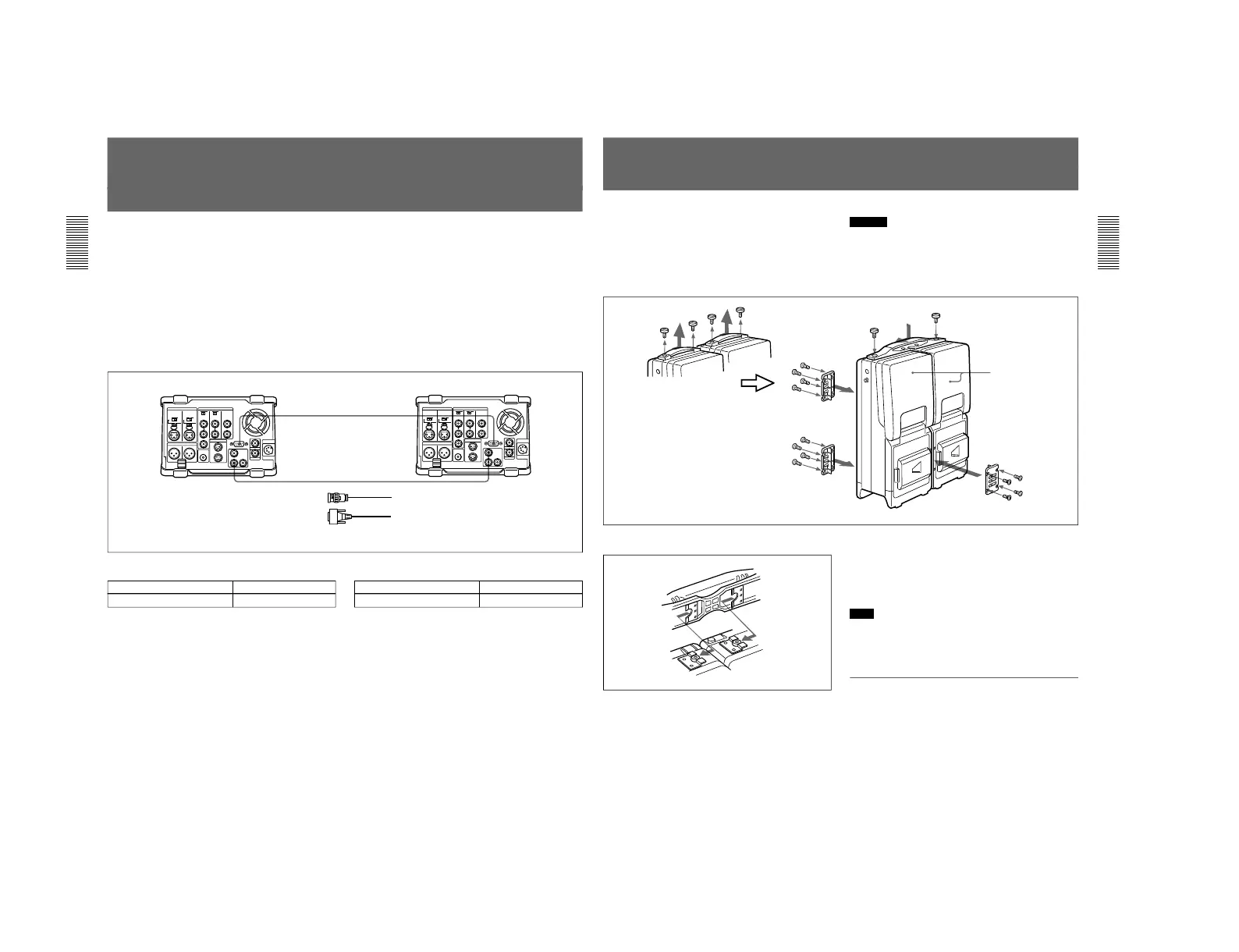
Connections for Digitally Dubbing Signals in
DVCAM Format
(Optional DSBK-140 or DSBK-150
Required)
You can use this unit to digitally dub signals in
DVCAM format automatically from the beginning of
the tape to the end, through an i.LINK or SDTI(QSDI)
interface.
For information about how to carry out digital dubbing, see
the section “Digitally Dubbing Signals in DVCAM Format”
on page 85.
Connecting two DSR-70/70P units using the
i.LINK interface (DSBK-140 i.LINK/DV Input/
Output Board)
Make the same connections and settings as described
in the section “Connections for Cut Editing Using Two
DSR-70/70P Units” on page 36.
Connecting two DSR-70/70P units using the SDTI(QSDI) interface (DSBK-150 SDTI (QSDI) Input/
Output Board)
Player settings
Switch Setting
REMOTE/LOCAL switch REMOTE
Recorder settings
Switch Setting
REMOTE/LOCAL switch LOCAL
When connecting this unit with a DSR-60/60P/
80/80P/85/85P unit using the SDTI(QSDI)
interface (DSBK-150)
Replace the DSR-70/70P (player) shown in the above
diagram with a DSR-60/60P/80/80P/85/85P unit and
make the same connections as shown above.
The SDTI(QSDI) interface connector of the DSR-60/
60P/80/80P/85/85P is marked “QSDI(OUTPUT)”.
Chapter 8 Connections and Settings
Chapter 8 Connections and Settings
125
Combining Two VCRs
The following figure shows how to combine two
VCRs using the optional BKNW-225 Docking Kit.
For more information, refer to the operation guide for the
BKNW-225.
Caution
If you combine two units or separate the combined
units incorrectly, the units may fall down and cause
body injury.
Follow the procedures described below for separation
or combination.
DSR-70/70P
How to attach handle
Attaching the fixing plates
If you want to be able to combine two units or separate
the combined units without using tools such as
screwdrivers, replace the screws (M3) that hold the
fixing place in place with the supplied coin screws.
Note
The coin screws (M4) for fixing the handle have
washers. When you remove the handle, keep the
screws and washers by fastening them to the handle.
To separate the combined VCRs
Reverse the steps for combination in a horizontal
position.



 To Next Page