3
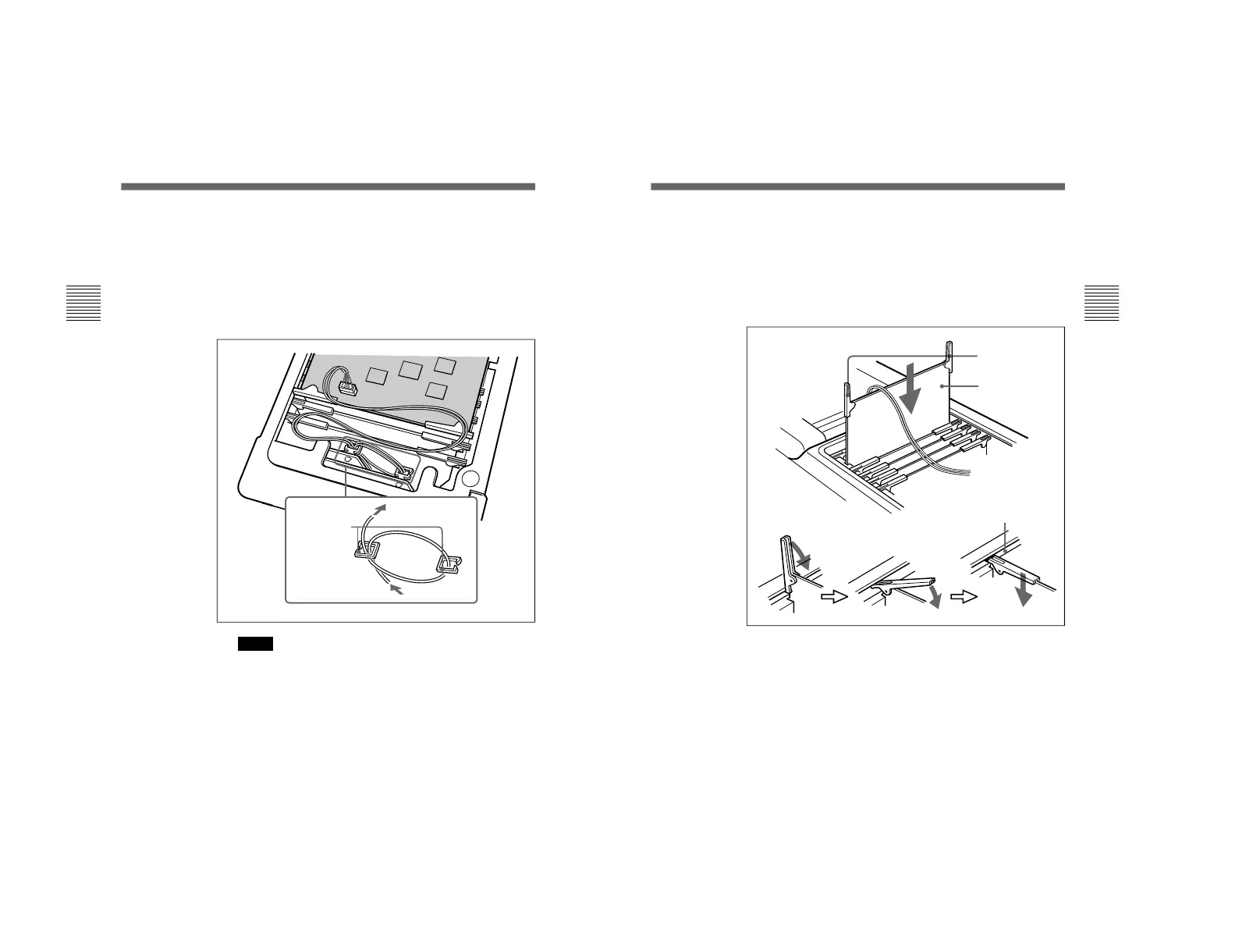
Take up the slack in the harness by inserting it first into the
cable holder on the left, then into the cable holder on the
right, then again into the cable holder on the left, as shown
in the figure (left and right are as seen from the rear of the
DSR-70/70P).
Place the DV-19 board above the opening where the
battery panel was removed, and connect the harness to the
CN101 on the board.
Notes
• When winding the harness around the cable holders, do
not pull it tight. Loop it loosely through the cable holders
as shown in the figure.
• Make sure that the harness does not pass over or under
any board levers.
Cable holders
To DV-19 board
From connector panel
Installation
17
4
Insert the DV-19 board into the second slot from the front
of the DSR-70/70P. Holding the levers on both sides of the
board, slowly slide it into place.
When the board is inserted until the levers are aligned with
the board retaining rail, lower the levers slightly to seat the
board firmly, then lower the levers to be flush with the
edge of the board.
Board
retaining rail
Levers
DV-19 board
(Continued)



 To Next Page