If yourTV has componentvideo inputjacks
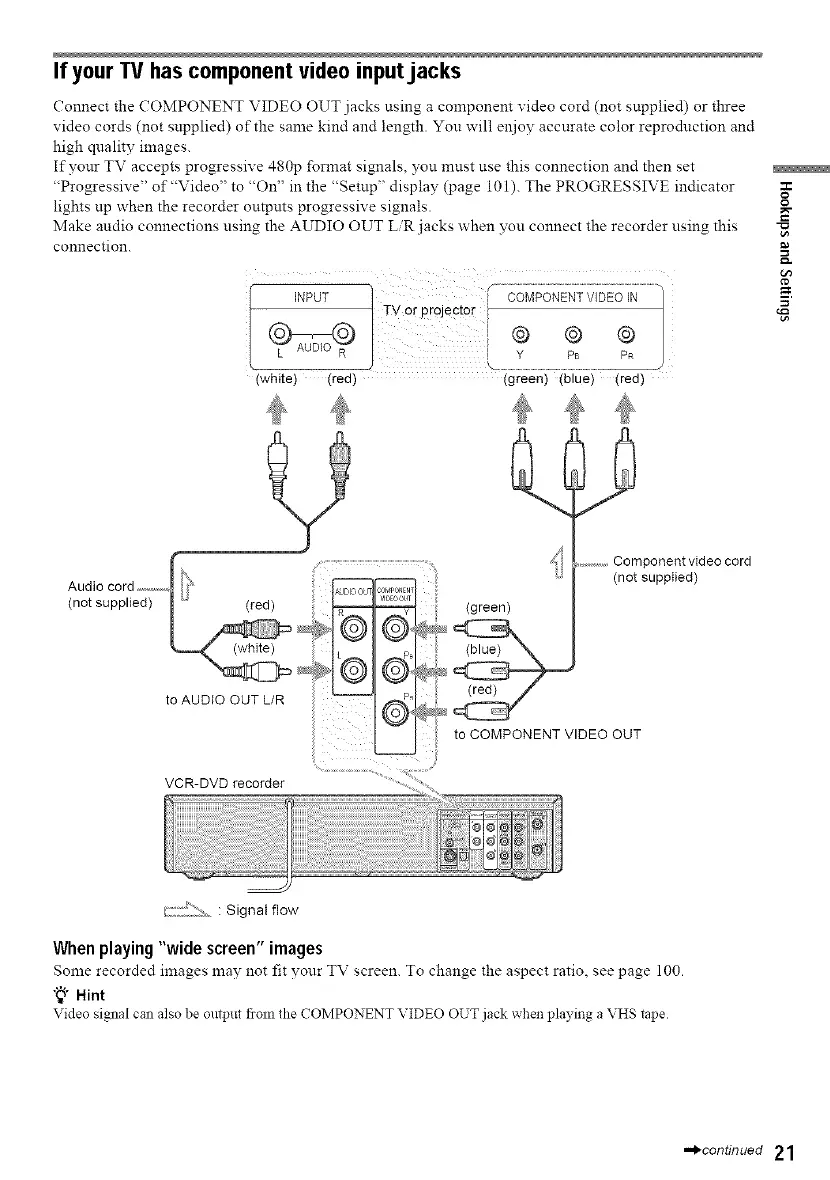
Connect the COMPONENT VIDEO OUT jacks using a component video cord (not supplied) or three
video cords (not supplied) of the same kind and length. You will el_ioy accurate color reproduction and
high quality images.
If your TV accepts progressive 480p format signals, you must use this connection and then set
"Progressive" of"Video" to "On" in the "Setup" display (page 101). The PROGRESSIVE indicator
lights up when the recorder outputs progressive signals.
Make audio connections using the AUDIO OUT LiR jacks when you connect the recorder using this
connection.
f ............................................................................................
INPUT ] t COMPONENTWDEO_N"/
1TV Or proJecto( i [
i® ® ®1
I Y Ps PR
) .................................................................................................................J
(white) (red) (green) (blue) (red)
O
g
Audio cord ...........
(not supplied)
to AUDIO OUT L/R
VCR-DVD recorder
.............Component video cord
(not supplied)
ii toOOMPONENTVOEOOUT
2/:::_i}::;_ : Signal flow
When playing "wide screen" images
Some recorded images may not fit vour TV screen. To change the aspect ratio, see page 100.
"_° Hint
Video signal call also be olltptlt flOnl tile COMPONENT VIDEO OUT jack when playing aVHS tape
•._continued 21


 To Next Page