Oxygen Analyzer
3–44 4900002239 rev. G 7-11-17
All settings will be applied by pressing .
TCP/IP settings
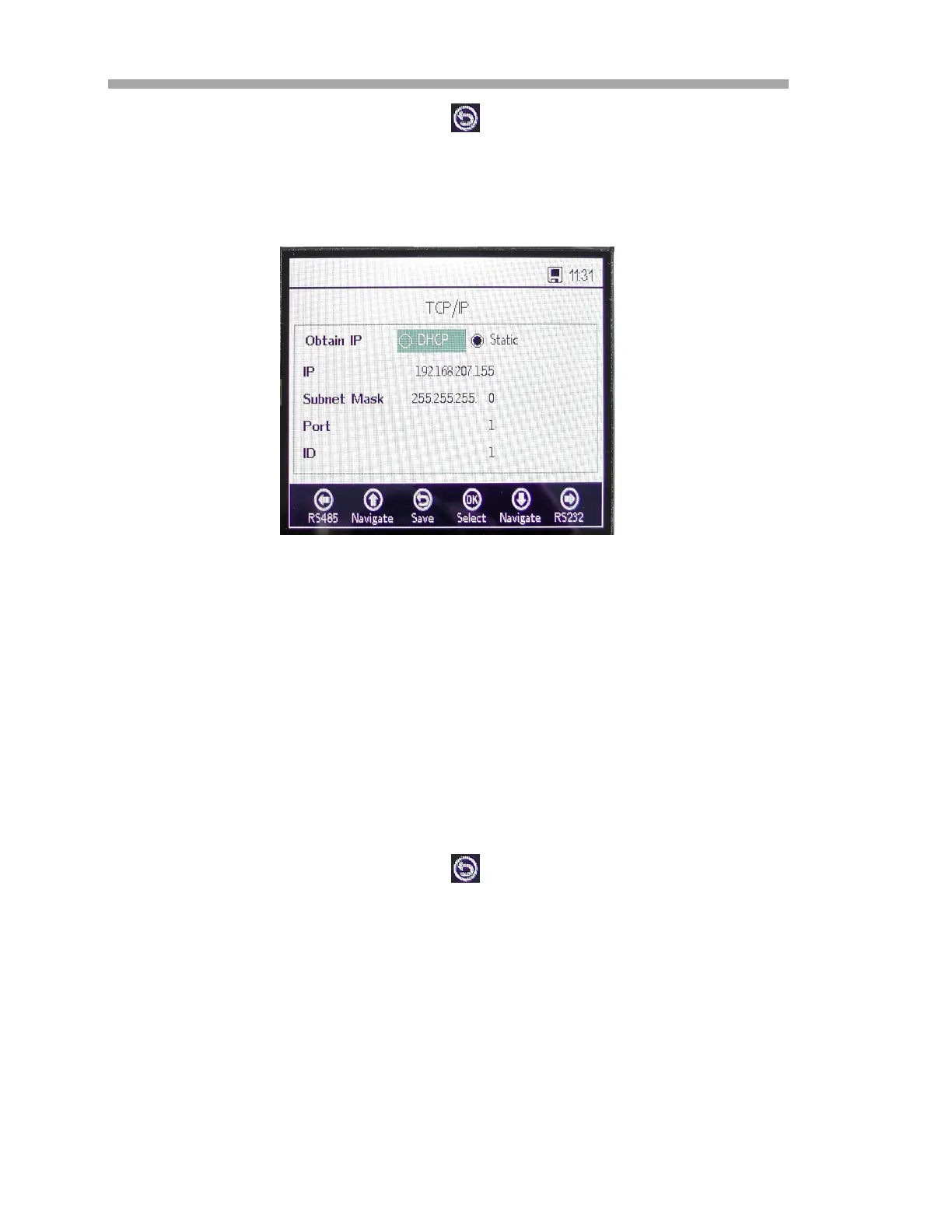
Use this screen to set TCP/IP. Refer to Figure 3–48.
• If DHCP is selected, the IP and Subnet Mask will be assigned by
the DHCP server, and therefore are not editable.
• If Static is selected, the IP and Subnet Mask have to be entered
manually. Contact your local Network Administrator for assistance if
input data needs to be confirmed.
• Port specifies the network port under which the Modbus application
takes place. The default value for most Modbus applications is 502.
• The ID, which will be used with the Modbus communication, can be
set to any value between 1 and 32.
All settings will be applied by pressing .
Analog Output Settings (Analogues) Options
From the MAIN MENU, press Analogues to access the 4-20mA Interface
Settings, 4-20mA Values, Concentration Alarm Relay (LS2) and 4-20mA
Calibration.
Figure 3–48 Digitals -TCP/IP settings



 To Next Page
 Loading...