3-22
17 363 02 0320
System description
3.7.4 Connecting handpieces
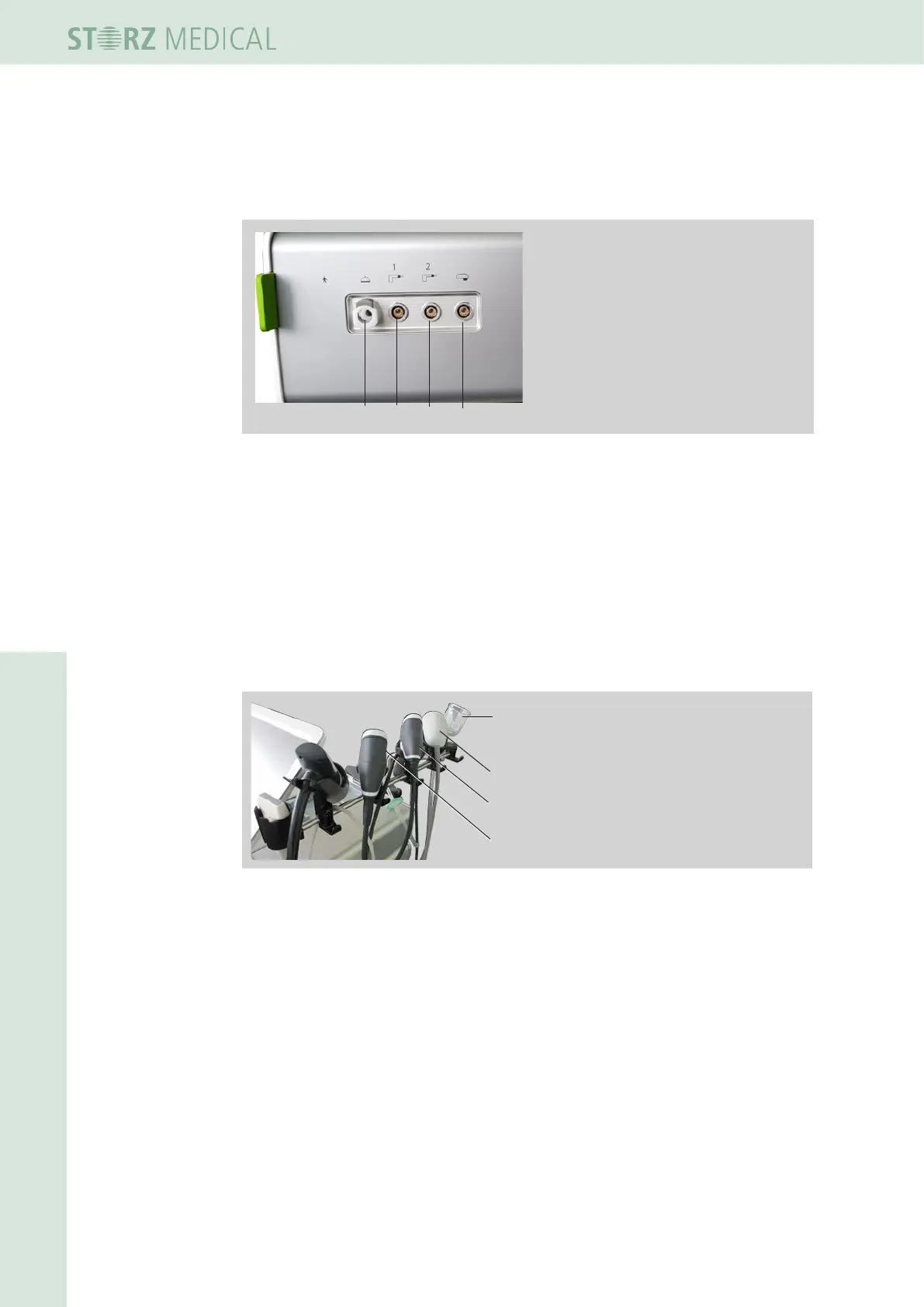
The R-SW module has four connectors. These are located on the right side of the
device.
1 VACU-ACTOR connection
2 u. 3 Connection for
R-SW handpieces
4 Connection for
V-ACTOR handpiece
3
1
2
4
Fig. 3-33 Connection for the handpieces and the VACU-ACTOR
• Insert the plug of the handpiece into the handpiece connector on the control
device.
• Make sure that the red dot on the socket is aligned with the red dot on the
handpiece connector.
• Gently pushing the plug into the connector will immediately lock the connection
and will prevent the connector from disengaging automatically when the cable is
pulled.
• Place the handpiece into the handpiece holder.
2
3
4
1 VACU ACTOR
2 V-Actor handpiece
3 R-SW 2
4 R-SW 1
1
Fig. 3-34 Handpiece holder with handpieces R-SW1, R-SW2, V-Actor and
VACU-ACTOR
• To break the connection, pull the outside of the plug body. This rst releases the
locking function, allowing the plug then to be pulled out of the handpiece connector.














 To Next Page